
Klipt — Social Media Clipper
Save social media posts to your Mac with one click. On-device AI auto-tags and searches them. Private, offline, no cloud.
As of June 2026, Klipt — Social Media Clipper has 4 users in the Workflow & Planning category.
Usersno change0%
4
4
Ratingno change0%
—
— reviews
Reviewsno change0%
—
Version
1.0.1
Manifest V3
90-day change · In the last 90 days this extension 1 version update.
History
5 snapshotsTracking since Apr 8, 2026.
View as table
| Date | Users | Rating | Reviews | Version |
|---|---|---|---|---|
| Apr 8, 2026 | — | — | — | 0.1.7 |
| Apr 19, 2026 | — | — | — | 0.1.7 |
| Apr 25, 2026 | 1 | — | — | 0.1.7 |
| May 9, 2026 | 1 | — | — | 0.1.7 |
| May 13, 2026 | 5 | — | — | 1.0.1 |
| Now | 4 | — | — | 1.0.1 |
Permissions & access
- Permissions
- activeTabstoragenativeMessagingalarmscontextMenus
- Host access
- http://127.0.0.1:21453/*
Screenshots


About
Your social feed is full of insights you'll never find again. That thread on LinkedIn. That Discord tip. That Substack deep-dive. Gone the moment you scroll past.

Klipt fixes that.

One click on any post, and it lands in the Klipt desktop app on your Mac — auto-tagged, searchable, and fully private. No cloud. No account. No copy-paste gymnastics.

WHAT HAPPENS WHEN YOU CLIP
• Post text, author, and images are captured with one click
• Content transfers directly to the Klipt desktop app via Chrome Native Messaging
• On-device AI auto-generates tags and a summary — nothing leaves your machine
• Semantic search lets you find clips by meaning, not just keywords
• Clips queue locally if the desktop app isn't running — nothing is lost

TWO WAYS TO CLIP
• From the browser: click the Klipt button that appears on any supported post
• From anywhere: use Quick Klip (global keyboard shortcut) to capture whatever is on your clipboard — articles, tweets, notes, anything you copy

ORGANIZE AND RESURFACE
• Collections with emoji and color to group clips your way
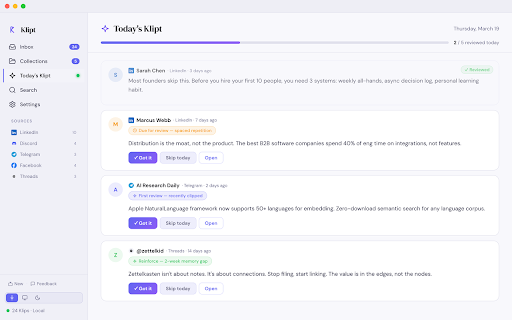
• Today's Klipt uses spaced repetition to resurface what matters
• Copy any clip as a formatted quote or shareable image card

YOUR PRIVACY
Everything stays on your Mac. No account required. No data sent to any server. The extension only reads post content when you explicitly click "Send to Klipt".

REQUIRES
Klipt desktop app for Mac (free 3-day trial, then $29 lifetime license). Download at https://getklipt.com
Technical
- Version
- 1.0.1
- Manifest
- V3
- Size
- 48.81KiB
- Min Chrome
- 88
- Languages
- 1
- Featured
- No
Metadata
- ID
- gjcgglchcmmeaemhfojpfkblhonlpbbb
- Developer ID
- u884510a4df4405fd608d2bf45cb3427b
- Developer Email
- [email protected]
- Created
- Apr 8, 2026
- Last Updated (Store)
- May 4, 2026
- Last Scraped
- Jun 7, 2026
- Website
- getklipt.com
- Support URL
- —
- Privacy Policy
- https://getklipt.com/privacy
Data sourced from the Chrome Web Store · last verified Jun 7, 2026.