
Snaplay - Screen Capture & Recording
Capture and record your screen moments with ease. Take screenshots, record your screen, and save your digital memories.
As of June 2026, Snaplay - Screen Capture & Recording has 66 users in the Productivity category.
Usersdown 13.2 percent−13.2%
66
66
Ratingno change0%
—
— reviews
Reviewsno change0%
—
Version
0.4.2
Manifest V3
History
9 snapshotsTracking since Apr 1, 2026.
View as table
| Date | Users | Rating | Reviews | Version |
|---|---|---|---|---|
| Apr 1, 2026 | 76 | — | — | 0.4.2 |
| Apr 17, 2026 | 78 | — | — | 0.4.2 |
| Apr 24, 2026 | 76 | — | — | 0.4.2 |
| May 1, 2026 | 74 | — | — | 0.4.2 |
| May 12, 2026 | 71 | — | — | 0.4.2 |
| May 18, 2026 | 70 | — | — | 0.4.2 |
| May 24, 2026 | 73 | — | — | 0.4.2 |
| May 31, 2026 | 68 | — | — | 0.4.2 |
| Jun 6, 2026 | 70 | — | — | 0.4.2 |
| Now | 66 | — | — | 0.4.2 |
Permissions & access
- Permissions
- storagescriptingactiveTabdesktopCapturedownloads
- Host access
- <all_urls>
Screenshots


About
Snaplay – Screen Capture & Recording

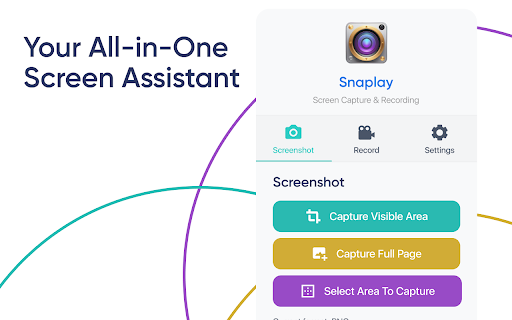
Snaplay is a powerful and user-friendly screen capture and recording tool designed to help you capture, annotate, and share your screen effortlessly. Whether you need to record high-quality videos, take precise screenshots, or create tutorials and presentations, Snaplay makes the process seamless.

Key Features:
Screen Recording: Capture your entire screen, specific windows, or custom areas with high-quality video and audio support.
Screenshot Capture: Take instant screenshots and annotate them with text, shapes, and highlights.
Easy Sharing: Save and share your captures directly via links, cloud storage, or social media.
Lightweight & Fast: Minimal impact on system performance while delivering smooth recordings.
Customization Options: Choose resolution, frame rate, and format to suit your needs.
Perfect for professionals, educators, gamers, and content creators, Snaplay ensures you never miss an important moment on your screen. 🚀
Technical
- Version
- 0.4.2
- Manifest
- V3
- Size
- 514KiB
- Min Chrome
- 88
- Languages
- 2
- Featured
- No
Metadata
- ID
- gjaceghgmobiddmenbcalhdnmppdacib
- Developer ID
- uce1c336f9e6511be902badc875615176
- Developer Email
- [email protected]
- Created
- Mar 25, 2025
- Last Updated (Store)
- Mar 16, 2026
- Last Scraped
- Jun 6, 2026
- Website
- snapplay-proscreenrecorder.com
- Support URL
- https://snapplay-proscreenrecorder.com/
- Privacy Policy
- https://snapplay-proscreenrecorder.com/privacy-policy
Similar extensions
Alternatives to Snaplay - Screen Capture & Recording, ranked by description similarity.

Snappr - Makes screen-recording easier
Experience a free and privacy-focused screen recorder with limitless features. Effortlessly capture, annotate, and edit your videos!
35

Screen Recorder and Screenshot Tool
Record your screen, capture screenshots, annotate, and share instantly. Full HD recording with audio support.
4

ScreenSnap - Screenshot & Screen Recorder
All-in-one screenshot tool & screen recorder with built-in editor. Capture, edit, annotate, crop, and record your screen with audio
22
★ 5.0

QuickShot By Explified
Capture. Edit. Record. Share — All in One Click.
QuickShot is a fast, lightweight, and powerful screen capture and…
4

Screen Recorder & Screenshot - SnapRec
Screen recorder & full page screenshot tool. Record in 4K, annotate with blur/arrows/text, add webcam overlay, and share instantly.
217
★ 5.0

ScreenFlow
Free screen recorder & screenshot tool. No limits, no watermarks.
62
★ 5.0
Screen Recorder
Capture your screen, camera, utilize tools, and download with a single click
642
★ 4.4

QuickySnippy - Screenshots & Recordings: Edit, Share. Super Fast & Easy!
Instantly capture, annotate, and record your screen. The ultimate all-in-one tool for visual feedback, right from your browser.
21
★ 5.0
Data sourced from the Chrome Web Store · last verified Jun 6, 2026.