Privacy Manager
Manage privacy settings, browsing data deletion, quickly access page in incognito mode, manage cookies and monitor network traffic
As of June 2026, Privacy Manager has 10,000 users and a 4.21/5 rating from 163 reviews in the Workflow & Planning category.
Usersno change0%
10.0K
10,000
Ratingdown 0.2 percent−0.2%
4.21
163 reviews
Reviewsdown 0.6 percent−0.6%
163
Version
4.0.0
Manifest V3
History
2 snapshotsTracking since May 3, 2026.
View as table
| Date | Users | Rating | Reviews | Version |
|---|---|---|---|---|
| May 3, 2026 | 10.0K | 4.22 | 164 | 4.0.0 |
| Jun 3, 2026 | 10.0K | 4.22 | 164 | 4.0.0 |
| Now | 10.0K | 4.21 | 163 | 4.0.0 |
Permissions & access
- Permissions
- privacycookiesbrowsingDatatabswebRequestdeclarativeNetRequestWithHostAccessstorage
- Host access
- None declared
Screenshots


About
Privacy Manager is completely free and open source chrome extension for data transparency and control.

Privacy Manager can help you with:
* Privacy Management
* Cookie Management
* Browsing data deletion on browser start
* Network monitoring

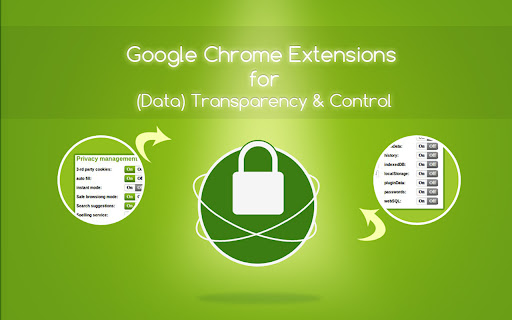
Privacy Management - Extension provides ability to manage current privacy settings (Enable/Disable):
* Blocks third-party sites from setting cookies.
* Hyperlink auditing management.
* Manage whether chrome must allow sending referrer headers with requests.
* Show alternate error pages or not.
* Automatically fill in forms settings management.
* Enable or disable 'OK, Google' to start a voice search
* Enable or disable password saving
* Enable safe browsing in case if the option is disabled by another extension (if safe - ---  - browsing is enabled Chrome does its best to protect you from phishing and malware).
* Enable or disable safe browsing reporting
* Search suggestion management.
* Enable or disable correct spelling service.
* Translate service switch.
* Network prediction management.
* Web RTC IP handling

Browsing data deletion on browser start:
* Clear websites appcaches.
* Clear browser cache.
* Clear browser cookies.
* Clear browser download list.
* Clear browser file system.
* Clear browser form data.
* Clear browser history.
* Clear websites IndexedDB data.
* Clear websites local storage data.
* Server-bound certificates.
* Clear stored passwords.
* Clear plugins data.
* Clear service workers
* Clear websites WebSQL data.

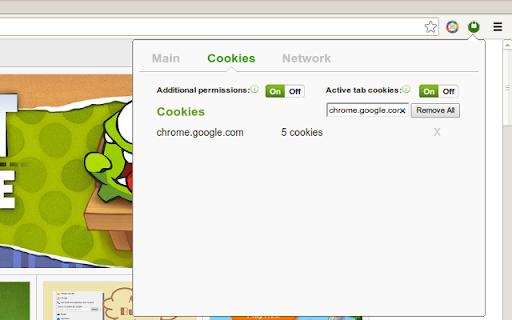
Cookie Management - is a tool for managing cookies (to use the tool you need to allow optional host permissions inside of the extension):
* View cookies attached to domains
* Filter cookies by domain
* Add/create cookie
* Modify cookie
* Delete single cookie
* Delete cookies from specific domain
* Delete All cookies

Network monitoring - User also can manage network traffic in popup window - collect http headers and also block user agent data to be sent via request, to use that feature you need to allow optional host permissions.

Github: https://github.com/Privacy-Managers/Privacy-Manager
Releases: https://github.com/Privacy-Managers/Privacy-Manager/releases
Issues and feature requests: https://github.com/Privacy-Managers/Privacy-Manager#reporting-bugs-suggestions-and-questions
Help me translate: https://github.com/Privacy-Managers/Privacy-Manager#translations

Privacy Policy: https://github.com/Privacy-Managers/Privacy-Manager/blob/master/privacy-policy.md

Contacts:
Email: [email protected]
Linkedin: http://www.linkedin.com/pub/manvel-saroyan/39/8a7/b22
Technical
- Version
- 4.0.0
- Manifest
- V3
- Size
- 90.21KiB
- Min Chrome
- 88
- Languages
- 4
- Featured
- Yes
Metadata
- ID
- giccehglhacakcfemddmfhdkahamfcmd
- Developer ID
- u1785dfe75335d41673ab7f25069581cd
- Developer Email
- [email protected]
- Created
- Aug 23, 2012
- Last Updated (Store)
- Jan 2, 2023
- Last Scraped
- Jun 3, 2026
- Website
- —
- Support URL
- https://github.com/Privacy-Managers/Privacy-Manager#reporting-bugs-suggestions-and-questions
- Privacy Policy
- —
Similar extensions
Alternatives to Privacy Manager, ranked by description similarity.

Extension Manager
Quickly enable or disable extensions. No Ads. No nonsense.
4.0K
★ 4.5

Privacy Settings
Alter the browser's built-in privacy settings in a toolbar popup
2.0K
★ 4.5

Privacy Focused Website Blocker (by Avrodh.com)
Website blocker with a focus on privacy. Block unlimited websites with schedules, password protection, and custom blocked pages
270
★ 4.8

CrosManager - A Web-based System Monitor
Take charge of your Chromebook with focused monitoring tools!
346
★ 4.7

PRYVL - Privacy Browser Manager
Manage multiple isolated browser profiles with fingerprint protection.
16

ProxyEmpire Proxy Manager
Manage your proxies with ease
10.0K
★ 4.1

Extension Manager Pro
Disable, Toggle, Whitelist, Debug, and Manage Chrome Extensions.
6

Smart Tab Manager
Organize tabs with custom groups, save sessions, and instantly search & switch between tabs.
3
Data sourced from the Chrome Web Store · last verified Jun 3, 2026.