Flowchart Maker
Build interactive diagrams with intuitive UI. You can export result to PNG, JPG or SVG.
As of June 2026, Flowchart Maker has 6,000 users and a 2.67/5 rating from 12 reviews.
Usersdown 14.3 percent−14.3%
6.0K
6,000
Ratingno change0%
2.67
12 reviews
Reviewsno change0%
12
Version
1.0
Manifest V2
90-day change · In the last 90 days this extension lost 1.0K users.
History
2 snapshotsTracking since May 3, 2026.
View as table
| Date | Users | Rating | Reviews | Version |
|---|---|---|---|---|
| May 3, 2026 | 7.0K | 2.67 | 12 | 1.0 |
| Jun 3, 2026 | 7.0K | 2.67 | 12 | 1.0 |
| Now | 6.0K | 2.67 | 12 | 1.0 |
Permissions & access
- Permissions
- None declared
- Host access
- None declared
Screenshots

About
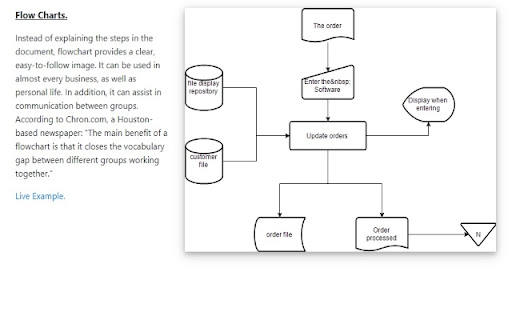
A flow chart is a graphical method of presenting a process. Each step of the process is represented by a different symbol and it contains the steps/decision to
take during that step. The steps are linked together with arrows to show how a particular process works in an organization. Flowcharts can also be known as
process models, process charts, decision process diagrams and much more. The common factor is that any process/decision is broken down into steps, and users would
know the information required etc to make a decision.

Main Benefits of Using Flowcharts

- Knowledge transfer as new employees can be trained on the methodology on how to make decisions within the organization
- Clear rules for employees on how to handle specific scenarios
- Allows every individual to understand how decisions are arrived at and avoids ambigious situations as there is clear process guidelines in place
- Allows better decisions to be made, as the process of how to make decisions can be updated/debated
- Helps to make businesses run more efficiently as processes can be examined and modified

Standard Flow Chart Symbols Used

Oval Shapes - Indicates the start/end of the process
Rectangular Shape - Indicates a step in the process
Diamond Shape - Indicates a decision/branch in the flow chart
Arrows - Indicates the flow of the process

Core Features of our Free Flowchart Maker

- Create unlimited flow charts to document any business process/decision making within your organization
- flow charts can be saved into your Google Drive/Local Computer
- 5+ free flowchart templates which you can edit to create your own flowcharts
- Share your Flow Chart with other team members/individuals by creating a shared folder inside Google Drive
- Step by step tutorial on how to create your own flow chart
- Collaborate with your classmates/colleagues and allow them to edit the flowchart as well
Technical
- Version
- 1.0
- Manifest
- V2
- Size
- 132KiB
- Min Chrome
- —
- Languages
- 1
- Featured
- No
Metadata
- ID
- giaclhbcgnglocijghgfbehcdkpphmba
- Developer ID
- ud969c69941dd8d55e66f662b8efaf662
- Developer Email
- [email protected]
- Created
- May 17, 2019
- Last Updated (Store)
- May 17, 2019
- Last Scraped
- Jun 3, 2026
- Website
- bddiagrams.com
- Support URL
- —
- Privacy Policy
- —
Similar extensions
Alternatives to Flowchart Maker, ranked by description similarity.

Flowchart Maker
Create professional flowcharts and data flow diagrams with the Flowchart Maker. Simplify your design process!
2.0K
★ 4.8

AI Diagram Maker
Draw Flowchart, Sequence diagram, Gantt chart, Timing diagrams, UML diagram, Venn diagram, etc. In natural language through AI.
5.0K
★ 4.4

Logic Tree Diagrams Creator
Build interactive diagrams with intuitive UI. You can export result to PNG, JPG or SVG.
158
★ 3.0

SWOT Analysis Diagrams
Build interactive diagrams with intuitive UI. You can export result to PNG, JPG or SVG.
7

Google Drawings
Create shapes and diagrams
—
★ 4.2

Tree Chart Creator
Build interactive diagrams with intuitive UI. You can export result to PNG, JPG or SVG.
15

Organizational Chart
Build interactive diagrams with intuitive UI. You can export result to PNG, JPG or SVG.
67
★ 5.0

Lucidchart for Education
Diagramming software for students, educators, and faculty with an email address from accredited educational institutions.
1.0M
★ 4.0
Data sourced from the Chrome Web Store · last verified Jun 3, 2026.