
Syncroll: Split View Sync Scroller
Sync scroll across Chrome Split View, side-by-side windows, and canvas apps like Figma. Works on any two tabs in any window.
As of June 2026, Syncroll: Split View Sync Scroller has 10 users in the Productivity category.
Usersno change0%
10
10
Ratingno change0%
—
— reviews
Reviewsno change0%
—
Version
1.1.0
Manifest V3
90-day change · In the last 90 days this extension 1 version update.
History
5 snapshotsTracking since May 14, 2026.
View as table
| Date | Users | Rating | Reviews | Version |
|---|---|---|---|---|
| May 14, 2026 | — | — | — | 1.0.0 |
| May 20, 2026 | — | — | — | 1.0.0 |
| May 26, 2026 | 3 | — | — | 1.1.0 |
| Jun 2, 2026 | 6 | — | — | 1.1.0 |
| Jun 8, 2026 | 8 | — | — | 1.1.0 |
| Now | 10 | — | — | 1.1.0 |
Changelog
- May 20, 2026description
Syncroll keeps two side-by-side tabs scrolling in sync when using Chrome's native Split View feature.

HOW IT WORKS
Open two tabs in Split View, click the extension icon, and hit "Sync Split Panes". Scroll either side — the other follows.

SUPPORTED PAGE TYPES
• Normal websites — syncs by scroll percentage, so pages of different lengths stay aligned
• Chat UIs (ChatGPT, Gemini) — detects the inner scrollable container automatically
• Canvas apps (Figma, Miro, Excalidraw) — relays wheel events for pan/zoom sync

Any combination works: a normal website on the left and Figma on the right, two chat windows, etc.

PANE DETECTION
The extension automatically finds your Split View tabs using Chrome's splitViewId API, highlighted tab status, or adjacent tab index as a fallback.

PRIVACY
This extension does not collect, store, or transmit any user data. All scroll synchronization happens locally between your tabs through Chrome's built-in message passing. No external servers are contacted.
Syncroll keeps two browser tabs scrolling in sync — whether they're in Chrome's native Split View, in two side-by-side windows, or on opposite ends of different Chrome windows. Works smoothly even on canvas apps that other sync extensions can't handle.

THREE MODES, ONE EXTENSION
• Chrome Split View — Syncroll is the only scroll-sync extension that supports Chrome's native Split View. Open two tabs in Split View, click sync, done.
• Side-by-side windows — pick two tabs, tick "Open in new window", and Syncroll launches them as half-width windows on your screen.
• Any two tabs, any window — pick the left and right tab from a dropdown. Works across multiple Chrome windows without rearranging anything.

WORKS WITH CANVAS APPS
Most scroll-sync extensions fail on Figma, Miro, or Excalidraw because those apps render via WebGL and have no DOM scrolling. Syncroll intercepts and relays raw wheel events, so pan/zoom syncs smoothly across canvas pages — just like butter.

SUPPORTED PAGE TYPES
• Standard websites — syncs by scroll percentage, so pages of different lengths stay aligned
• Chat UIs (ChatGPT, Gemini, Slack) — detects the inner scrollable container automatically; sidebar stays put
• Canvas apps (Figma, Miro, Excalidraw) — wheel events relayed across panes for true side-by-side panning

Any combination works: a Wikipedia article next to a Figma canvas, two ChatGPT conversations side by side, a Slack thread mirrored against a Notion doc.

HOW IT WORKS
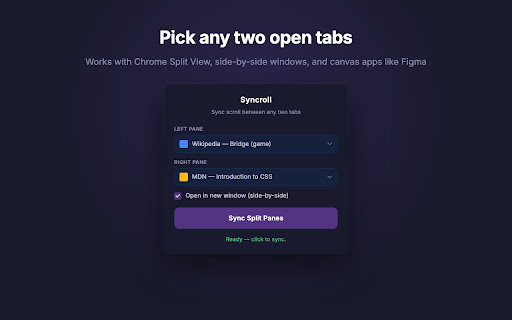
1. Click the Syncroll icon in your toolbar
2. Pick the left and right tab from the dropdowns (or let Split View detection pre-fill them for you)
3. Optionally tick "Open in new window" to launch the two tabs as half-width windows
4. Click Sync — scroll either side, and the other follows

WHAT'S NEW IN 1.1.0
• Pick any two open tabs from a dropdown — no need to set up Split View first
• Cross-window sync — sync a tab in one Chrome window with a tab in another
• "Open in new window (side-by-side)" mode auto-arranges your two tabs as half-width windows
• Full keyboard navigation in the picker (Arrow keys, Home, End, Enter, Esc)

PRIVACY
No data collection, no tracking, no servers. All scroll synchronization happens locally between your tabs through Chrome's built-in messaging. No external network requests are made.
- May 20, 2026short_description
Sync scroll between two tabs in Chrome's Split View. Works on websites, chat UIs, and canvas apps like Figma.
Sync scroll across Chrome Split View, side-by-side windows, and canvas apps like Figma. Works on any two tabs in any window.
Permissions & access
- Permissions
- tabsscriptingactiveTab
- Host access
- <all_urls>
Screenshots



About
Syncroll keeps two browser tabs scrolling in sync — whether they're in Chrome's native Split View, in two side-by-side windows, or on opposite ends of different Chrome windows. Works smoothly even on canvas apps that other sync extensions can't handle.

THREE MODES, ONE EXTENSION
• Chrome Split View — Syncroll is the only scroll-sync extension that supports Chrome's native Split View. Open two tabs in Split View, click sync, done.
• Side-by-side windows — pick two tabs, tick "Open in new window", and Syncroll launches them as half-width windows on your screen.
• Any two tabs, any window — pick the left and right tab from a dropdown. Works across multiple Chrome windows without rearranging anything.

WORKS WITH CANVAS APPS
Most scroll-sync extensions fail on Figma, Miro, or Excalidraw because those apps render via WebGL and have no DOM scrolling. Syncroll intercepts and relays raw wheel events, so pan/zoom syncs smoothly across canvas pages — just like butter.

SUPPORTED PAGE TYPES
• Standard websites — syncs by scroll percentage, so pages of different lengths stay aligned
• Chat UIs (ChatGPT, Gemini, Slack) — detects the inner scrollable container automatically; sidebar stays put
• Canvas apps (Figma, Miro, Excalidraw) — wheel events relayed across panes for true side-by-side panning

Any combination works: a Wikipedia article next to a Figma canvas, two ChatGPT conversations side by side, a Slack thread mirrored against a Notion doc.

HOW IT WORKS
1. Click the Syncroll icon in your toolbar
2. Pick the left and right tab from the dropdowns (or let Split View detection pre-fill them for you)
3. Optionally tick "Open in new window" to launch the two tabs as half-width windows
4. Click Sync — scroll either side, and the other follows

WHAT'S NEW IN 1.1.0
• Pick any two open tabs from a dropdown — no need to set up Split View first
• Cross-window sync — sync a tab in one Chrome window with a tab in another
• "Open in new window (side-by-side)" mode auto-arranges your two tabs as half-width windows
• Full keyboard navigation in the picker (Arrow keys, Home, End, Enter, Esc)

PRIVACY
No data collection, no tracking, no servers. All scroll synchronization happens locally between your tabs through Chrome's built-in messaging. No external network requests are made.
Technical
- Version
- 1.1.0
- Manifest
- V3
- Size
- 26.62KiB
- Min Chrome
- 88
- Languages
- 1
- Featured
- No
Metadata
- ID
- ghpgfihdllhgmjkgkjnkmoonelfokpdi
- Developer ID
- u1567cf2bdd044acd1aa477714979b2f4
- Developer Email
- [email protected]
- Created
- May 13, 2026
- Last Updated (Store)
- May 18, 2026
- Last Scraped
- Jun 8, 2026
- Website
- jubayeramb.com
- Support URL
- —
- Privacy Policy
- —
Data sourced from the Chrome Web Store · last verified Jun 8, 2026.