
FormBlink
Auto-fill complex and repetitive web forms with a single click.
As of June 2026, FormBlink has 2 users in the Productivity category.
Usersup 100.0 percent+100.0%
2
2
Ratingno change0%
—
— reviews
Reviewsno change0%
—
Version
1.0.0
Manifest V3
History
5 snapshotsTracking since Apr 17, 2026.
View as table
| Date | Users | Rating | Reviews | Version |
|---|---|---|---|---|
| Apr 17, 2026 | 1 | — | — | 1.0.0 |
| Apr 27, 2026 | 1 | — | — | 1.0.0 |
| May 21, 2026 | 1 | — | — | 1.0.0 |
| May 31, 2026 | — | — | — | 1.0.0 |
| Jun 8, 2026 | 1 | — | — | 1.0.0 |
| Now | 2 | — | — | 1.0.0 |
Permissions & access
- Permissions
- storageactiveTab
- Host access
- <all_urls>
Screenshots

About
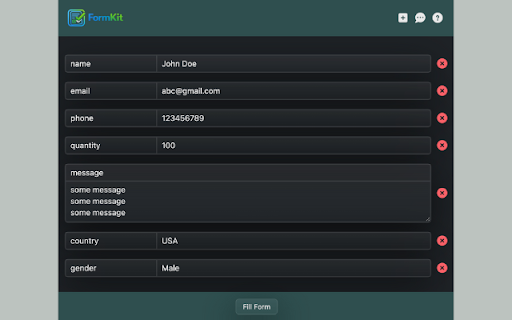
FormBlink helps you fill complex and repetitive web forms with a single click.

Unlike traditional autofill tools, FormBlink understands structured forms,
repeating sections, and dynamic fields commonly found on job portals,
government websites, and enterprise applications.

Why download FormBlink?
- Save hours spent filling repetitive forms
- Avoid manual copy-paste errors
- Fill entire sections instead of one field at a time
- Reuse your data across similar websites
- Stay fully in control - your data never leaves your browser

How it works:
- Tag form sections visually once
- Map your data to the correct fields
- Reuse the configuration across similar forms
- Fill entire forms instantly with one click

Key features:
- Smart field matching using labels, placeholders, and structure
- Support for repeating sections like experience and education
- Works with dynamic and multi-step forms
- Fully offline - no data leaves your browser
- No tracking, no analytics, no ads

Privacy-first by design:
FormBlink stores all data locally using Chrome’s secure storage.
Your information is never sent to any external server.

Note:
Some highly customized or protected environments are not supported.
This includes editors like Google Docs and forms embedded inside cross-domain iframes, as these do not expose standard form fields for security reasons.
Technical
- Version
- 1.0.0
- Manifest
- V3
- Size
- 828KiB
- Min Chrome
- 88
- Languages
- 1
- Featured
- No
Metadata
- ID
- ghnpnbajadfhmclajdgjdnpijkadnhop
- Developer ID
- u212375dd14bdafa8b37cfda5006aa2f3
- Developer Email
- [email protected]
- Created
- Feb 15, 2026
- Last Updated (Store)
- Feb 15, 2026
- Last Scraped
- Jun 8, 2026
- Website
- —
- Support URL
- https://rb-form-blink.vercel.app/contact
- Privacy Policy
- https://rb-form-blink.vercel.app/privacy-policy
Similar extensions
Alternatives to FormBlink, ranked by description similarity.

Quick Form Fill
Store form field values once and select them from a dropdown while filling forms. Fast, simple, and no typing needed.
34
★ 5.0

ApplyBuddy Smart Form Autofiller
Intelligent Google Forms autofill extension that learns from your data. AI-powered field detection for forms and surveys.
105
★ 5.0

Blinkle
The better way to job search.
6
★ 5.0

Sexy Form Filler
Intelligently fill web forms with data from CSV files.
2

Form Autofill
Form Autofill Assistance
14

Auto Fill Input Form
Smart form filler with auto-suggestions and context menu integration.
26
★ 5.0

FormFairy: AI Autofill for Job Applications & Complex Forms
AI form filler that autofills job applications, registrations & complex forms instantly. Zero setup — data never leaves your device.
72
★ 5.0

Ez Fill - Smart Form Auto-Fill
Fill forms automatically and save hours of tedious work. Secure, privacy-first autofill that keeps your data local and encrypted.
2
Data sourced from the Chrome Web Store · last verified Jun 8, 2026.