
Twitch Mute Skipper
Skip muted sections in Twitch VODs
As of June 2026, Twitch Mute Skipper has 334 users and a 3.13/5 rating from 8 reviews in the Productivity category.
Usersup 5.4 percent+5.4%
334
334
Ratingno change0%
3.13
8 reviews
Reviewsno change0%
8
Version
1.5.2
Manifest V3
History
5 snapshotsTracking since Apr 1, 2026.
View as table
| Date | Users | Rating | Reviews | Version |
|---|---|---|---|---|
| Apr 1, 2026 | 317 | 3.13 | 8 | 1.5.2 |
| Apr 21, 2026 | 313 | 3.13 | 8 | 1.5.2 |
| May 7, 2026 | 315 | 3.13 | 8 | 1.5.2 |
| May 18, 2026 | 331 | 3.13 | 8 | 1.5.2 |
| Jun 1, 2026 | 335 | 3.13 | 8 | 1.5.2 |
| Now | 334 | 3.13 | 8 | 1.5.2 |
Permissions & access
- Permissions
- activeTabscriptingstorage
- Host access
- *://*.twitch.tv/*
Screenshots
About
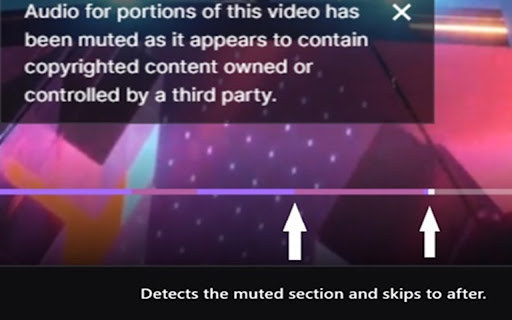
Twitch Mute Skipper is a Chrome extension designed to enhance the viewing experience of Twitch users by automatically skipping muted sections in Twitch Video on Demand (VODs). This extension is particularly useful for viewers who want to watch VODs without interruptions caused by silent segments.

Key Features:

Automatic Detection of Muted Segments: Twitch Mute Skipper intelligently identifies parts of a VOD that have been muted, likely due to copyright issues or streamer preferences.

Seamless Skipping: Once a muted segment is detected, the extension automatically skips over it, ensuring a continuous and enjoyable viewing experience.

User-Friendly Interface: The extension operates in the background with minimal user input required. Once installed, it works automatically when you watch Twitch VODs.

Privacy-Focused: Twitch Mute Skipper does not collect or store any personal data from its users, ensuring privacy and security.

How It Works:

The extension uses the visual cues from Twitch's video player to identify muted parts of the video. These are typically indicated by specific color codes on the video timeline. Upon encountering a muted segment during playback, the extension fast-forwards the video to the end of the muted part, then resumes normal playback.

Why Use Twitch Mute Skipper?

Improve Your Viewing Experience: Enjoy uninterrupted Twitch VOD content without manually skipping muted sections.
Save Time: Automatically bypass silent parts, making your viewing more efficient.
Focus on Content: Spend less time dealing with muted sections and more time enjoying the content you love.
Compatibility and Updates:

Twitch Mute Skipper is regularly updated to ensure compatibility with the latest Twitch interface and features.
Technical
- Version
- 1.5.2
- Manifest
- V3
- Size
- 13.18KiB
- Min Chrome
- 88
- Languages
- 1
- Featured
- No
Metadata
- ID
- ghkpmohoacnbnbndoeppnnaddfgbpaij
- Developer ID
- u422aaeb2f5d45f912a48e8b7f1620937
- Developer Email
- [email protected]
- Created
- Feb 18, 2024
- Last Updated (Store)
- Jul 16, 2025
- Last Scraped
- Jun 1, 2026
- Website
- —
- Support URL
- —
- Privacy Policy
- —
Similar extensions
Alternatives to Twitch Mute Skipper, ranked by description similarity.

YouTube Silence Skipper
Automatically skips silent periods in YouTube videos for a smoother viewing experience.
334
★ 3.0

Ad blocker
Automatically skip and block ads on YouTube™ & Twitch™. A fast video ad blocker extension for uninterrupted streaming.
661
★ 4.5

Twitch VOD Unmute
A browser extension that unmutes Twitch VODs
30.0K
★ 3.1

YouTube Viewing Enhancer
Improves the YouTube viewing experience by enhancing video controls
29
★ 5.0

Auto Skip Live Stream
Automatically skips YouTube live streams and plays the next video. Features customizable themes and easy toggle controls.
22

Ad Skipper for YouTube
Automatically skips YouTube ads when the Skip button appears.
23
★ 5.0

Ad Skipper
Automatic ad skipping extension
40.0K
★ 4.4

BlipSkip - Lightweight Ad Skipping
Speed-up video ads without adding elements to the page. Skip through ads with minimal impact to your browsing experience.
130
★ 3.9
Data sourced from the Chrome Web Store · last verified Jun 1, 2026.