
AI Safety Guard
Warns you before you send private info to an AI tool. Calm, plain-English, never punitive. Scanning happens on your device.
As of July 2026, AI Safety Guard has — users in the Workflow & Planning category.
Usersno change0%
—
—
Ratingno change0%
—
— reviews
Reviewsno change0%
—
Version
1.0.0
Manifest V3
History
1 snapshotsTracking since Jul 9, 2026.
Not enough history yet for this metric — the chart fills in as we collect more snapshots.
View as table
| Date | Users | Rating | Reviews | Version |
|---|---|---|---|---|
| Jul 9, 2026 | — | — | — | 1.0.0 |
| Now | — | — | — | 1.0.0 |
Permissions & access
- Permissions
- storageoffscreenscripting
- Host access
- https://chatgpt.com/*, https://chat.openai.com/*, https://claude.ai/*, https://gemini.google.com/*, https://www.perplexity.ai/*, https://copilot.microsoft.com/*
Screenshots




About
Think before you send.

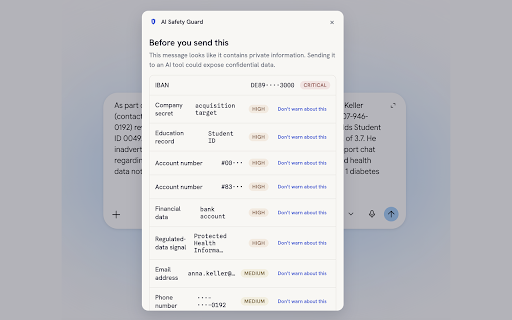
AI Safety Guard watches the message box on ChatGPT, Claude, Gemini, Perplexity and Microsoft Copilot. As you type, it scans your text ON YOUR DEVICE for sensitive information: emails, phone numbers, credit cards, SSNs and EU identifiers (IBAN, French NIR, German Steuer-ID, Spanish DNI), API keys and private keys, passwords, and confidential business, legal, financial or health language - in English, French, German and Spanish.

If you try to send something risky, it pauses and shows a clear warning listing what it found - always masked, never the raw secret. Redact everything with one click, send anyway, or keep editing. You stay in control.

PRIVATE BY DESIGN
- Scanning is 100% local. No accounts, no logging, no telemetry, no network calls — verify it yourself in DevTools.
- The extension stores only your settings and a few local counters. Prompt text is never stored or transmitted.
- Open source: https://github.com/Sushegaad/AI-Safety-Guard-Chrome-Extension

ALSO INCLUDED
- Attachment scanning: PDF and Word files are read locally, including hidden comments and metadata. Pasted screenshots get a gentle reminder.
- Three sensitivity modes (Basic / Balanced / Strict) and per-category "don't warn again" muting.
- Add your own AI domains — Chrome asks permission for that one site only.
- Optional local history of recent catches (masked values only, clearable).
- Fully keyboard operable and screen-reader friendly (WCAG 2.1 AA).
Technical
- Version
- 1.0.0
- Manifest
- V3
- Size
- 615KiB
- Min Chrome
- 88
- Languages
- 1
- Featured
- No
Metadata
- ID
- ghjnpbnohiidngnjcfkehdnnpbkkhfdp
- Developer ID
- ua9929bc7dd0866d5a83fbfc431794e5a
- Developer Email
- [email protected]
- Created
- Jul 8, 2026
- Last Updated (Store)
- Jul 8, 2026
- Last Scraped
- Jul 9, 2026
- Website
- —
Data sourced from the Chrome Web Store · last verified Jul 9, 2026.