
RedactShield: Blur & Redact for Screen Share
Blur, block, or truly redact anything on a page for demos and screen shares. Real DOM redaction, on-device, no subscription.
As of June 2026, RedactShield: Blur & Redact for Screen Share has — users in the Privacy & Security category.
Usersno change0%
—
—
Ratingno change0%
—
— reviews
Reviewsno change0%
—
Version
0.1.1
Manifest V3
History
1 snapshotsTracking since Jun 11, 2026.
Not enough history yet for this metric — the chart fills in as we collect more snapshots.
View as table
| Date | Users | Rating | Reviews | Version |
|---|---|---|---|---|
| Jun 11, 2026 | — | — | — | 0.1.1 |
| Now | — | — | — | 0.1.1 |
Permissions & access
- Permissions
- activeTabcommandsscriptingstorage
- Host access
- None declared
Screenshots


About
Stop leaking private data during demos, screen shares, and recordings.

RedactShield hides sensitive information on any web page in one click — customer names, revenue, API keys, emails, account numbers, anything. Built for sales engineers, founders, support teams, and creators who share their screen on real, logged-in dashboards.

───────────────────────────────

WHY REDACTSHIELD IS DIFFERENT — REAL, DEEP DOM REDACTION

Most blur extensions just apply a CSS filter, so the data is still sitting in the page — anyone can right-click → Inspect Element and read it, and it can flash on screen during a recording. RedactShield's deep redaction actually replaces the text in the page with block characters and keeps the original only in your browser's memory. Inspect the element and you see ███, never the real value.

───────────────────────────────

FEATURES

✓ Click to blur, block, mask, or hide any element
✓ Draw-box mode — click and drag to cover charts, graphics, or embedded widgets
✓ Adjustable blur intensity (1–20px) for soft context or a hard block
✓ Auto-detect common secrets — emails, AWS/Stripe keys, JWTs, database URLs, card numbers (Luhn-checked), SSNs, and more
✓ Zero-flash persistence — redactions reappear instantly on reload and on single-page app navigation, with no flash of unblurred data
✓ Works inside iframes and embedded portals
✓ Optimized for heavy sites — stays smooth on feeds and dashboards
✓ Starter profiles for Stripe, AWS, GitHub, and Vercel dashboards
✓ Panic screen — one shortcut (Ctrl/Cmd+Shift+X) instantly covers the whole tab
✓ 100% local — your page content never leaves your browser

───────────────────────────────

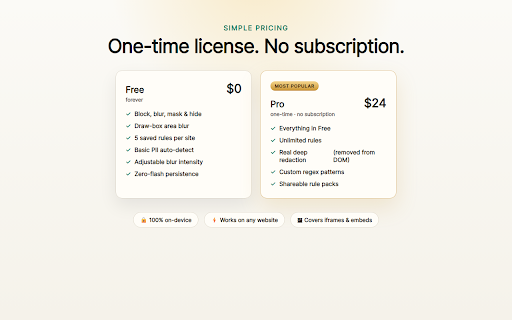
FREE & PRO — ONE-TIME UPGRADE, NO SUBSCRIPTION

FREE
• Blur, block, mask & hide
• Draw-box area blur
• 5 saved rules per site
• Auto-detect & adjustable intensity

PRO
• Unlimited rules
• Real deep redaction — text removed from the DOM
• Custom regex patterns
• Shareable rule packs
• One-time purchase, no subscription

───────────────────────────────

PRIVACY FIRST

RedactShield runs entirely on your device. It does not collect, transmit, or sell your browsing data or page content. No host permissions are requested at install — you grant access per site, only when you choose. The only network request is license verification with Gumroad, made only when you activate a paid license.

Full policy: https://docs.google.com/document/d/e/2PACX-1vTYSaJIaYvm7RJok11N_B4DyOlETtdXbtikJVjWubn98-Z9VX0b-ZDFWp9TJdYvlufFtq7JJOfADJEg/pub

Hide what matters. Share with confidence.
Technical
- Version
- 0.1.1
- Manifest
- V3
- Size
- 38.35KiB
- Min Chrome
- 88
- Languages
- 1
- Featured
- No
Metadata
- ID
- ghfkifjcekeoicbklepgpikkajkgiche
- Developer ID
- u1fd6b67c2a9941c78766d170274f8bc2
- Developer Email
- [email protected]
- Created
- Jun 10, 2026
- Last Updated (Store)
- Jun 10, 2026
- Last Scraped
- Jun 11, 2026
- Website
- —
- Support URL
- —
Data sourced from the Chrome Web Store · last verified Jun 11, 2026.