
Swagger Filter by Emad
🔥 Swagger Filter by Emad is a premium Chrome extension designed to enhance the usability of Swagger API documentation. It helps…
As of June 2026, Swagger Filter by Emad has 17 users in the Developer Tools category.
Usersup 30.8 percent+30.8%
17
17
Ratingno change0%
—
— reviews
Reviewsno change0%
—
Version
1.3
Manifest V3
History
4 snapshotsTracking since Apr 1, 2026.
View as table
| Date | Users | Rating | Reviews | Version |
|---|---|---|---|---|
| Apr 1, 2026 | 13 | — | — | 1.3 |
| Apr 21, 2026 | 15 | — | — | 1.3 |
| May 7, 2026 | 13 | — | — | 1.3 |
| Jun 4, 2026 | 13 | — | — | 1.3 |
| Now | 17 | — | — | 1.3 |
Permissions & access
- Permissions
- scriptingactiveTabtabswindowsstorage
- Host access
- None declared
Screenshots
About
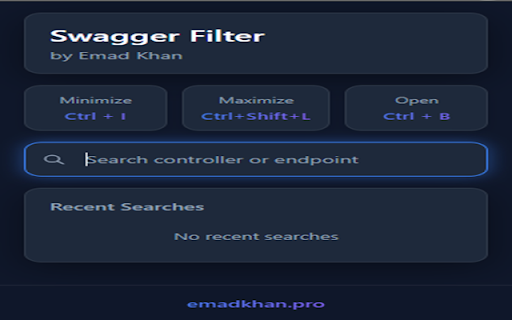
🔥 Swagger Filter by Emad is a premium Chrome extension designed to enhance the usability of Swagger API documentation. It helps developers quickly find, filter, and organize API endpoints without scrolling through large documentation.

✨ Key Features:
✅ Modern Dark Mode UI: Sleek, eye-friendly interface designed for developers who spend hours with API documentation.
✅ Smart Search & Filter: Instantly find API endpoints using keywords, including controller names, URLs, and Sprint numbers.
✅ Search History: Automatically saves your 5 most recent searches for quick access.
✅ Notes System: Add detailed notes to each search item to remember important details about endpoints.
✅ One-Click Copy: Copy your saved notes with a single click for easy reference.
✅ Individual Item Management: Easily delete specific search items or clear all history as needed.
✅ Keyboard Shortcuts: Navigate efficiently with Ctrl+I (minimize all), Ctrl+Shift+L (maximize all), and Ctrl+B (open extension).
✅ Optimized for Developers: Works seamlessly with any Swagger UI implementation, including dynamic/lazy-loaded documentation.

🔒 Privacy & Security:
- This extension uses Chrome's local storage API solely to remember your searches and notes.
- All data remains on your device - no information is transmitted over the internet.
- No user data collection, tracking, or analytics.
- The extension requires minimal permissions: only those needed to interact with Swagger UI and save your search history.

🔹 How to Use:
1️⃣ Install the extension.
2️⃣ Open any Swagger API documentation page.
3️⃣ Press Ctrl+B or click the extension icon to open the filter.
4️⃣ Use the search box to filter endpoints by name, URL, or sprint number.
5️⃣ Add notes to searches by clicking the pencil icon.
6️⃣ Copy your notes with the copy button for quick reference.
7️⃣ Use keyboard shortcuts for quick navigation.

This extension is perfect for developers, QA engineers, and technical team members who regularly work with Swagger/OpenAPI documentation and need to keep track of important API information.
Technical
- Version
- 1.3
- Manifest
- V3
- Size
- 72.86KiB
- Min Chrome
- 88
- Languages
- 1
- Featured
- No
Metadata
- ID
- ghcemigiolbokbhnndncmbbpckedebcm
- Developer ID
- u4fb675191af1d12bf31ee8413f4d6588
- Developer Email
- [email protected]
- Created
- Feb 22, 2025
- Last Updated (Store)
- Apr 23, 2025
- Last Scraped
- Jun 4, 2026
- Website
- emadkhan.pro
- Support URL
- emadkhan.pro
- Privacy Policy
- https://emadkhan.pro/privacy-policy
Similar extensions
Alternatives to Swagger Filter by Emad, ranked by description similarity.

Swagger UI Enhancement
Enhances Swagger UI with token management, API search, and body persistence features
42

Swagger Filter
An extension built on Swagger UI that provides an intuitive interface to filter and manage API endpoints.
1

Swagger Navigator
Enhanced navigation for large OpenAPI specifications with starred routes, search, and sticky sidebar
15
★ 5.0

Swagger Enhancer
Enhances the Swagger UI experience with visual and usability improvements.
28

Swagger Helper
Boost your Swagger UI workflow: quickly track active endpoints, auto-fill common parameters, and save time testing APIs.
7
★ 5.0

Better Swagger Extension
Make Swagger UI beautiful again with modern styling and enhanced features
3

All-in-One Swagger Helper
Production-ready Swagger UI productivity toolkit with auto-login, token management, environment switching, and UI enhancements
6
★ 5.0

Swagger made Simple
Transform Your API Documentation Experience!
Tired of dealing with cumbersome and hard-to-navigate Swagger documentation?…
13
★ 5.0
Data sourced from the Chrome Web Store · last verified Jun 4, 2026.