
Email Sender Icons by cloudHQ
Identify Companies in Your Inbox.
As of June 2026, Email Sender Icons by cloudHQ has 1,000 users and a 4.62/5 rating from 13 reviews in the Communication category.
Usersno change0%
1.0K
1,000
Ratingno change0%
4.62
13 reviews
Reviewsno change0%
13
Version
1.0.1.3
Manifest V3
History
1 snapshotsTracking since Apr 19, 2026.
View as table
| Date | Users | Rating | Reviews | Version |
|---|---|---|---|---|
| Apr 19, 2026 | 1.0K | 4.62 | 13 | 1.0.1.3 |
| Now | 1.0K | 4.62 | 13 | 1.0.1.3 |
Permissions & access
- Permissions
- scriptingstoragebackgroundtabs
- Host access
- https://mail.google.com/, https://inbox.google.com/, https://www.cloudhq.net/
Screenshots


About
It's no secret that companies have more purchasing power than individuals, so identifying them in your inbox can be helpful when you need to triage who you reply back to first.

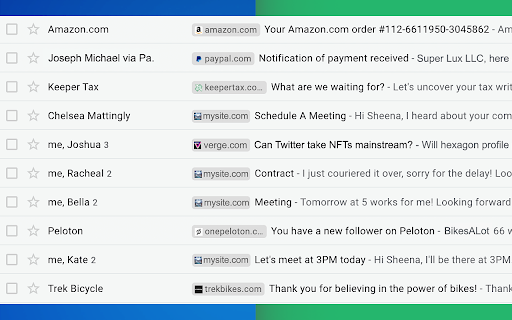
Email Sender Icons by cloudHQ does just that. It visually associates an official company logo (favicon) to someone who sends you an email, without having to open the email itself. It's like "caller id" for your email.

Now you can prioritize triaging your email response time to large companies first, instead of individuals with a free email account on platforms like Gmail™, Yahoo, Hotmail, etc.

Easily Identify:
- Companies in your inbox
- Invoices to pay (Paypal, Venmo, etc)
- Inter-office emails
- Purchase Orders

The icon (aka favicon) is determined by the sender's email domain address, and appears on the same line as your email preview.

For example, if you receive an email from [email protected], this Gmail™ extension will add the Tesla logo next to your message preview so that you can immediately identify that Elon is probably very important and you should return his message before others in your inbox.

A note on privacy and security:
All logo (favicon) processing is done locally within your browser, and no Gmail™  data is ever uploaded or shared anywhere.

cloudHQ. Helping your productivity, 1 click at a time.

cloudHQ Website: https://www.cloudhq.net/
App Website: https://www.email-sender-icons.com
Pricing: FREE
Support page: https://support.cloudhq.net
Blog: https://support.cloudhq.net/category/browser-extensions/email-sender-icons/

Gmail is a trademark of Google LLC. Use of this trademark is subject to Google Permissions.

cloudHQ is trademark of cloudHQ LLC. https://www.cloudhq.net/trademark
Technical
- Version
- 1.0.1.3
- Manifest
- V3
- Size
- 607KiB
- Min Chrome
- 88
- Languages
- 1
- Featured
- Yes
Metadata
- ID
- ggmjpbolghodajmlbemkmflffcnfjgeb
- Developer ID
- u9999076a1cee8608be24fd86bc3000b6
- Developer Email
- [email protected]
- Created
- Jan 11, 2022
- Last Updated (Store)
- Nov 29, 2025
- Last Scraped
- Jun 4, 2026
- Privacy Policy
- https://www.cloudhq.net/privacy
Similar extensions
Alternatives to Email Sender Icons by cloudHQ, ranked by description similarity.

Email Signature Generator by cloudHQ
Email signature generator and signature templates
20.0K
★ 4.5
Mailto: Set Default Email to Gmail by cloudHQ
Set Gmail as default email application when clicking on an email address on the internet
7.0K
★ 4.0

Copilot for Gmail™ by cloudHQ
Mini CRM for your Gmail
10.0K
★ 4.5

Gmail Message Preview by cloudHQ
Preview emails in inbox.
10.0K
★ 4.0
Gmail Button by cloudHQ
Create a button in your email to get more clicks with Gmail Button
30.0K
★ 4.6

Sort Gmail Inbox by cloudHQ
Find an email in seconds with free preset filters
10.0K
★ 4.1

Auto Follow Up for Gmail™ by cloudHQ
Automated follow up emails and mail merge
9.0K
★ 4.9

Gmail™ Email Templates by cloudHQ
Beautiful email templates for Gmail. Design your templates or import templates from Mailchimp. With team sharing!
100.0K
★ 4.2
Data sourced from the Chrome Web Store · last verified Jun 4, 2026.