
JobAnvil
Capture job listings and sync your LinkedIn profile to JobAnvil.
As of June 2026, JobAnvil has 6 users in the Productivity category.
Usersno change0%
6
6
Ratingno change0%
—
— reviews
Reviewsno change0%
—
Version
0.350.4
Manifest V3
90-day change · In the last 90 days this extension 3 version updates, changed permissions.
History
6 snapshotsTracking since Apr 7, 2026.
Not enough history yet for this metric — the chart fills in as we collect more snapshots.
View as table
| Date | Users | Rating | Reviews | Version |
|---|---|---|---|---|
| Apr 7, 2026 | — | — | — | 0.240.2 |
| Apr 19, 2026 | — | — | — | 0.240.2 |
| Apr 24, 2026 | — | — | — | 0.318.1 |
| May 8, 2026 | — | — | — | 0.318.1 |
| May 19, 2026 | — | — | — | 0.346.1 |
| Jun 7, 2026 | — | — | — | 0.350.4 |
| Now | 6 | — | — | 0.350.4 |
Changelog
- May 13, 2026description
JobAnvil is a private, automated job search tool that runs on your Windows PC. This extension is its companion — it lets you capture job listings from LinkedIn directly into your local JobAnvil app as you browse, and import your LinkedIn profile for AI analysis.

WHAT IT DOES
• Capture jobs from LinkedIn with a single click while you browse
• Import your LinkedIn profile text into JobAnvil for AI-powered optimization suggestions
• All captured jobs queue locally and flow into your private pipeline — scored, tracked, and matched against your profile

HOW IT WORKS
When you browse a job listing on a supported site, JobAnvil detects it and adds a capture button. Click it and the job is sent directly to your local JobAnvil desktop app via native messaging — no cloud, no server, no third-party storage. Your data never leaves your machine.

REQUIRES JOBANVIL DESKTOP APP
This extension requires the JobAnvil desktop app for Windows (available at jobanvil.io). It will not function as a standalone tool — it is a capture bridge between your browser and your local app.

PRIVACY
JobAnvil is built on a local-first architecture. This extension communicates exclusively with the JobAnvil app installed on your own PC using Chrome's native messaging API. No job data, profile information, or browsing activity is transmitted to any external server.

SUPPORTED SITES
• LinkedIn (job listings + profile import)
• Indeed
• Greenhouse
• Lever
• Workday

GET STARTED
Download the JobAnvil desktop app at jobanvil.io, then install this extension. Once the app is running, the extension connects automatically — no configuration needed.
JobAnvil is a private, automated job search tool that runs on your Windows PC. This extension is its companion — it lets you capture job listings from LinkedIn directly into your local JobAnvil app as you browse, and import your LinkedIn profile for AI analysis.

WHAT IT DOES
• Capture jobs with a single click while you browse
• Import your LinkedIn profile text into JobAnvil to inform AI-driven job scoring and resume tailoring
• All captured jobs queue locally and flow into your private pipeline — scored, tracked, and matched against your profile

HOW IT WORKS
When you browse a job listing on a supported site, JobAnvil detects it and adds a capture button. Click it and the job is sent directly to your local JobAnvil desktop app via native messaging — no cloud, no server, no third-party storage. Your data never leaves your machine.

REQUIRES JOBANVIL DESKTOP APP
This extension requires the JobAnvil desktop app for Windows (available at jobanvil.io). It will not function as a standalone tool — it is a capture bridge between your browser and your local app.

PRIVACY
JobAnvil is built on a local-first architecture. This extension communicates exclusively with the JobAnvil app installed on your own PC using Chrome's native messaging API — no job data, profile information, or browsing activity is sent to any external server by the extension itself. The desktop app may send anonymous usage telemetry, license validation requests, and (for Managed AI subscribers) AI prompts to JobAnvil's servers — see https://jobanvil.io/privacy for the full data policy.

SUPPORTED SITES
• LinkedIn (job listings + profile import)
• Indeed
• Greenhouse
• Lever
• Workday

GET STARTED
Download the JobAnvil desktop app at jobanvil.io — every new install includes a 7-day full-access trial with Managed AI, no credit card required. Then install this extension. Once the app is running, the extension connects automatically — no configuration needed.
- May 8, 2026permissions
nativeMessaging, activeTab, storage, alarms, cookies, tabs, scripting
nativeMessaging, storage, alarms, cookies, tabs, scripting
- Apr 19, 2026description
JobAnvil is a private, automated job search tool that runs on your Windows PC. This extension is its companion — it lets you capture job listings from LinkedIn directly into your local JobAnvil app as you browse, and import your LinkedIn profile for AI analysis.

WHAT IT DOES

• Capture jobs from LinkedIn with a single click while you browse
• Import your LinkedIn profile text into JobAnvil for AI-powered optimization suggestions
• All captured jobs queue locally and flow into your private pipeline — scored, tracked, and matched against your profile

HOW IT WORKS

When you browse a job listing on a supported site, JobAnvil detects it and adds a capture button. Click it and the job is sent directly to your local JobAnvil desktop app via native messaging — no cloud, no server, no third-party storage. Your data never leaves your machine.

REQUIRES JOBANVIL DESKTOP APP

This extension requires the JobAnvil desktop app for Windows (available at jobanvil.io). It will not function as a standalone tool — it is a capture bridge between your browser and your local app.

PRIVACY

JobAnvil is built on a local-first architecture. This extension communicates exclusively with the JobAnvil app installed on your own PC using Chrome's native messaging API. No job data, profile information, or browsing activity is transmitted to any external server.

SUPPORTED SITES

• LinkedIn (job listings + profile import)
JobAnvil is a private, automated job search tool that runs on your Windows PC. This extension is its companion — it lets you capture job listings from LinkedIn directly into your local JobAnvil app as you browse, and import your LinkedIn profile for AI analysis.

WHAT IT DOES
• Capture jobs from LinkedIn with a single click while you browse
• Import your LinkedIn profile text into JobAnvil for AI-powered optimization suggestions
• All captured jobs queue locally and flow into your private pipeline — scored, tracked, and matched against your profile

HOW IT WORKS
When you browse a job listing on a supported site, JobAnvil detects it and adds a capture button. Click it and the job is sent directly to your local JobAnvil desktop app via native messaging — no cloud, no server, no third-party storage. Your data never leaves your machine.

REQUIRES JOBANVIL DESKTOP APP
This extension requires the JobAnvil desktop app for Windows (available at jobanvil.io). It will not function as a standalone tool — it is a capture bridge between your browser and your local app.

PRIVACY
JobAnvil is built on a local-first architecture. This extension communicates exclusively with the JobAnvil app installed on your own PC using Chrome's native messaging API. No job data, profile information, or browsing activity is transmitted to any external server.

SUPPORTED SITES
• LinkedIn (job listings + profile import)
• Indeed
• Greenhouse
• Lever
• Workday

GET STARTED
Download the JobAnvil desktop app at jobanvil.io, then install this extension. Once the app is running, the extension connects automatically — no configuration needed.
- Apr 19, 2026host_permissions
*://www.linkedin.com/*
*://www.linkedin.com/*, *://*.myworkdayjobs.com/*, *://*.workday.com/*, *://boards.greenhouse.io/*, *://jobs.lever.co/*, *://*.indeed.com/*
- Apr 19, 2026permissions
nativeMessaging, activeTab, storage
nativeMessaging, activeTab, storage, alarms, cookies, tabs, scripting
Permissions & access
- Permissions
- nativeMessagingstoragealarmscookiestabsscripting
- Host access
- *://www.linkedin.com/*, *://*.myworkdayjobs.com/*, *://*.workday.com/*, *://boards.greenhouse.io/*, *://jobs.lever.co/*, *://*.indeed.com/*
Screenshots




About
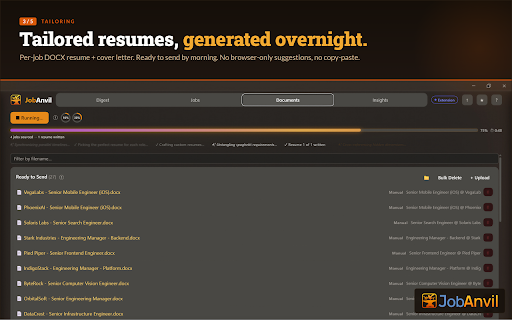
JobAnvil is a private, automated job search tool that runs on your Windows PC. This extension is its companion — it lets you capture job listings from LinkedIn directly into your local JobAnvil app as you browse, and import your LinkedIn profile for AI analysis.

WHAT IT DOES
• Capture jobs with a single click while you browse
• Import your LinkedIn profile text into JobAnvil to inform AI-driven job scoring and resume tailoring
• All captured jobs queue locally and flow into your private pipeline — scored, tracked, and matched against your profile

HOW IT WORKS
When you browse a job listing on a supported site, JobAnvil detects it and adds a capture button. Click it and the job is sent directly to your local JobAnvil desktop app via native messaging — no cloud, no server, no third-party storage. Your data never leaves your machine.

REQUIRES JOBANVIL DESKTOP APP
This extension requires the JobAnvil desktop app for Windows (available at jobanvil.io). It will not function as a standalone tool — it is a capture bridge between your browser and your local app.

PRIVACY
JobAnvil is built on a local-first architecture. This extension communicates exclusively with the JobAnvil app installed on your own PC using Chrome's native messaging API — no job data, profile information, or browsing activity is sent to any external server by the extension itself. The desktop app may send anonymous usage telemetry, license validation requests, and (for Managed AI subscribers) AI prompts to JobAnvil's servers — see https://jobanvil.io/privacy for the full data policy.

SUPPORTED SITES
• LinkedIn (job listings + profile import)
• Indeed
• Greenhouse
• Lever
• Workday

GET STARTED
Download the JobAnvil desktop app at jobanvil.io — every new install includes a 7-day full-access trial with Managed AI, no credit card required. Then install this extension. Once the app is running, the extension connects automatically — no configuration needed.
Technical
- Version
- 0.350.4
- Manifest
- V3
- Size
- 69.71KiB
- Min Chrome
- 88
- Languages
- 1
- Featured
- No
Metadata
- ID
- gfolneajelllaanhjccnkjcbmjonhhpn
- Developer ID
- uf53c67eae6d26d90f9ef4f8b924ba41c
- Developer Email
- [email protected]
- Created
- Apr 7, 2026
- Last Updated (Store)
- May 18, 2026
- Last Scraped
- Jun 7, 2026
- Website
- —
- Support URL
- https://jobanvil.io
- Privacy Policy
- https://jobanvil.io/privacy
Data sourced from the Chrome Web Store · last verified Jun 7, 2026.