Backtick
Format code in Google Docs using Markdown-style `backticks`
As of May 2026, Backtick has 588 users and a 3.67/5 rating from 6 reviews in the Developer Tools category.
Usersup 1.7 percent+1.7%
588
588
Ratingdown 3.4 percent−3.4%
3.67
6 reviews
Reviewsup 20.0 percent+20.0%
6
Version
0.4.0
Manifest V3
History
3 snapshotsTracking since Apr 1, 2026.
View as table
| Date | Users | Rating | Reviews | Version |
|---|---|---|---|---|
| Apr 1, 2026 | 578 | 3.80 | 5 | 0.4.0 |
| May 1, 2026 | 596 | 3.67 | 6 | 0.4.0 |
| May 31, 2026 | 611 | 3.67 | 6 | 0.4.0 |
| Now | 588 | 3.67 | 6 | 0.4.0 |
Permissions & access
- Permissions
- identitystorage
- Host access
- None declared
Screenshots

About
> Update Aug 11, 2023:
>
> About a year after this extension first came out, [Google released built-in inline code markdown support for Google Docs](https://workspaceupdates.googleblog.com/2022/12/format-display-code-google-docs.html), rendering this extension obsolete for most use-cases. The extension will remain for those want to continue using it, but I don't intend on making any further updates. To get the built-in inline code and code blocks working via backticks, ensure the Tools -> Preferences -> "Automatically detect Markdown" checkbox is enabled inside Google Docs.

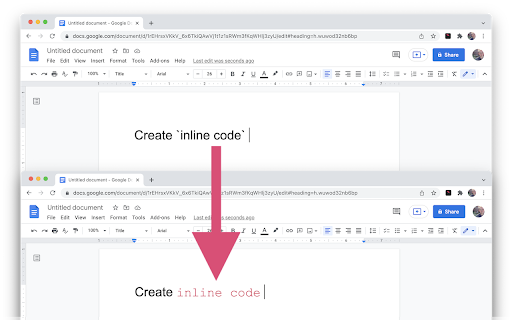
Write inline code inside Google Docs. Just enclose a word or phrase with `backticks` and it will be automatically formatted as inline code.

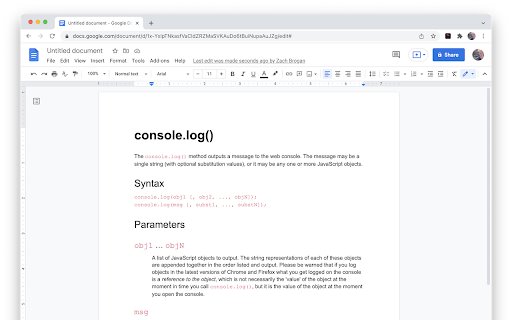
A great tool for software developers who are used to the feature in Slack, Github, Jira, Markdown files, etc.

# Features
• Auto-format inline code using backticks
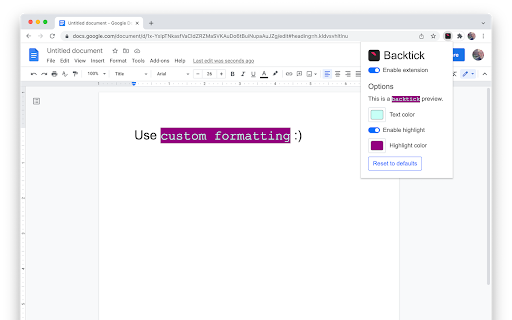
• Customizable text color
• Customizable highlight color
• Extension on/off toggle
• Support for multiple Google accounts
• Secure and private. Docs data is processed client-side.

# Planned Features:
• Add multi-line code blocks using markdown-style triple backtick syntax. Ex)
```javascript
console.log('hello!`)
```
• Syntax highlighting in multiple programming languages for code blocks
• Theme choices for code blocks

# Technical Limitations
Due to the way the Google Docs API was designed, there are some limitations to this extension:
• The extension has no notion of where your cursor is and will parse the document from bottom to top. Because of this, at most one inline code section is created per backtick key press to avoid large amounts unwanted formatting.
• Take care when dealing with large or collaborative documents that may have existing backtick characters. Remember that the extension has a disable toggle for turning it off until it's needed again.
• To "escape" backtick characters in your document, format each backtick character differently from the surrounding text. For example, bolding the `s, but leaving text before and after unbolded will hide the characters from the extension.
• The formatting will happen more quickly when typing another character immediately after pressing the closing backtick character. The reason is complicated, but is essentially to preserve the existing text formatting and avoid extraneous spaces.

# Privacy Policy
https://backtick.zachbrogan.com/privacy-policy.html
Technical
- Version
- 0.4.0
- Manifest
- V3
- Size
- 56.33KiB
- Min Chrome
- 88
- Languages
- 1
- Featured
- No
Metadata
- ID
- gfollmknbahbmikbkhepbggabhdpjlhh
- Developer ID
- ufa2badc0d4ef2b0d28dfbbdaf73c1ff2
- Developer Email
- [email protected]
- Created
- Jan 17, 2022
- Last Updated (Store)
- Aug 13, 2023
- Last Scraped
- May 31, 2026
- Website
- —
- Support URL
- —
- Privacy Policy
- https://backtick.zachbrogan.com/privacy-policy.html
Similar extensions
Alternatives to Backtick, ranked by description similarity.

Code to Docs
Save GitHub code to Google Docs for AI context.
6

Markdown Formatter for Bearblog
Easily format your markdown text by selecting it and pressing a key to wrap it, saving you time and effort. Built for Bearblog.
6
★ 5.0

Easy2Markdown
Convert selected code into a clean Markdown code block with language highlighting — perfect for docs, READMEs, notes, and Discord.
2
★ 1.0

Reddit Syntax Highlighting
Enhance Your Reddit Browsing Experience with Code Syntax Highlighting!
14
★ 5.0

Better comments for GitHub
A chrome extension that will enhance the GitHub native comment editor with a more powerful wysiwyg block based editor
90

Colorful Comments for online code editors
Color and Highlight special comment tags
2

Vim for Google Docs™
Vim for Google Docs: Supercharge Your Typing With Vim
1.0K
★ 3.8

ChatGPT Web Preview
Preview HTML, CSS, and JS code from ChatGPT with Tailwind CSS support.
889
★ 4.9
Data sourced from the Chrome Web Store · last verified May 31, 2026.