
Hotkeys for Search
Perform a search for selected text using keyboard shortcuts.
As of May 2026, Hotkeys for Search has 1,000 users and a 4.40/5 rating from 25 reviews in the Productivity category.
Usersno change0%
1.0K
1,000
Ratingno change0%
4.40
25 reviews
Reviewsno change0%
25
Version
1.4.0
Manifest V3
Permissions & access
- Permissions
- commandsactiveTabstoragescripting
- Host access
- None declared
Screenshots

About
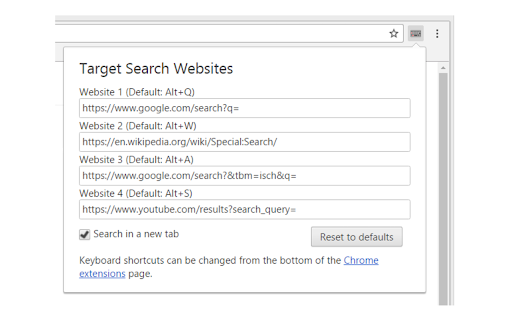
1. Select text on a web page using the mouse.
2. Press a keyboard shortcut to search for the selected text on your desired website.

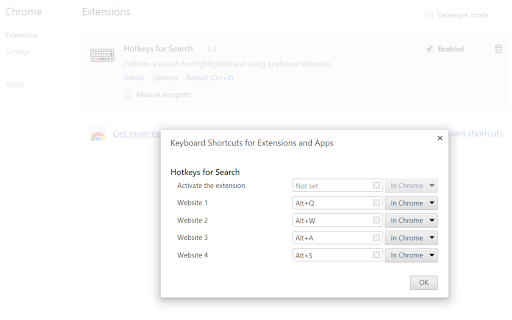
Default shortcuts:
Alt+Q = Google
Alt+W = Wikipedia
Alt+A = Google Images
Alt+S = YouTube

Options:
- Change the target search websites
- Change the keyboard shortcut keys
- Open the search in the current tab, a new tab or a background tab
- Choose the position of the new tab (left or right of the current tab)


Source code: https://github.com/Juuso-h/hotkeys-for-search
Technical
- Version
- 1.4.0
- Manifest
- V3
- Size
- 22.89KiB
- Min Chrome
- 88
- Languages
- 2
- Featured
- No
Metadata
- ID
- gfmeadbjkfhkeklgaomifcaihbhpeido
- Developer ID
- u05f36183e6fdb972c68ca1f02b2d3996
- Developer Email
- [email protected]
- Created
- Apr 18, 2017
- Last Updated (Store)
- Sep 21, 2025
- Last Scraped
- May 31, 2026
- Website
- —
- Support URL
- —
- Privacy Policy
- —
Similar extensions
Alternatives to Hotkeys for Search, ranked by description similarity.

Select Search
Select -> Search / Translate / Go to link
79
★ 5.0

Instant Text Search — Highlight & Find Quickly
Quickly search highlighted text across various search engines with this fast Chrome extension.
7

Open Selection or Google Search
Open selected link in a new tab or search selected text on Google using a hotkey.
1

Jump to Search
A search helper that allows users to instantly jump to search pages of selected websites
—

EZ Shortcut Search
Search Google using highlighted text with a shortcut or context menu.
73
★ 5.0

NavTools
Adds a keyboard shortcut to focus web page input boxes
—

Quick Search
Select text on any webpage, right-click, and search on a website from your custom list.
2

Search the Current Site
Search the current site using the most popular search engine
891
★ 2.0
Data sourced from the Chrome Web Store · last verified May 31, 2026.