
Bad Connection Simulator
Get out of calls by simulating a bad connection
As of May 2026, Bad Connection Simulator has 2,000 users and a 4.50/5 rating from 6 reviews in the Social & Communication category.
Usersup 100.0 percent+100.0%
2.0K
2,000
Ratingno change0%
4.50
6 reviews
Reviewsno change0%
6
Version
1.0.0
Manifest V3
90-day change · In the last 90 days this extension gained 1.0K users.
History
2 snapshotsTracking since May 1, 2026.
View as table
| Date | Users | Rating | Reviews | Version |
|---|---|---|---|---|
| May 1, 2026 | 1.0K | 4.50 | 6 | 1.0.0 |
| May 31, 2026 | 1.0K | 4.50 | 6 | 1.0.0 |
| Now | 2.0K | 4.50 | 6 | 1.0.0 |
Permissions & access
- Permissions
- activeTab
- Host access
- http://*/*, https://*/*
Screenshots


About
The perfect excuse to off of video calls

Stuck on a video call you want to get out and need a good excuse? The Bad Connection Simulator Chrome Extension simulates a bad connection with just a click!

→ Works with any web-based video calling app
→ Easy to use - just install the extension, no other installations required
→ 3 levels of impairment - none, moderate, and severe
→ Evades low bandwidth adaptation used by video calling apps

HOW TO USE 🍰
 1. Install the extension from the Chrome WebStore
 2. Join your video call
 3. Click the Bad Connection Simulator icon and select your impairment level
 4. Adjust as needed throughout your call

Verified with Zoom, Google Meet, Microsoft Teams, Facebook Messenger, Google Duo, Jitsi Meet, Whereby.

Make sure to use the web-version of your video calling app. Bad Connection Simulator also needs to run inside a tab.

THREE LEVELS OF IMPAIRMENT
Adjust your impairment depending on your needs:

1️⃣ NONE - Normal connectivity
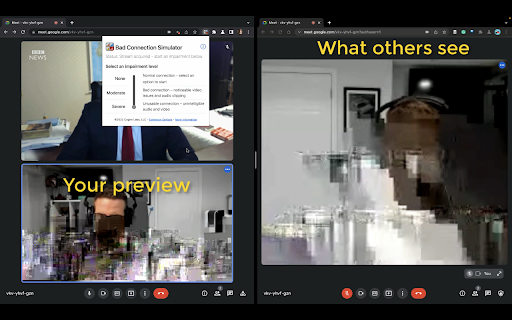
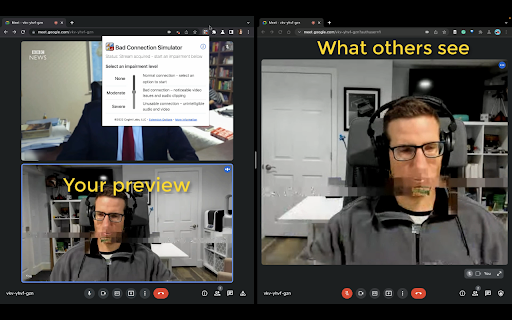
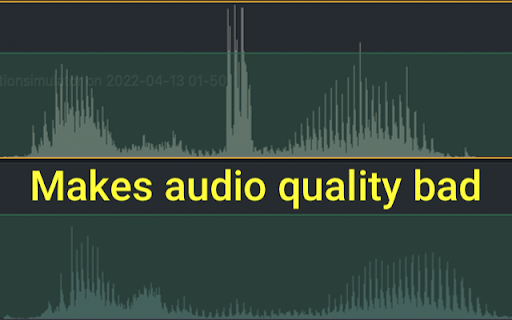
2️⃣ MODERATE - will show some visual impairments and audibly degrade your audio quality. Others will notice you are having some connection issues.
3️⃣ SEVERE - unusable connection with obvious visual artifacts and unusable audio. Now it is safe to drop off

Star with moderate to signal you may have connection issues then switch to severe when you’re ready to drop. Decrease or stop the impairment at any time.

FOR BEST RESULTS
You have to join from Chrome or Edge!

Bad Connection Simulator only works on Chromium-based Desktop browsers like Chrome or Edge. Also note, many web calling apps prefer to send you to their native desktop application instead of taking the call from the browser. Make sure you do not click through to the Desktop app.

Turn off virtual backgrounds
Don't use the virtual background feature. Usually this will not be altered, so your video will look impaired but the virtual background won't be.

How it works ℹ️️
Bad Connection Simulator extension inserts itself after your webcam and microphone streams. Unlike other impairment simulators, everything is contained in the browser and controlled by the extension.

* No installing fake device drivers
* No need to select a special device
* No need to load any external apps

Modern video calling systems are designed to deal with bad connections and will try to adapt to reduce any impairments. Bad Connection Simulator applies realistic impairments directly to the source video stream before it is transmitted. Video conferencing systems see a normal stream, so they do not make any adjustments while your video and audio come through like garbage!

Explanation for Nerds 🤓
Bad Connection Simulator makes use of WebRTC Insertable Streams. After a getUserMedia call, the source streams are routed through WebCodecs where the stream is re-encoded with simulated packet loss and latency. Then the stream is passed to the video calling app where it is displayed and can be passed to a RTCPeerConnection.
Technical
- Version
- 1.0.0
- Manifest
- V3
- Size
- 2.44MiB
- Min Chrome
- 88
- Languages
- 1
- Featured
- Yes
Metadata
- ID
- gflankmgolakfdeiponkgmbhbhpdmjlg
- Developer ID
- u209e7a41d2805f25603aa80fdbd61e1c
- Developer Email
- [email protected]
- Created
- Apr 21, 2022
- Last Updated (Store)
- Apr 21, 2022
- Last Scraped
- May 31, 2026
- Website
- badconnectionsimulator.com
- Support URL
- —
- Privacy Policy
- —
Similar extensions
Alternatives to Bad Connection Simulator, ranked by description similarity.

Videochat Extension - IP Locator for Omegle
Universal WebRTC monitoring and geolocation tool, works great with Omegle-like sites.
100.0K
★ 4.7

Simu Connect
Manage your office calls easily and never miss a call from your business phone system.
13
★ 5.0

Videochat Extension FreeCM
A small extension for the free CooMeet video chat that attempts to distinguish bots from humans.
621

PayCall WebPhone
PayCall WebPhone is a WebRTC client.
20

Voiso Contact Center
Enables click-to-call and SMS capabilities in any web-based application
422
★ 5.0

AI assistant for Linkedin
Supercharge your LinkedIn experience with AI.
1.0K
★ 4.3

Mic Test & Recorder
Test your microphone, monitor input level and record voice directly in Chrome.
44

Talkative Meeting Rooms
Talkative Meeting Rooms lets you add video, voice, screenshare and chat to your existing channels.
190
★ 5.0
Data sourced from the Chrome Web Store · last verified May 31, 2026.