
LeetCode Timer
Leetcode timer and performance tracking
As of June 2026, LeetCode Timer has 10,000 users and a 4.44/5 rating from 25 reviews in the Developer Tools category.
Usersno change0%
10.0K
10,000
Ratingup 1.1 percent+1.1%
4.44
25 reviews
Reviewsup 8.7 percent+8.7%
25
Version
4.2
Manifest V3
90-day change · In the last 90 days this extension 1 version update, changed permissions.
History
1 snapshotsTracking since May 1, 2026.
View as table
| Date | Users | Rating | Reviews | Version |
|---|---|---|---|---|
| May 1, 2026 | 10.0K | 4.39 | 23 | 4.0 |
| Now | 10.0K | 4.44 | 25 | 4.2 |
Changelog
- May 1, 2026description
This Chrome browser extension is a must-have for coders who want to track their coding time on LeetCode.com and set time limits for themselves. With this extension, you can:

- Track your coding time on each LeetCode problem. The extension will automatically start a timer when you start working on a problem and stop it when you submit your solution. You can then view your total coding time at the end for each problem.

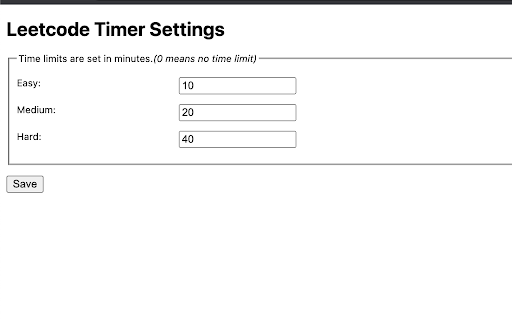
- Set time limits for yourself based on problem difficulty. The extension allows you to set different time limits for easy, medium, and hard problems. This can help you to focus on and complete problems more efficiently.

Release notes for Ver. 4.0:
- Fix timer not showing up due to recent Leetcode layout changes.

Release notes for Ver. 3.9:
- Minor bug fixes

Release notes for Ver. 3.8:
- Fix a bug in timer toggling functionality.

Release notes for Ver. 3.7:
- Fix a bug in timer auto pause functionality when a problem is submitted multiple times.

Release notes for Ver. 3.6:
- Fix a bug in timer auto pause functionality when a problem is submitted multiple times.

Release notes for Ver. 3.5:
- Show/Hide Difficulty in recommended problems list
- Many more bug fixes and improvements

Release notes for Ver. 3.4:
- Fix broken Auto pause functionality in Dynamic layout

Release notes for Ver. 3.3:
- Fix broken timer animation when paused in new layouts
- Fix broken Hide Acceptance rate feature in Dynamic layout
- Fix timer reset button not working when problem page is loaded

Release notes for Ver. 3.2:
- Fix timer stuck at loading in Dynamic layout when Hide difficulty setting is turned on.

Release notes for Ver. 3.1:
- Fix broken styles causing timer text invisible in dark mode
- Update feedback/bug report link
- Add extension rating link in the popup page.

Release notes for Ver. 3.0:
- New Timer Design
- Timer is now draggable and can be placed where ever you want on the page.
- Added support for all Leetcode UI modes(Old, Split View , Dynamic)
- Bug fixes


Update: 2023-08-16
Fix Broken features in old UI due to the recent release.

Update: 2023-08-13
Fix Broken features due to Leetcode UI updates.

Update: 2022-09-16
New Features:
  1. Improved UI.
  2. Timer will now appear for all LeetCode Explore problems.
  3. Set time limits for each difficulty.
Bug fixes:
  1. Fix: Timer showing up in the problem discussion page
  2. Fix: Hide time icon not showing up


Update: 2022-01-25
New Features:
  1. Autostart timer functionality.
  2. Automatically pause timer on successful submission
Bug fixes:
  1. Fix broken functionality due to Leetcode new layout
    * Hide Locked Questions
    * Hide Difficulty
    * Hide Acceptance rate


Update: 2021-08-02
Fix broken features due to LeetCode layout change

Other features:
* Hide Difficulty
* Hide Acceptance rate
* Hide Locked questions
* Hide timer to run in background

Please rate it if you find this extension useful and provide feedback if you are uninstalling.
This Chrome browser extension is a must-have for coders who want to track their coding time on LeetCode.com and set time limits for themselves. With this extension, you can: - Track your coding time on each LeetCode problem. The extension will automatically start a timer when you start working on a problem and stop it when you submit your solution. You can then view your total coding time at the end for each problem. - Set time limits for yourself based on problem difficulty. The extension allows you to set different time limits for easy, medium, and hard problems. This can help you to focus on and complete problems more efficiently. Release notes for Ver. 4.2: - Revert the timer hiding behavior to its previous version. Release notes for Ver. 4.1: - Fix broken features (Hiding difficulty and acceptance rates) due to UI changes. - The timer has been made robust to handle inactive tabs when practicing outside of the browser tab. Release notes for Ver. 4.0: - Fix timer not showing up due to recent Leetcode layout changes. Release notes for Ver. 3.9: - Minor bug fixes Release notes for Ver. 3.8: - Fix a bug in timer toggling functionality. Release notes for Ver. 3.7: - Fix a bug in timer auto pause functionality when a problem is submitted multiple times. Release notes for Ver. 3.6: - Fix a bug in timer auto pause functionality when a problem is submitted multiple times. Release notes for Ver. 3.5: - Show/Hide Difficulty in recommended problems list - Many more bug fixes and improvements Release notes for Ver. 3.4: - Fix broken Auto pause functionality in Dynamic layout Release notes for Ver. 3.3: - Fix broken timer animation when paused in new layouts - Fix broken Hide Acceptance rate feature in Dynamic layout - Fix timer reset button not working when problem page is loaded Release notes for Ver. 3.2: - Fix timer stuck at loading in Dynamic layout when Hide difficulty setting is turned on. Release notes for Ver. 3.1: - Fix broken styles causing timer text invisible in dark mode - Update feedback/bug report link - Add extension rating link in the popup page. Release notes for Ver. 3.0: - New Timer Design - Timer is now draggable and can be placed where ever you want on the page. - Added support for all Leetcode UI modes(Old, Split View , Dynamic) - Bug fixes Update: 2023-08-16 Fix Broken features in old UI due to the recent release. Update: 2023-08-13 Fix Broken features due to Leetcode UI updates. Update: 2022-09-16 New Features: 1. Improved UI. 2. Timer will now appear for all LeetCode Explore problems. 3. Set time limits for each difficulty. Bug fixes: 1. Fix: Timer showing up in the problem discussion page 2. Fix: Hide time icon not showing up Update: 2022-01-25 New Features: 1. Autostart timer functionality. 2. Automatically pause timer on successful submission Bug fixes: 1. Fix broken functionality due to Leetcode new layout * Hide Locked Questions * Hide Difficulty * Hide Acceptance rate Update: 2021-08-02 Fix broken features due to LeetCode layout change Other features: * Hide Difficulty * Hide Acceptance rate * Hide Locked questions * Hide timer to run in background Please rate it if you find this extension useful and provide feedback if you are uninstalling. - May 1, 2026permissions
declarativeContent, storage, scripting, webRequest, webNavigation, tabs, alarms
declarativeContent, storage, scripting, webRequest, webNavigation, tabs
Permissions & access
- Permissions
- declarativeContentstoragescriptingwebRequestwebNavigationtabs
- Host access
- *://*/*
Screenshots



About
This Chrome browser extension is a must-have for coders who want to track their coding time on LeetCode.com and set time limits for themselves. With this extension, you can:

- Track your coding time on each LeetCode problem. The extension will automatically start a timer when you start working on a problem and stop it when you submit your solution. You can then view your total coding time at the end for each problem.

- Set time limits for yourself based on problem difficulty. The extension allows you to set different time limits for easy, medium, and hard problems. This can help you to focus on and complete problems more efficiently.

Release notes for Ver. 4.2:
- Revert the timer hiding behavior to its previous version.

Release notes for Ver. 4.1:
- Fix broken features (Hiding difficulty and acceptance rates) due to UI changes.
- The timer has been made robust to handle inactive tabs when practicing outside of the browser tab.

Release notes for Ver. 4.0:
- Fix timer not showing up due to recent Leetcode layout changes.

Release notes for Ver. 3.9:
- Minor bug fixes

Release notes for Ver. 3.8:
- Fix a bug in timer toggling functionality.

Release notes for Ver. 3.7:
- Fix a bug in timer auto pause functionality when a problem is submitted multiple times.

Release notes for Ver. 3.6:
- Fix a bug in timer auto pause functionality when a problem is submitted multiple times.

Release notes for Ver. 3.5:
- Show/Hide Difficulty in recommended problems list
- Many more bug fixes and improvements

Release notes for Ver. 3.4:
- Fix broken Auto pause functionality in Dynamic layout

Release notes for Ver. 3.3:
- Fix broken timer animation when paused in new layouts
- Fix broken Hide Acceptance rate feature in Dynamic layout
- Fix timer reset button not working when problem page is loaded

Release notes for Ver. 3.2:
- Fix timer stuck at loading in Dynamic layout when Hide difficulty setting is turned on.

Release notes for Ver. 3.1:
- Fix broken styles causing timer text invisible in dark mode
- Update feedback/bug report link
- Add extension rating link in the popup page.

Release notes for Ver. 3.0:
- New Timer Design
- Timer is now draggable and can be placed where ever you want on the page.
- Added support for all Leetcode UI modes(Old, Split View , Dynamic)
- Bug fixes


Update: 2023-08-16
Fix Broken features in old UI due to the recent release.

Update: 2023-08-13
Fix Broken features due to Leetcode UI updates.

Update: 2022-09-16
New Features:
  1. Improved UI.
  2. Timer will now appear for all LeetCode Explore problems.
  3. Set time limits for each difficulty.
Bug fixes:
  1. Fix: Timer showing up in the problem discussion page
  2. Fix: Hide time icon not showing up


Update: 2022-01-25
New Features:
  1. Autostart timer functionality.
  2. Automatically pause timer on successful submission
Bug fixes:
  1. Fix broken functionality due to Leetcode new layout
    * Hide Locked Questions
    * Hide Difficulty
    * Hide Acceptance rate


Update: 2021-08-02
Fix broken features due to LeetCode layout change

Other features:
* Hide Difficulty
* Hide Acceptance rate
* Hide Locked questions
* Hide timer to run in background

Please rate it if you find this extension useful and provide feedback if you are uninstalling.Technical
- Version
- 4.2
- Manifest
- V3
- Size
- 72.94KiB
- Min Chrome
- 88
- Languages
- 1
- Featured
- No
Metadata
- ID
- gfkgelnlcnomnahkfmhemgpahgmibofd
- Developer ID
- u5f9e196faa48b00e060fba035d8f4d66
- Developer Email
- [email protected]
- Created
- May 29, 2020
- Last Updated (Store)
- Apr 4, 2026
- Last Scraped
- Jun 20, 2026
- Website
- —
- Support URL
- —
Similar extensions
Alternatives to LeetCode Timer, ranked by description similarity.

Leetcode Calendar
A chrome extension that displays your leetcode submission history as a heatmap/calendar every time you open a new tab!
116
★ 5.0

HiddenHints
Clean up LeetCode UI: hide difficulty, acceptance rate, and company tags for better focus.
4

LeetChatGPT
Get ChatGPT's help and guidance for solving leetcode/hacker-rank questions
551
★ 4.0

LeetCode Progress Tracker
Track your LeetCode problem-solving progress with automatic attempt logging, statistics, and insights
5

LeetCodeReminder
Make sure you are reminded of question of the day for leetcode
10
★ 4.5

Timer
Displays a configurable timer on every page that persists across tabs and reloads.
22
★ 4.3

CodeMentor - AI Coding Assistant
AI-powered coding hints, contest tracking, and streak management to improve your coding skills on LeetCode, Codeforces & CodeChef
93
★ 5.0

KeepCode
Prep smarter for coding interviews! KeepCode tracks your LeetCode progress so you can focus on solving.
—
Data sourced from the Chrome Web Store · last verified Jun 20, 2026.