Speech to Text
Dictate your messages using your Voice.
As of May 2026, Speech to Text has 2,000 users and a 2.90/5 rating from 21 reviews in the Workflow & Planning category.
Usersdown 33.3 percent−33.3%
2.0K
2,000
Ratingno change0%
2.90
21 reviews
Reviewsno change0%
21
Version
3.0.0
Manifest V3
90-day change · In the last 90 days this extension lost 1.0K users.
History
2 snapshotsTracking since May 1, 2026.
View as table
| Date | Users | Rating | Reviews | Version |
|---|---|---|---|---|
| May 1, 2026 | 3.0K | 2.90 | 21 | 3.0.0 |
| May 31, 2026 | 3.0K | 2.90 | 21 | 3.0.0 |
| Now | 2.0K | 2.90 | 21 | 3.0.0 |
Permissions & access
- Permissions
- None declared
- Host access
- None declared
Screenshots
About
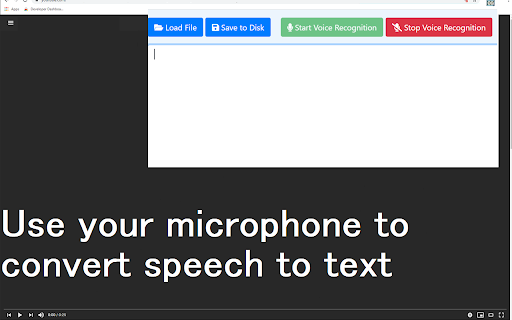
Speech to Text is a simple extension which allows you to dictate messages using your voice.

Create documents and notes by speaking and let your hands take a break. To begin using this software, here is
what you need to do.

Install the software extension Speech to Text.
Click on our extension icon
Click on the Microphone icon and give permission for microphone access to our extension.
Just begin talking normally and the text will start appearing on the notepad file.

Once you finish dictating your note, just press stop and you can save this notepad file to the local hard drive.
Technical
- Version
- 3.0.0
- Manifest
- V3
- Size
- 364KiB
- Min Chrome
- 88
- Languages
- 40
- Featured
- Yes
Metadata
- ID
- gffcflcjaiacifpfiinkcifhafeeagph
- Developer ID
- ua9e52d3a441bd5987510b98c0fbcb01e
- Developer Email
- [email protected]
- Created
- Oct 19, 2020
- Last Updated (Store)
- Apr 8, 2022
- Last Scraped
- May 31, 2026
- Support URL
- —
- Privacy Policy
- —
Similar extensions
Alternatives to Speech to Text, ranked by description similarity.

Voice AI Transcribe | Siri For Web Browser | CR8OR AI
A Speech to text browser tool which functions like Siri. Continuous speech to test recording and simple copy paste
115
★ 5.0

Speech to text
Helps to convert speech into text
2.0K
★ 3.3

Speech To Text Engine
For your browser, there's an easy-to-use speech synthesis and analysis program!
3.0K
★ 4.5

Voice Recorder
Record Audio from Microphone or Desktop right from your browser
1.0K
★ 3.0

Typing Through Voice by Spokenly
Type by speaking on any website. Voice dictation for any text field, with multi-language support and a single keyboard shortcut.
4.0K
★ 4.4

Speech To Text Helper
Voice to text & speech recognition on any webpage. Dictation, optional AI to improve or translate. By Fahim Code Limited.
5

Voice Memo
Record voice online, create voice memo, and save ideas effortlessly with instant sharing and accurate voice to text conversion!
102
★ 5.0
Speechnotes Speech to Text
Type with your voice (speech to text) on ANY page across the web, with a click running the most accurate speech recognition tech.
20.0K
★ 3.5
Data sourced from the Chrome Web Store · last verified May 31, 2026.