
Visual Feedback Capture: UI Reviews, Bug Reports & AI Prompts
Capture visual comments on browser-based UIs and copy AI-ready handoffs for PMs, QA testers, developers, and AI agents.
As of June 2026, Visual Feedback Capture: UI Reviews, Bug Reports & AI Prompts has 9 users and a 5.00/5 rating from 7 reviews in the Productivity category.
Usersup 12.5 percent+12.5%
9
9
Ratingno change0%
5.00
7 reviews
Reviewsno change0%
7
Version
0.1.1
Manifest V3
90-day change · In the last 90 days this extension 1 version update.
History
2 snapshotsTracking since Jun 1, 2026.
View as table
| Date | Users | Rating | Reviews | Version |
|---|---|---|---|---|
| Jun 1, 2026 | 8 | 5.00 | 7 | 0.1.0 |
| Jun 7, 2026 | 8 | 5.00 | 7 | 0.1.0 |
| Now | 9 | 5.00 | 7 | 0.1.1 |
Permissions & access
- Permissions
- activeTabscriptingstorage
- Host access
- None declared
Screenshots



About
Visual Feedback Capture help users easily capture feedback and turn it into structured handoffs to other team members or AI agent.

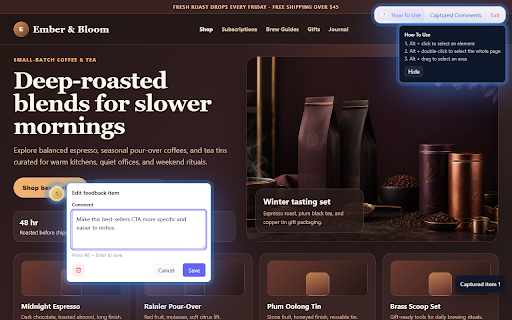
Start review mode on a browser-based UI, capture comments by selecting an element, dragging over an area, or adding a page-level note, then review all captured comments in one local session.

When you are ready to hand off the feedback, copy either a visual handoff containing screenshots, markers, and structured comments or a text-only output. The MVP includes Basic and AI-focused formats designed for copy/paste workflows.

Use it for:
- UI reviews on websites, web apps, SaaS products, prototypes, and preview deployments.
- Visual bug reports and QA notes.
- Design review feedback.
- AI coding prompts and implementation handoffs.
- Client or stakeholder review sessions where comments need to become clear next steps.

Core workflow:
1. Start review mode from the extension icon.
2. Alt + click to comment on a UI element.
3. Alt + drag to comment on an area.
4. Alt + double-click to add a page-level comment.
5. Review comments in Captured Comments.
6. Copy a visual handoff or copy text only.

Privacy-first by default:
- No account required to start.
- No backend required for default local mode.
- No AI API calls in the default MVP.
- No GitHub, Jira, repository, or source-code access.
- Captured comments and screenshots are stored locally in your browser.
- Data is not uploaded by default.
- Copying or exporting is user-initiated.

Visual Feedback Capture is built for low-friction review workflows where the goal is simple: click the UI, leave a note, and create a clean handoff.
Technical
- Version
- 0.1.1
- Manifest
- V3
- Size
- 49.57KiB
- Min Chrome
- 88
- Languages
- 1
- Featured
- No
Metadata
- ID
- gfaljnoadkfjobgghaepkdkdkjcmchin
- Developer ID
- uf38df932d1178c0fae6df97aae6885b8
- Developer Email
- [email protected]
- Created
- May 25, 2026
- Last Updated (Store)
- Jun 2, 2026
- Last Scraped
- Jun 7, 2026
- Website
- —
Data sourced from the Chrome Web Store · last verified Jun 7, 2026.