
NoteLab
A Google Chrome extension that makes taking notes 100 times easier.
As of June 2026, NoteLab has 82 users and a 5.00/5 rating from 2 reviews in the Productivity category.
Usersup 32.3 percent+32.3%
82
82
Ratingno change0%
5.00
2 reviews
Reviewsno change0%
2
Version
0.2.1
Manifest V3
90-day change · In the last 90 days this extension 1 version update, changed permissions.
History
8 snapshotsTracking since Apr 1, 2026.
View as table
| Date | Users | Rating | Reviews | Version |
|---|---|---|---|---|
| Apr 1, 2026 | 62 | 5.00 | 2 | 0.1.4 |
| May 1, 2026 | 60 | 5.00 | 2 | 0.1.4 |
| May 8, 2026 | 85 | 5.00 | 2 | 0.2.1 |
| May 13, 2026 | 77 | 5.00 | 2 | 0.2.1 |
| May 18, 2026 | 75 | 5.00 | 2 | 0.2.1 |
| May 25, 2026 | 81 | 5.00 | 2 | 0.2.1 |
| Jun 1, 2026 | 78 | 5.00 | 2 | 0.2.1 |
| Jun 7, 2026 | 77 | 5.00 | 2 | 0.2.1 |
| Now | 82 | 5.00 | 2 | 0.2.1 |
Changelog
- May 1, 2026description
NoteLab won 1st Place at Hack the Education and Beyond 2022 Hackathon!

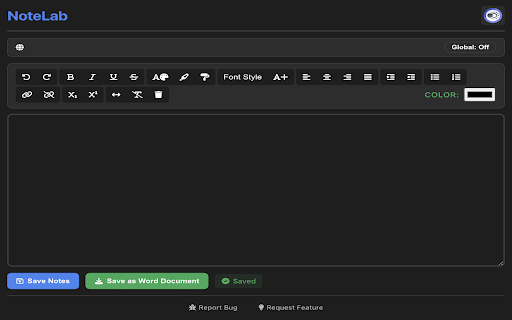
NoteLab is powerful educational note taking chrome extension that allows users to add text, images, videos, and audio files to their notes with a simple click. Just by right clicking and selecting 'Add Selection to Notes', users will be able to create dynamic, effective, and inspiring educational notes. NoteLab also includes basic text editing functions, allowing users to add and change text the way they want to.

NoteLab is a Chrome Extension made for students by students. What makes NoteLab unique from other Chrome Extensions is:
1. No Ads
2. Usable Offline
3. Can Quickly Make Dynamic Notes
5. Can Add Any Text, Images, Videos, and Audio Files from Chrome
5. Supports Dark/Light Mode
4. Automatic Saving

New Features in the Latest Update:
- Automatic Saving of Notes
- Undo and Redo Button
- Font Style and Font Size Button
- Background Color Button
- Line Divider Button
-  Tooltip for all buttons
NoteLab won 1st Place at Hack the Education and Beyond 2022 Hackathon!

NoteLab is powerful educational note taking chrome extension that allows users to add text, images, videos, and audio files to their notes with a simple click. Just by right clicking and selecting 'Add Selection to Notes', users will be able to create dynamic, effective, and inspiring educational notes. NoteLab also includes basic text editing functions, allowing users to add and change text the way they want to.

NoteLab also features smart website-based notes saving, allowing users to associate different sets of notes for different websites. For example, your shopping list will automatically display when you visit an online shopping website.

NoteLab is a Chrome Extension made for students by students. What makes NoteLab unique from other Chrome Extensions is:
1. No Ads
2. Usable Offline
3. Built-In Website Based Smart Notes Display
4. Can Quickly Make Dynamic Notes
5. Can Add Any Text, Images, Videos, and Audio Files from Chrome
6. Supports Dark/Light Mode
7. Automatic Saving

New Features in the Latest Update:
- Built-In Website Based Smart Notes Display
- New Options to Report a Bug or Suggest a New Feature
- Improved UI of the entire chrome extension
- May 1, 2026permissions
tabs, contextMenus
contextMenus, tabs
Permissions & access
- Permissions
- contextMenustabs
- Host access
- None declared
Screenshots

About
NoteLab won 1st Place at Hack the Education and Beyond 2022 Hackathon!

NoteLab is powerful educational note taking chrome extension that allows users to add text, images, videos, and audio files to their notes with a simple click. Just by right clicking and selecting 'Add Selection to Notes', users will be able to create dynamic, effective, and inspiring educational notes. NoteLab also includes basic text editing functions, allowing users to add and change text the way they want to.

NoteLab also features smart website-based notes saving, allowing users to associate different sets of notes for different websites. For example, your shopping list will automatically display when you visit an online shopping website.

NoteLab is a Chrome Extension made for students by students. What makes NoteLab unique from other Chrome Extensions is:
1. No Ads
2. Usable Offline
3. Built-In Website Based Smart Notes Display
4. Can Quickly Make Dynamic Notes
5. Can Add Any Text, Images, Videos, and Audio Files from Chrome
6. Supports Dark/Light Mode
7. Automatic Saving

New Features in the Latest Update:
- Built-In Website Based Smart Notes Display
- New Options to Report a Bug or Suggest a New Feature
- Improved UI of the entire chrome extension
Technical
- Version
- 0.2.1
- Manifest
- V3
- Size
- 84.44KiB
- Min Chrome
- 88
- Languages
- 1
- Featured
- No
Metadata
- ID
- geolaeooajdkifdkblgijpfnboegnphb
- Developer ID
- u610b14af3629dd980423b4d61c803bc2
- Developer Email
- [email protected]
- Created
- Jul 5, 2022
- Last Updated (Store)
- Apr 21, 2026
- Last Scraped
- Jun 7, 2026
- Website
- —
- Support URL
- —
- Privacy Policy
- —
Similar extensions
Alternatives to NoteLab, ranked by description similarity.

PinNote
Notepad with dark theme, export/import, pinning, search, editing and syncing.
6
★ 5.0

NoteChrome
Enhanced note-taking with voice controls
9
★ 5.0

Color Note
Simple, fast and beautiful note pad extension.
207
★ 5.0

Colorful Notes
Notes with sidebar list, auto-save and date/time.
5
NotesLite
NotesLite: Your Digital Sticky Notes Companion
Transform your browser into a powerful note-taking workspace with NotesLite, the…
6
★ 5.0

Chrome Notepad
A simple notepad extension to save notes.
29

Scriblet: Side Note Taker
Rich text & Markdown notes in Chrome side panel. Auto-save, tags, search, images, export PDF/DOCX/TXT.
104
★ 5.0

Viable Lab
Write your own blog notes!
6
★ 5.0
Data sourced from the Chrome Web Store · last verified Jun 7, 2026.