
LecTranscribe
LMS 강의 + YouTube 영상 자동 감지 및 전사
As of June 2026, LecTranscribe has 11 users and a 5.00/5 rating from 2 reviews in the Education category.
Usersno change0%
11
11
Ratingno change0%
5.00
2 reviews
Reviewsno change0%
2
Version
1.5.8
Manifest V3
90-day change · In the last 90 days this extension 3 version updates, changed permissions.
History
10 snapshotsTracking since Apr 16, 2026.
View as table
| Date | Users | Rating | Reviews | Version |
|---|---|---|---|---|
| Apr 16, 2026 | — | — | — | 1.3.2 |
| Apr 22, 2026 | — | — | — | 1.3.2 |
| Apr 26, 2026 | 5 | — | — | 1.5.5 |
| May 4, 2026 | 7 | 5.00 | 1 | 1.5.7 |
| May 9, 2026 | 9 | 5.00 | 1 | 1.5.8 |
| May 14, 2026 | 8 | 5.00 | 1 | 1.5.8 |
| May 21, 2026 | 6 | 5.00 | 1 | 1.5.8 |
| May 27, 2026 | 7 | 5.00 | 1 | 1.5.8 |
| Jun 3, 2026 | 8 | 5.00 | 1 | 1.5.8 |
| Jun 9, 2026 | 12 | 5.00 | 2 | 1.5.8 |
| Now | 11 | 5.00 | 2 | 1.5.8 |
Changelog
- Apr 22, 2026description
LecTranscribe는 강의 영상을 텍스트로 변환하고 AI로 분석해주는 Chrome 확장 프로그램입니다.

주요 기능:
- YouTube 영상 전사: 영상 페이지에 뜨는 플로팅 pill에서 배속·프로젝트 설정 후 확장 아이콘 클릭 한 번으로 자동 녹음·전사
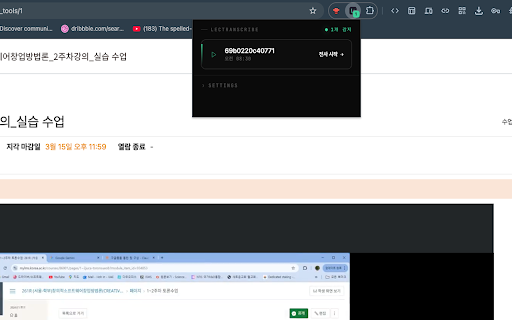
- LMS 강의 전사: 대학교 LMS(e-Campus 등)에서 강의 영상 URL 자동 감지, 원클릭 전사
- 실시간 녹음 상태 표시: 남은 시간 카운트다운과 진행 바를 영상 위에 표시
- YouTube 음소거 감지: 녹음 전 플레이어 음소거 상태를 감지하고 사용자에게 안내 (자동 해제 없음)
- 배속 녹음: 1x / 2x / 4x 중 선택해서 대기 시간 단축
- 타임스탬프 포함: 전사 결과에 정확한 타임스탬프가 함께 제공됩니다
- 주제별 섹션 자동 분할: AI가 긴 강의를 주제별로 나눠주고 섹션마다 요약해줍니다
- AI Agent 질의응답: 전사 내용에 대해 자유롭게 질문하고 노트·시험 대비 문제도 자동 생성
- 프로젝트 관리: 과목별로 전사 기록을 정리할 수 있습니다

사용 방법:
1. YouTube: 영상 페이지에 나타나는 LecTranscribe pill의 ⚙ 아이콘에서 배속/프로젝트 설정 → 우측 상단 확장 아이콘 클릭 → 자동 녹음 시작
2. LMS: 강의 영상 재생 시 자동 감지, 화면 우측 하단 LecTranscribe 버튼 클릭(고려대학교 학생 전용입니다)
3. 전사 완료 후 lectranscribe.vercel.app 대시보드에서 결과 확인, 타임스탬프 클릭으로 영상 해당 위치로 이동

음성 인식은 Whisper 모델, 요약·질의응답은 Gemini 2.5 Flash 모델을 사용합니다.

가입 시 90크레딧(약 90분 분량)을 무료 제공합니다. 신용카드 정보 없이 바로 시작할 수 있어요.
LecTranscribe is a Chrome extension that converts lecture videos into text and analyzes them with AI.

Key features:
YouTube automatic detection and transcription: Click the pill floating on the YouTube page or set up the browser extension for one-click auto transcription
LMS lecture detection: Automatically detects lecture URLs on university LMS platforms (e-Campus, etc.) for one-click transcription
Real-time progress display: Check progress in real time via a dropdown button above the timeline
YouTube audio-only detection: Guides users when only audio is detected on the Noto player (auto-resolved)
Timestamps included: Provided with timestamps synchronized to lecture scenes
Topic-based auto chapters: AI automatically divides lectures by topic and organizes them into sections
AI-generated quizzes: Automatically creates short-answer and multiple-choice questions based on lecture content to check understanding
Project management: Organize and store transcripts by subject
How to use:

YouTube: Click the LecTranscribe pill that appears on the YouTube page, or the icon in the top-right browser extension → auto transcription starts
LMS: Play the lecture video, then click the floating LecTranscribe button on the top-right
Once transcription is complete, check the results on lectranscribe.vercel.app dashboard — click a timestamp to jump to that scene in the video
Uses Whisper model for speech recognition and Gemini 2.5 Flash model for summarization.

Free 90 credits (~90 minutes) provided on signup. No credit card info required to start.
- Apr 22, 2026host_permissions
https://mylms.korea.ac.kr/*, https://kulms.korea.ac.kr/*, https://kucom.korea.ac.kr/*, https://korea-cms-object.cdn.gov-ntruss.com/*, https://www.youtube.com/*, https://youtube.com/*, https://*.googlevideo.com/*, https://lectranscribe.vercel.app/*, https://lectranscribe-backend-production.up.railway.app/*
https://mylms.korea.ac.kr/*, https://kulms.korea.ac.kr/*, https://kucom.korea.ac.kr/*, https://korea-cms-object.cdn.gov-ntruss.com/*, https://www.youtube.com/*, https://youtube.com/*, https://*.googlevideo.com/*, https://lectranscribe.com/*, https://www.lectranscribe.com/*, https://lectranscribe.vercel.app/*, http://localhost/*, https://lectranscribe-backend-production.up.railway.app/*
Permissions & access
- Permissions
- webRequeststorageactiveTabtabCaptureoffscreenscripting
- Host access
- https://mylms.korea.ac.kr/*, https://kulms.korea.ac.kr/*, https://kucom.korea.ac.kr/*, https://korea-cms-object.cdn.gov-ntruss.com/*, https://www.youtube.com/*, https://youtube.com/*, https://*.googlevideo.com/*, https://lectranscribe.com/*, https://www.lectranscribe.com/*, https://lectranscribe.vercel.app/*, http://localhost/*, https://lectranscribe-backend-production.up.railway.app/*
Screenshots



About
LecTranscribe is a Chrome extension that converts lecture videos into text and analyzes them with AI.

Key features:
YouTube automatic detection and transcription: Click the pill floating on the YouTube page or set up the browser extension for one-click auto transcription
LMS lecture detection: Automatically detects lecture URLs on university LMS platforms (e-Campus, etc.) for one-click transcription
Real-time progress display: Check progress in real time via a dropdown button above the timeline
YouTube audio-only detection: Guides users when only audio is detected on the Noto player (auto-resolved)
Timestamps included: Provided with timestamps synchronized to lecture scenes
Topic-based auto chapters: AI automatically divides lectures by topic and organizes them into sections
AI-generated quizzes: Automatically creates short-answer and multiple-choice questions based on lecture content to check understanding
Project management: Organize and store transcripts by subject
How to use:

YouTube: Click the LecTranscribe pill that appears on the YouTube page, or the icon in the top-right browser extension → auto transcription starts
LMS: Play the lecture video, then click the floating LecTranscribe button on the top-right
Once transcription is complete, check the results on lectranscribe.vercel.app dashboard — click a timestamp to jump to that scene in the video
Uses Whisper model for speech recognition and Gemini 2.5 Flash model for summarization.

Free 90 credits (~90 minutes) provided on signup. No credit card info required to start.
Technical
- Version
- 1.5.8
- Manifest
- V3
- Size
- 58.65KiB
- Min Chrome
- 88
- Languages
- 1
- Featured
- No
Metadata
- ID
- gefofhekkbljpjmcfblmjndnghkmehdp
- Developer ID
- u496b6f9e295d12576ed001ec6764d27b
- Developer Email
- [email protected]
- Created
- Apr 15, 2026
- Last Updated (Store)
- Apr 27, 2026
- Last Scraped
- Jun 9, 2026
- Website
- lectranscribe.com
- Support URL
- https://lectranscribe.com/support
- Privacy Policy
- https://lectranscribe.com/privacy
Data sourced from the Chrome Web Store · last verified Jun 9, 2026.