
Breeze: Website Management Tool
All-in-one tools for website migration project, operating website and SEO tools.
As of May 2026, Breeze: Website Management Tool has 4,000 users and a 3.14/5 rating from 7 reviews in the Developer Tools category.
Usersdown 20.0 percent−20.0%
4.0K
4,000
Ratingno change0%
3.14
7 reviews
Reviewsno change0%
7
Version
2.1.9
Manifest V3
90-day change · In the last 90 days this extension lost 1.0K users.
History
1 snapshotsTracking since May 1, 2026.
View as table
| Date | Users | Rating | Reviews | Version |
|---|---|---|---|---|
| May 1, 2026 | 5.0K | 3.14 | 7 | 2.1.9 |
| Now | 4.0K | 3.14 | 7 | 2.1.9 |
Permissions & access
- Permissions
- storageactiveTabscriptingtabsbrowsingDatacookiesdeclarativeNetRequestdownloads
- Host access
- *://*/*
Screenshots


About
Welcome to Breeze: The All-In-One Chrome Extension for Website Management
If you manage websites, it's time to declutter your extensions and simplify your workflow with Breeze.bar. This chrome extension is packed with essential tools for managing everything from website structure to SEO, all in one place. Whether you're clearing cache, editing live text, or checking meta descriptions, Breeze makes it easy.


Out of the Box with Breeze:
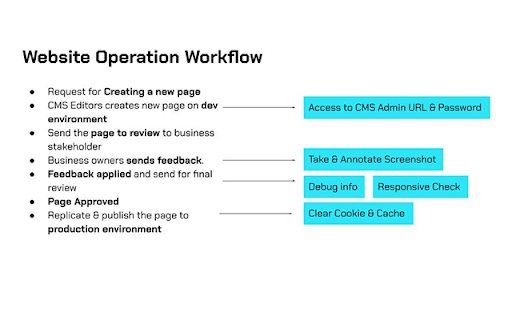
Clear Cache & Cookies: The clear cache extension helps you clear cookies, local storage, and cache—either for a specific website or across your entire browser. Choose from custom time ranges like "Last Hour," "7 Days," or "All Time."

SEO Panel: Easily check the meta title and meta description of any website, with a character count feature to ensure they fit Google’s standards. Ideal for content managers and marketers who need to review titles without using complex tools.

Download Media: Download images, videos, fonts, and brand colors directly from a webpage. The tool even lets you extract SVG icons and hosted MP4 files (except from YouTube).

Mobile View Switcher: Quickly toggle between mobile and desktop views without resizing your browser window. This feature allows you to check website responsiveness across multiple breakpoints, ensuring your site is optimized for different devices.

LiveEdit: Edit visible text and see changes in real-time without needing CMS access. Perfect for testing content updates before going live.

Take Screenshots + Annotate: Capture full-page or focused screenshots and add annotations. Developers will love the added debug info, including page size, resolution, and more.


Cookie & Cache Clear Extension
The Breeze clear cache chrome extension lets you remove cookies, cache, and local data with a single click. Whether you're troubleshooting a website or performing GDPR compliance checks, Breeze gives you full control over what’s stored on your browser. You can even export cookies as a CSV, Excel, or PDF file to document the dropped cookies for compliance purposes.


SEO Information at Your Fingertips
Forget about diving into source code or using expensive SEO tools to check page titles or descriptions. Breeze’s meta title checker and meta description checker let you see on-page SEO instantly. Plus, a handy character count tool ensures your meta tags won’t get cut off in Google search results.


Download Media from Web Pages
No need for separate tools to download media files. With Breeze, you can grab images, videos, and icons directly from any page. Whether it's a JPG, PNG, SVG, or hosted MP4, Breeze makes downloading media a breeze (pun intended!).


Mobile Responsive Layout Checker
Test how your website looks across devices with the mobile view extension. You can toggle between desktop and mobile views to check layout responsiveness without needing access to physical devices. Future updates will include Google Analytics data for top device sizes, making it even easier to optimize your site.


LiveEdit: Edit Text on Any Page
For marketers and content editors, the LiveEdit feature is a game-changer. Edit visible text on any page without logging into a CMS. Once you're happy with the changes, share the updated content with developers to implement. Plus, Breeze’s built-in page grid outlines the structure of your page, ensuring every element is perfectly aligned.


Screenshot + Debug Information for Developers
Go beyond a simple screenshot with Breeze's screenshot tool. Capture the entire page or a specific area, and add annotations such as arrows, numbers, or text. Share detailed debug info, including page size, resolution, and browser data to help your development team address any issues quickly.


Breeze Chrome Extension: Key Features
Clear Cookies & Cache: Efficiently clear browser data, including specific cookies, cache, and local storage.
SEO Panel: Instantly check meta titles, meta descriptions, and character limits.
Media Download: Download images, videos, fonts, and brand colors directly from the webpage.
Mobile View Switcher: Test website responsiveness across different breakpoints.
LiveEdit: Visually edit webpage text without CMS access.
Screenshot Tool: Take annotated screenshots with debug information for developers.


Why Choose Breeze?
With Breeze, you don’t need multiple extensions cluttering your toolbar. From clearing cookies and cache to checking website meta data, Breeze is the ultimate chrome extension for website management. Plus, with additional features like LiveEdit and the mobile view switcher, it’s built for marketing and non-technical teams—but even developers will appreciate its versatility.

Breeze is the only website migration and operation tool designed specifically for agencies and marketing teams, helping you stay productive and ahead of the curve.


Get Started with Breeze
Visit www.breeze.bar to learn more and start managing your websites with ease. Don't forget to install the clear cache extension and mobile view extension for an all-in-one solution.
Technical
- Version
- 2.1.9
- Manifest
- V3
- Size
- 1.96MiB
- Min Chrome
- 88
- Languages
- 1
- Featured
- No
Metadata
- ID
- gedoaajonjaiigaefeaanpfmhnadkgkm
- Developer ID
- u06c3d0289ac73d855fbd827240092902
- Developer Email
- [email protected]
- Created
- Jul 13, 2021
- Last Updated (Store)
- Oct 25, 2024
- Last Scraped
- May 30, 2026
- Website
- breeze.bar
- Support URL
- —
- Privacy Policy
- https://scube.co/legal/privacy/
Similar extensions
Alternatives to Breeze: Website Management Tool, ranked by description similarity.

SEO Auditor
Optimize your website with Orca SEO. Analyze SEO, check broken links, preview SERPs, and simulate rankings.
1

SERPData
Analyze and extract SEO elements directly from SERP pages.
24
★ 5.0

Meta Title & Description Checker
Check meta title and description of any webpage with SEO recommendations
119
★ 5.0

Clear Cache for Specific Site
Quickly clear cache and cookies for the current website with a single click. Site-specific cleaning without affecting other sites.
389
★ 5.0

Advanced SEO Checker
On-page SEO checker: overview, content, links, hreflangs, images, structured data, speed, and monitoring.
6
★ 5.0

Devision – Web Dev & Design Tools
Design, SEO, and development tools for any website. Color picker, SEO checker, CSS inspector, and many more.
76
★ 5.0

DevTools Suite
A collection of useful tools for developers and designers.
1.0K
★ 5.0

Site Data Cleaner: Cache & Cookies
Clear cache, cookies, storage, and service workers for the current site in one click. Fast, private, and fully configurable.
97
★ 3.0
Data sourced from the Chrome Web Store · last verified May 30, 2026.