
GEXRadar — Walls on TradingView
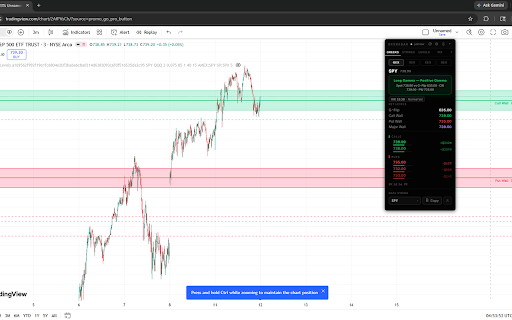
Live gamma walls, dealer positioning, and key levels overlaid on TradingView charts. GEXRadar subscribers only.
As of June 2026, GEXRadar — Walls on TradingView has 1,000 users and a 5.00/5 rating from 3 reviews in the Workflow & Planning category.
Usersno change0%
1.0K
1,000
Ratingno change0%
5.00
3 reviews
Reviewsno change0%
3
Version
1.0.32
Manifest V3
90-day change · In the last 90 days this extension 2 version updates.
History
4 snapshotsTracking since May 13, 2026.
View as table
| Date | Users | Rating | Reviews | Version |
|---|---|---|---|---|
| May 13, 2026 | — | — | — | 1.0.11 |
| May 18, 2026 | — | — | — | 1.0.11 |
| May 25, 2026 | 84 | 5.00 | 2 | 1.0.28 |
| Jun 1, 2026 | 1.0K | 5.00 | 2 | 1.0.32 |
| Now | 1.0K | 5.00 | 3 | 1.0.32 |
Permissions & access
- Permissions
- storage
- Host access
- https://www.tradingview.com/*, https://*.tradingview.com/*, https://gexradar.io/*, https://query1.finance.yahoo.com/*, https://finance.yahoo.com/*
Screenshots


About
GEXRadar overlays live gamma exposure walls, put walls, gamma flip, vanna,
charm, and DEX strikes directly onto your TradingView charts. Built for
options traders who already use TradingView and want to see the dealer
positioning that's actually moving price — in the same window, on the same
chart, no tab switching.

═══ FEATURES ═══

• Real-time Call Wall, Put Wall, and Gamma Flip zones drawn directly on
  any chart — color-matched to the GEXRadar Pine indicator (green / red
  / amber) with translucent fill bands so you can see at a glance which
  zone the price is approaching.

• Secondary call walls and put walls as dashed dimmed lines, so you can
  see the full structure of where dealer hedging is concentrated.

• Automatic ETF → futures conversion: load NQ1!, MNQ, ES, MES, etc., and
  the extension fetches the underlying QQQ/SPY gamma data, then converts
  the wall prices to futures scale using the live Yahoo Finance ratio.
  Wall labels show both the futures price AND the underlying ETF price
  in parens — e.g. "Call Wall  29297.75 / (710.00)".

• Vanna, charm, DEX, and levels-tab strike overlays — all optional, all
  toggleable from the in-chart settings panel.

• Floating HUD panel with full key levels, top call/put strikes by GEX,
  Vol/OI prints, and a one-click data string export for use with the
  GEXRadar Pine indicator as a fallback.

• 3,500+ tickers supported — every optionable stock, ETF, and major
  index that GEXRadar tracks works in the extension.

═══ HOW IT WORKS ═══

This extension is a companion to gexradar.io, a paid options analytics
platform. It reads your gamma data live from your GEXRadar account
(via a license key issued from your dashboard) and draws the levels on
TradingView so you don't have to flip between tabs.

A valid license key from your GEXRadar dashboard is required. Without
an active subscription the extension cannot fetch data — get one at
https://gexradar.io.

═══ PRIVACY ═══

The extension only communicates with gexradar.io (your account data),
TradingView (where it draws), and Yahoo Finance (for live ETF/futures
ratio quotes). It does NOT collect, store, or transmit any of your
trading data, browsing history, or personal information. Your license
key is stored locally in chrome.storage so you don't have to re-paste
it every session.

═══ INSTALLATION ═══

1. Install the extension.
2. Log into your GEXRadar account at gexradar.io.
3. Visit gexradar.io/dashboard/extension to retrieve your license key.
4. Click the GEXRadar extension icon in your toolbar and paste the key.
5. Open any TradingView chart — walls appear automatically.

For futures charts (NQ1!, ES1!, etc.), enable the ETF→Futures toggle in
the settings panel.

═══ SUPPORT ═══

• Website: https://gexradar.io
• Discord: https://discord.gg/ak5e6j3mtH
• X / Twitter: @GEXRadar
Technical
- Version
- 1.0.32
- Manifest
- V3
- Size
- 102KiB
- Min Chrome
- 88
- Languages
- 1
- Featured
- No
Metadata
- ID
- gebfheioifkacnbelhddhnnaicbndmcj
- Developer ID
- u89820318a508f1061a6d00f0af172af7
- Developer Email
- [email protected]
- Created
- May 12, 2026
- Last Updated (Store)
- May 25, 2026
- Last Scraped
- Jun 7, 2026
- Website
- gexradar.io
- Support URL
- https://discord.gg/pQGW4AeG
- Privacy Policy
- https://gexradar.io/disclosures
Data sourced from the Chrome Web Store · last verified Jun 7, 2026.