
InControl - Block URLs, Sneaky Redirects & Background Requests
Block sneaky redirects and third-party background requests. You stay in control.
As of June 2026, InControl - Block URLs, Sneaky Redirects & Background Requests has 12 users in the Privacy & Security category.
Usersno change0%
12
12
Ratingno change0%
—
— reviews
Reviewsno change0%
—
Version
1.1.0
Manifest V3
90-day change · In the last 90 days this extension 1 version update.
History
7 snapshotsTracking since Apr 21, 2026.
View as table
| Date | Users | Rating | Reviews | Version |
|---|---|---|---|---|
| Apr 21, 2026 | — | — | — | 1.0.0 |
| Apr 26, 2026 | — | — | — | 1.0.0 |
| May 9, 2026 | — | — | — | 1.0.0 |
| May 14, 2026 | 1 | — | — | 1.1.0 |
| May 26, 2026 | 2 | — | — | 1.1.0 |
| Jun 2, 2026 | 5 | — | — | 1.1.0 |
| Jun 8, 2026 | 10 | — | — | 1.1.0 |
| Now | 12 | — | — | 1.1.0 |
Changelog
- May 9, 2026description
What it catches
InControl watches two kinds of behavior that normal browsing tools ignore:

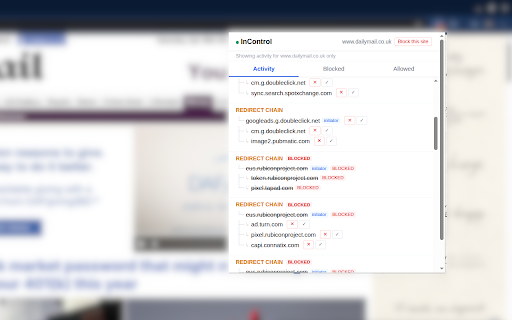
Redirect hijacks — you click a link to site A, it silently redirects through B, C, D before landing somewhere else. InControl surfaces the full chain.
Background fires — you load a page and it quietly fires requests to dozens of other domains (trackers, ad networks, fingerprinters). InControl lists them per tab so you can see exactly who your current page is talking to.

How to use the plugin
Click the InControl icon in the toolbar or the extensions menu. The popup has three tabs:

Activity
Live view of what's happening on the current tab. Redirect chains and third-party domains appear as a tree. Hover over any domain, and use the icons to the right to Block or Allow it.

Blocked
Every domain you've chosen to block. Future requests to these domains are stopped before they load. Hover to unblock.

Allowed
Domains you've marked as trusted. InControl stops flagging these in the Activity view. Useful for CDNs or services you rely on.
What's new in 1.1.0
1. Multi-hop redirect detection: every interim URL in a redirect chain  (HTTP 30x, JavaScript, meta-refresh) is now captured and shown as a single connected tree, so you can see and block any hop the chain passes through — not just the final landing page.
2. The current site now appears as the first row of the activity tree, with inline Block / Allow buttons alongside every other domain.

What it catches
InControl watches two kinds of behavior that normal browsing tools ignore:

Redirect hijacks — you click a link to site A, it silently redirects through B, C, D before landing somewhere else. InControl surfaces the full chain.
Background fires — you load a page and it quietly fires requests to dozens of other domains (trackers, ad networks, fingerprinters). InControl lists them per tab so you can see exactly who your current page is talking to.

How to use the plugin
Click the InControl icon in the toolbar or the extensions menu. The popup has three tabs:

Activity
Live view of what's happening on the current tab. Redirect chains and third-party domains appear as a tree. Hover over any domain, and use the icons to the right to Block or Allow it.

Blocked
Every domain you've chosen to block. Future requests to these domains are stopped before they load. Hover to unblock.

Allowed
Domains you've marked as trusted. InControl stops flagging these in the Activity view. Useful for CDNs or services you rely on.
- May 9, 2026name
InControl — Block Sneaky Redirects & Background Requests
InControl - Block URLs, Sneaky Redirects & Background Requests
Permissions & access
- Permissions
- webRequestwebNavigationtabsstoragedeclarativeNetRequestdeclarativeNetRequestWithHostAccess
- Host access
- <all_urls>
Screenshots

About
What's new in 1.1.0
1. Multi-hop redirect detection: every interim URL in a redirect chain  (HTTP 30x, JavaScript, meta-refresh) is now captured and shown as a single connected tree, so you can see and block any hop the chain passes through — not just the final landing page.
2. The current site now appears as the first row of the activity tree, with inline Block / Allow buttons alongside every other domain.

What it catches
InControl watches two kinds of behavior that normal browsing tools ignore:

Redirect hijacks — you click a link to site A, it silently redirects through B, C, D before landing somewhere else. InControl surfaces the full chain.
Background fires — you load a page and it quietly fires requests to dozens of other domains (trackers, ad networks, fingerprinters). InControl lists them per tab so you can see exactly who your current page is talking to.

How to use the plugin
Click the InControl icon in the toolbar or the extensions menu. The popup has three tabs:

Activity
Live view of what's happening on the current tab. Redirect chains and third-party domains appear as a tree. Hover over any domain, and use the icons to the right to Block or Allow it.

Blocked
Every domain you've chosen to block. Future requests to these domains are stopped before they load. Hover to unblock.

Allowed
Domains you've marked as trusted. InControl stops flagging these in the Activity view. Useful for CDNs or services you rely on.
Technical
- Version
- 1.1.0
- Manifest
- V3
- Size
- 18.95KiB
- Min Chrome
- 88
- Languages
- 1
- Featured
- No
Metadata
- ID
- geaodnebehkllfibndjcplkpiikggiag
- Developer ID
- ubd1e60115bf4066b9c24fcae91c99373
- Developer Email
- [email protected]
- Created
- Apr 20, 2026
- Last Updated (Store)
- May 3, 2026
- Last Scraped
- Jun 8, 2026
- Website
- —
- Support URL
- —
- Privacy Policy
- https://zuura15.github.io/urlguard/privacy-policy.html
Data sourced from the Chrome Web Store · last verified Jun 8, 2026.