
BearGPT - Chatgpt Enhancer
a better experience in chatgpt with table of questions, customize content width and so on
As of June 2026, BearGPT - Chatgpt Enhancer has 270 users and a 4.92/5 rating from 13 reviews in the Productivity category.
Usersup 10.2 percent+10.2%
270
270
Ratingno change0%
4.92
13 reviews
Reviewsno change0%
13
Version
0.0.6
Manifest V3
History
7 snapshotsTracking since Apr 1, 2026.
View as table
| Date | Users | Rating | Reviews | Version |
|---|---|---|---|---|
| Apr 1, 2026 | 245 | 4.92 | 13 | 0.0.6 |
| Apr 16, 2026 | 249 | 4.92 | 13 | 0.0.6 |
| Apr 22, 2026 | 264 | 4.92 | 13 | 0.0.6 |
| May 2, 2026 | 262 | 4.92 | 13 | 0.0.6 |
| May 10, 2026 | 264 | 4.92 | 13 | 0.0.6 |
| May 28, 2026 | 244 | 4.92 | 13 | 0.0.6 |
| Jun 6, 2026 | 246 | 4.92 | 13 | 0.0.6 |
| Now | 270 | 4.92 | 13 | 0.0.6 |
Permissions & access
- Permissions
- activeTabstorage
- Host access
- None declared
Screenshots

About
Take your ChatGPT experience to the next level!
BearGPT is a powerful enhancement tool designed for ChatGPT power users. It solves the pain points of navigating long conversations, limited content display area, and non-visual technical diagrams.

Key Features:
📑 Question Navigation Sidebar
Automatically extracts all your questions from the conversation into a clean sidebar
One-click jump to any question — no more endless scrolling
Shows total question count to track conversation progress
Collapsible design with auto-saved state

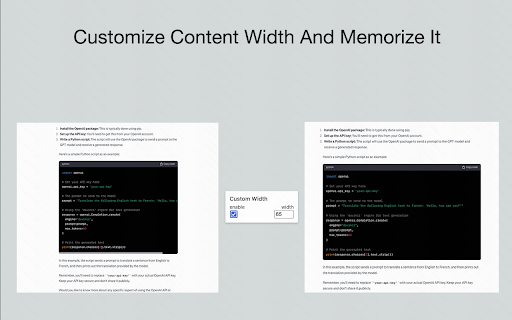
📏 Custom Content Width
Break free from ChatGPT's narrow default content area
Adjust width from 10% to 100% — make the most of your widescreen display
Settings persist automatically across page refreshes

📊 Live Mermaid Diagram Rendering
Automatically detects Mermaid code blocks and renders them into visual diagrams instantly
Supports 15+ diagram types: flowcharts, sequence diagrams, class diagrams, Gantt charts, state diagrams, ER diagrams, mind maps, and more
Built-in toolbar: zoom in/out, drag to pan, fullscreen mode, toggle between code and diagram
Perfect dark mode support

Perfect For:
✅ Long technical discussions where you need to quickly revisit specific questions
✅ Widescreen users who want ChatGPT content to fill more screen space
✅ Viewing flowcharts, architecture diagrams, and sequence diagrams generated by ChatGPT — see the visual output, not just code
✅ Developers, product managers, and technical writers who want to boost productivity

Why BearGPT?
🔒 Privacy First - Runs entirely locally, no data collection
⚡ Lightweight - Zero latency, no impact on page performance
🎨 Native Look - Seamlessly blends with ChatGPT's UI, auto light/dark mode
🔄 Remember Settings - All preferences auto-saved
Technical
- Version
- 0.0.6
- Manifest
- V3
- Size
- 82.47KiB
- Min Chrome
- 88
- Languages
- 1
- Featured
- Yes
Metadata
- ID
- gdojaklebiimihgaggfmkpflepmehbfb
- Developer ID
- u7a7528eff5f47a99810ea1207609e64a
- Developer Email
- [email protected]
- Created
- Dec 20, 2023
- Last Updated (Store)
- Jan 22, 2026
- Last Scraped
- Jun 6, 2026
- Website
- —
- Support URL
- —
- Privacy Policy
- —
Similar extensions
Alternatives to BearGPT - Chatgpt Enhancer, ranked by description similarity.

Contextual - Context Visualizer for ChatGPT
Tool to help you visualize context of conversations in ChatGPT
3
★ 5.0

ChatGPT | Next UX
Improve ChatGPT's UX by providing expandable content area with a click and scroll to top functionality for code blocks.
2

PowerTools For ChatGPT - Pin, Search ChatGPT messages
Pin, Search, Navigate ChatGPT conversations and messages quickly
29
★ 4.0

ChatGPT Power User – Save Prompts, Minimap & PDF Export
A lightweight extension that adds prompt saving, conversation minimap, and PDF export to make ChatGPT faster and easier to use.
5
★ 5.0

ChatMap: Floating Navigator & Sidebar Manager
Gemini、豆包、ChatGPT、Claude 长对话的大纲与收藏助手
29
★ 5.0

GPT Navigator
A Chrome extension to expand and collapse ChatGPT message panes for better navigation.
21
★ 1.5

Chat Glider
Navigate through questions in ChatGPT and Gemini chats.
21
★ 5.0

ChatGPT Diagram & Visual Enhancement
Transform your ChatGPT conversations with powerful diagram and visualization tools.
3
Data sourced from the Chrome Web Store · last verified Jun 6, 2026.