
TCG STATS
Import and sync your Cardmarket seller inventory with TCG STATS
As of June 2026, TCG STATS has 7 users in the Productivity category.
Usersno change0%
7
7
Ratingno change0%
—
— reviews
Reviewsno change0%
—
Version
0.5.1
Manifest V3
90-day change · In the last 90 days this extension 6 version updates, changed permissions.
History
11 snapshotsTracking since Apr 1, 2026.
View as table
| Date | Users | Rating | Reviews | Version |
|---|---|---|---|---|
| Apr 1, 2026 | — | — | — | 0.1.2 |
| Apr 17, 2026 | — | — | — | 0.1.2 |
| Apr 22, 2026 | 1 | — | — | 0.1.3 |
| Apr 27, 2026 | 2 | — | — | 0.1.3 |
| May 4, 2026 | 4 | — | — | 0.1.3 |
| May 10, 2026 | 4 | — | — | 0.2.2 |
| May 15, 2026 | 6 | — | — | 0.2.2 |
| May 22, 2026 | 6 | — | — | 0.3.0 |
| May 28, 2026 | 9 | — | — | 0.3.1 |
| Jun 4, 2026 | 6 | — | — | 0.4.1 |
| Jun 10, 2026 | 9 | — | — | 0.4.1 |
| Now | 7 | — | — | 0.5.1 |
Changelog
- May 4, 2026description
Connect your Cardmarket seller account to TCG STATS and keep your inventory in sync — no manual data entry needed.

IMPORT FROM CARDMARKET
Browse your Cardmarket stock pages and import your existing items directly into TCG STATS for review.

PUSH LISTINGS TO CARDMARKET
Create listings in TCG STATS and publish them to all multiple seller platforms including Cardmarket with one click.

SYNC PRICES & QUANTITIES
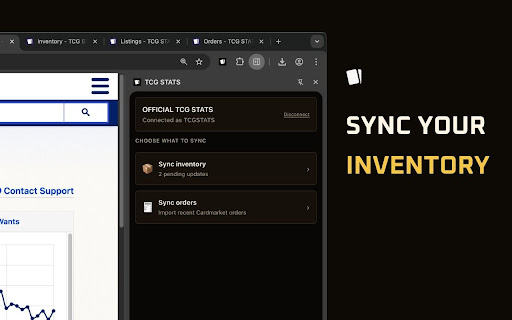
Update prices or stock levels in TCG STATS and the extension applies the changes on Cardmarket
automatically. A floating dashboard on Cardmarket shows how many updates are pending with
real-time progress.

HOW IT WORKS
  1. Install the extension
  2. Connect your TCG STATS account
  3. Select which store to sync
  4. Visit Cardmarket and start syncing

REQUIREMENTS
A TCG STATS account with at least one location configured.
Visit https://tcgstats.com/for-sellers to get started.
TCG STATS keeps your inventory in sync with Cardmarket through this extension — no manual data entry needed.

IMPORT FROM CARDMARKET
Browse your Cardmarket stock pages and import your existing items directly into TCG STATS for review.

PUSH LISTINGS TO CARDMARKET
Create listings in TCG STATS and publish them to all multiple seller platforms such as eBay, Shopify, Cardtrader, WooCommerce, and Cardmarket.

SYNC PRICES & QUANTITIES
Update prices or stock levels in TCG STATS and the extension applies the changes on Cardmarket
automatically. The sidepanel extension shows how many updates are pending with
real-time progress.

HOW IT WORKS
  1. Install the extension
  2. Connect your TCG STATS account
  3. Select which store to sync
  4. Visit Cardmarket and start syncing

REQUIREMENTS
A TCG STATS account with at least one location configured.
Visit https://tcgstats.com to get started.
- May 4, 2026permissions
storage, tabs
storage, tabs, sidePanel, scripting
- Apr 17, 2026host_permissions
https://www.cardmarket.com/*, https://app.tcgstats.com/*, https://staging.tcgstats.com/*, https://tcgstats.local/*
https://www.cardmarket.com/*, https://app.tcgstats.com/*
Permissions & access
- Permissions
- storagetabssidePanelscripting
- Host access
- https://www.cardmarket.com/*, https://app.tcgstats.com/*
Screenshots


About
TCG STATS keeps your inventory in sync with Cardmarket through this extension — no manual data entry needed.

IMPORT FROM CARDMARKET
Browse your Cardmarket stock pages and import your existing items directly into TCG STATS for review.

PUSH LISTINGS TO CARDMARKET
Create listings in TCG STATS and publish them to all multiple seller platforms such as eBay, Shopify, Cardtrader, WooCommerce, and Cardmarket.

SYNC PRICES & QUANTITIES
Update prices or stock levels in TCG STATS and the extension applies the changes on Cardmarket
automatically. The sidepanel extension shows how many updates are pending with
real-time progress.

HOW IT WORKS
  1. Install the extension
  2. Connect your TCG STATS account
  3. Select which store to sync
  4. Visit Cardmarket and start syncing

REQUIREMENTS
A TCG STATS account with at least one location configured.
Visit https://tcgstats.com to get started.
Technical
- Version
- 0.5.1
- Manifest
- V3
- Size
- 97.29KiB
- Min Chrome
- 88
- Languages
- 1
- Featured
- No
Metadata
- ID
- gdlddcifpchmjpjalilcipmlmhpjhobe
- Developer ID
- u1dd3fbba1ef86c37922cfd44721e74ba
- Developer Email
- [email protected]
- Created
- Mar 28, 2026
- Last Updated (Store)
- Jun 9, 2026
- Last Scraped
- Jun 10, 2026
- Website
- tcgstats.com
- Support URL
- —
- Privacy Policy
- https://tcgstats.com/chrome-extension/privacy
Data sourced from the Chrome Web Store · last verified Jun 10, 2026.