
LinkBoard Pro - Bookmark Dashboard & New Tab
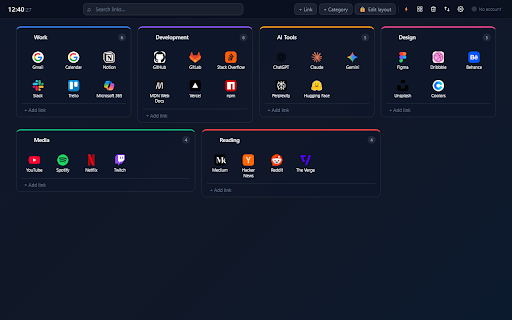
Visual bookmark dashboard. Organize links by category, sync across devices, drag & drop, quick access and full design customization.
As of June 2026, LinkBoard Pro - Bookmark Dashboard & New Tab has 3 users and a 5.00/5 rating from 1 reviews in the Productivity category.
Usersno change0%
3
3
Ratingno change0%
5.00
1 reviews
Reviewsno change0%
1
Version
1.1.0
Manifest V3
History
2 snapshotsTracking since Jun 4, 2026.
Not enough history yet for this metric — the chart fills in as we collect more snapshots.
View as table
| Date | Users | Rating | Reviews | Version |
|---|---|---|---|---|
| Jun 4, 2026 | — | — | — | 1.1.0 |
| Jun 9, 2026 | — | — | — | 1.1.0 |
| Now | 3 | 5.00 | 1 | 1.1.0 |
Permissions & access
- Permissions
- storagetabsactiveTabidentitytabGroupsbookmarks
- Host access
- https://www.googleapis.com/*, https://accounts.google.com/*
Screenshots



About
LinkBoard Pro replaces your new tab with a visual dashboard designed to help you organize, access and manage your links faster.

Create categories and subcategories, add your most-used websites, reorder everything with drag and drop, and sync your board across devices with Google Drive.

KEY FEATURES

• New tab dashboard with fully customizable layout
• Organize links in categories and subcategories
• Drag and drop to reorder links and categories
• Free positioning mode — arrange categories anywhere on the screen
• Quick Access mode — pin your most important links for one-click access
• Google Drive sync — back up and restore your full board automatically
• Browser popup — save any page with one click without opening the dashboard
• Trash with 15-day recovery — nothing is permanently deleted by accident
• Background images and slideshow — personalize your new tab visually
• Import open tabs or existing Chrome bookmarks in one click
• Right-click context menu on every link for fast actions
• Keyboard shortcuts: Ctrl+K to search, N for new link, Escape to close
• Available in English, Spanish, French and German

WHO IS IT FOR

LinkBoard Pro is ideal for anyone who wants a more organized and visual alternative to the browser's default bookmarks bar: developers, designers, students, researchers, remote workers — anyone who manages many links daily.

Use it for work tools, documentation, study resources, personal websites, dashboards, social profiles, client projects or any page you visit frequently.
Technical
- Version
- 1.1.0
- Manifest
- V3
- Size
- 109KiB
- Min Chrome
- 88
- Languages
- 1
- Featured
- No
Metadata
- ID
- gdkinjmdecadmcjonfkpmmljfgeoiipf
- Developer ID
- u17d94a5a1ef8272050b3335ca094cd2e
- Developer Email
- [email protected]
- Created
- Jun 3, 2026
- Last Updated (Store)
- Jun 3, 2026
- Last Scraped
- Jun 9, 2026
- Website
- —
- Support URL
- —
Data sourced from the Chrome Web Store · last verified Jun 9, 2026.