
MaxQA
Chrome/Edge extension to allow chatting with Maximo using OpenAI
As of May 2026, MaxQA has 19 users and a 5.00/5 rating from 1 reviews in the Workflow & Planning category.
Usersdown 36.7 percent−36.7%
19
19
Ratingno change0%
5.00
1 reviews
Reviewsno change0%
1
Version
1.0.1
Manifest V3
History
2 snapshotsTracking since May 1, 2026.
View as table
| Date | Users | Rating | Reviews | Version |
|---|---|---|---|---|
| May 1, 2026 | 30 | 5.00 | 1 | 1.0.1 |
| May 30, 2026 | 25 | 5.00 | 1 | 1.0.1 |
| Now | 19 | 5.00 | 1 | 1.0.1 |
Permissions & access
- Permissions
- storage
- Host access
- <all_urls>
Screenshots


About
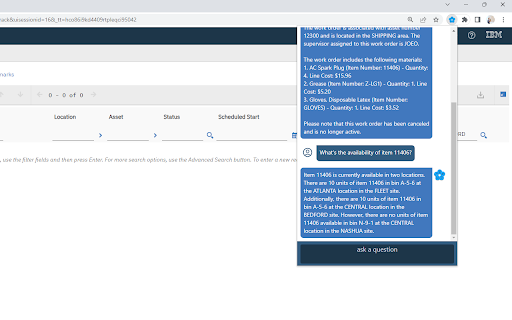
# Chrome/Edge extension to allow chatting with Maximo using OpenAI.

This is a client-only tool. Means you have to provide your own Open API key.
Based on questions from the user, OpenAI will determine whether to query Maximo to get the information and use that to answer the question.

The tool comes with some basic queries which can be used with an out-of-the-box Maximo demo instance. You can plug it into your Maximo and these basic queries will most likely work immediately. You can modify or define new queries so that it can access to data specific to your need.

Before using the tool, you need to open the Options page of the extension (by right click to the Extension icon, then choose Options) to set it up:

- Provide your own OpenAI API Key
- Provide either an Maximo API key or username/password. This is used by the tool to query Maximo via REST api. If you don't provide the credentials, you'll have to login to Maximo before using the tool so that the browser has a valid session.

This is an experimental tool. If you have any questions or feedback, please feel free to reach out to my [email]([email protected]) or send me a message on [LinkedIn](https://www.linkedin.com/in/viettranit/)
Technical
- Version
- 1.0.1
- Manifest
- V3
- Size
- 1.17MiB
- Min Chrome
- 88
- Languages
- 1
- Featured
- No
Metadata
- ID
- gcjkfpemegfmgifkfokfjlimbgeilkaa
- Developer ID
- u0210b49ba803577ac5e50cfcee17fc50
- Developer Email
- [email protected]
- Created
- Jul 18, 2023
- Last Updated (Store)
- Jul 20, 2023
- Last Scraped
- May 30, 2026
- Website
- https://blog.relia.app/
- Support URL
- —
- Privacy Policy
- https://blog.relia.app/legal/privacy.htm
Similar extensions
Alternatives to MaxQA, ranked by description similarity.

b2's OpenAI Text Fixer / Text Helper
A Chrome extension to fix text (or do other stuff with selected text) using ChatGPT API
9

Gemini Side Panel
Chat with AI in Chrome's side panel - Supports Gemini & OpenAI APIs
3

GPT+ (GPT Plus)
Uses the power of OpenAI gpt-turbo-3.5 to generate queries from you, without hassle and leaving your website.
173
★ 3.0

ChatGPT Slack Reply Generator
Generates replies in Slack using ChatGPT
15

MAIL EVOLVED
A Chrome extension to use ChatGPT to generate email replies in Gmail
3
ChatGPT+ Extension
Access OpenAI's API from anywhere on the web
1.0K
★ 5.0

May This Known As AI Powered
Automate web tasks with AI! May is an open-source Chrome extension that lets you extract data, fill forms, and more.
55
★ 5.0

ChatGPT Assistant For Quora™
This is an Open-AI ChatGPT powerful tool to give you the AI magic on Quora for marketing promotion.
632
★ 5.0
Data sourced from the Chrome Web Store · last verified May 30, 2026.