
CleanPaste Pro – Human Text Cleaner
Instantly clean, format, and rephrase any messy text or AI output in 1 click.
As of June 2026, CleanPaste Pro – Human Text Cleaner has 26 users and a 5.00/5 rating from 5 reviews in the Productivity category.
Usersup 18.2 percent+18.2%
26
26
Ratingno change0%
5.00
5 reviews
Reviewsno change0%
5
Version
1.5.0
Manifest V3
History
5 snapshotsTracking since Apr 1, 2026.
View as table
| Date | Users | Rating | Reviews | Version |
|---|---|---|---|---|
| Apr 1, 2026 | 22 | 5.00 | 5 | 1.5.0 |
| Apr 28, 2026 | 27 | 5.00 | 5 | 1.5.0 |
| May 8, 2026 | 26 | 5.00 | 5 | 1.5.0 |
| May 25, 2026 | 30 | 5.00 | 5 | 1.5.0 |
| Jun 4, 2026 | 25 | 5.00 | 5 | 1.5.0 |
| Now | 26 | 5.00 | 5 | 1.5.0 |
Permissions & access
- Permissions
- clipboardReadclipboardWritestorage
- Host access
- https://api.gumroad.com/*, https://cleanpaste-proxy.cool-meadow-f757.workers.dev/*
Screenshots



About
CleanPaste Pro: The Essential AI Text Humanizer & Text Cleaner
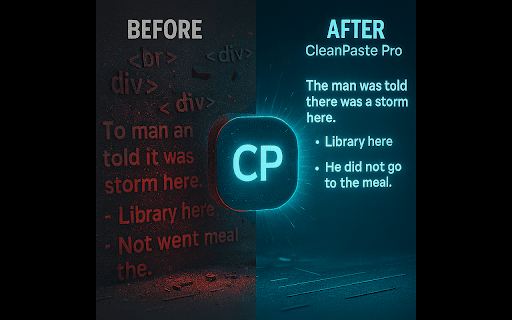
Tired of wrestling with stiff, impersonal AI-generated output, informal jargon, or fragmented notes? CleanPaste Pro is the definitive Chrome Extension for instantly transforming any messy text into clear, natural, and highly professional human messages.

Stop wasting time on manual re-formatting. Eliminate errors, polish your prose, and communicate flawlessly across all your platforms in just one simple click from your Chrome toolbar.

Who Needs CleanPaste Pro?

If you are a founder, salesperson, recruiter, freelancer, support representative, or anyone who sends professional messages daily, CleanPaste Pro is built for your workflow.

Core Value: The "Humanize" Feature

Our proprietary algorithm goes beyond simple formatting to give your text a polished, authentic human tone that bypasses generic AI detectors.

Free Forever – The Essential Toolkit

CleanPaste Pro starts with 4 powerful and lightning-fast presets that run 100% locally in your browser.

Zero-Weirdness Clean: The ultimate "Paste as Plain Text" (removes hidden characters, excessive spaces, and complex formatting).

Ultimate Bullets: Converts any messy paragraphs into perfectly formatted, clear bullet lists.

ALL CAPS → Sentence Case: Instantly fixes accidentally capitalized text, converting it to proper sentence case.

No Emojis: Quickly strips out all graphical and extended pictographic emojis.

Pro – Unlock 10 Specialized AI Presets ($2.99/mo or $24/year)

Upgrade to Pro for unlimited, one-click access to specialized AI models designed for high-impact communication.

Preset Name	Use Case

Human-Friendly - Removes obvious AI tone and makes output sound naturally written.

LinkedIn-Ready - Polishes rough notes into professional, engaging posts and messages.

Gmail-Ready - Converts fragments into clear, professional email replies.

Executive Email - Refines text into a concise, formal tone for senior leadership.

CRM-Ready - Extracts key data points and cleans up unstructured notes for systems like Salesforce and HubSpot.

Meeting Notes Extractor - Instantly converts meeting transcripts or large blocks of text into action items and summaries.

Quick TL;DR - Summarizes long blocks of text into a concise overview.

WhatsApp/Slack Chat Tone - Optimizes text for quick, friendly internal messaging.

Notion/Docs Ready - Structuring and cleaning text for documentation platforms.

Aggressive Clean (AI) - Maximum formatting and jargon removal using AI.

Pro upgrades are optional, offer unlimited usage, and are handled securely via our external processor (Gumroad). A single license key instantly unlocks Pro.

How It Works (Simple 4-Step Flow)

1. Copy any messy text (from a PDF, website, or AI tool).

2. Click the CleanPaste Pro icon in your Chrome toolbar.

3. Choose the perfect preset (Free or Pro).

4. Paste the polished, ready-to-send text instantly.

100% Privacy and Transparency
Your data security is our top priority.

No Sign-up, No Accounts: Get started immediately without creating an account.

Free Version: Your text never leaves your browser. It is processed instantly and locally.

Pro Version: We only make a one-time secure call to Gumroad to verify your license key. No text or content is ever sent.

No tracking, no analytics, and no usage limits.

Install CleanPaste Pro for free now → Try all 10 Pro presets free for 7 days.
Technical
- Version
- 1.5.0
- Manifest
- V3
- Size
- 34.36KiB
- Min Chrome
- 88
- Languages
- 1
- Featured
- No
Metadata
- ID
- gcioielpmcphbcnianbebolfeghdbiob
- Developer ID
- uf289bd08814d12bfa781361484d8aa7e
- Developer Email
- [email protected]
- Created
- Nov 20, 2025
- Last Updated (Store)
- Dec 18, 2025
- Last Scraped
- Jun 4, 2026
- Website
- —
- Support URL
- https://cleanpastepro.com/#contact
- Privacy Policy
- https://cleanpastepro.com/privacy/
Similar extensions
Alternatives to CleanPaste Pro – Human Text Cleaner, ranked by description similarity.

PlainTextify: AI Clean Text Converter
Convert AI-generated or formatted text to clean plain text. Removes styles, symbols, hidden characters, and AI fingerprints.
85

CleanText Pro
Clean messy text from PDFs, AI tools, and websites instantly.
—

Textsmith Pro - AI Writing Assistant
Paraphrase, check grammar, and improve your writing anywhere on the web
19
★ 4.8

AI Text Cleaner: Format & Copy
Clean AI responses from stars, dashes, and links instantly.
28

AI Text Polisher
Pasted text is auto-cleaned of redundant, AI-generated em dashes [—]. You can also define your own custom filtering rules..
5

Custom Text Inputs
Quickly paste saved text snippets anywhere you can type.
7

Caretly – AI Text Enhancer & Writing Assistant
Enhance any text for LinkedIn, cold emails, X, resumes & blogs. AI-powered engagement booster. Optimize content in one click.
4

AI Toolbelt
All-in-one AI assistant: translate, rewrite, summarize, check grammar, compose emails, and more. 10 AI tools in one extension.
—
★ 5.0
Data sourced from the Chrome Web Store · last verified Jun 4, 2026.