
Synchro: Productivity Manager for Students
Synchro is a simple and intuitive task tracker built specifically for students to stay productive and organized.
As of May 2026, Synchro: Productivity Manager for Students has 650 users and a 5.00/5 rating from 11 reviews in the Workflow & Planning category.
Usersdown 8.8 percent−8.8%
650
650
Ratingno change0%
5.00
11 reviews
Reviewsno change0%
11
Version
3.0
Manifest V3
History
3 snapshotsTracking since Apr 1, 2026.
View as table
| Date | Users | Rating | Reviews | Version |
|---|---|---|---|---|
| Apr 1, 2026 | 713 | 5.00 | 11 | 3.0 |
| May 1, 2026 | 718 | 5.00 | 11 | 3.0 |
| May 30, 2026 | 685 | 5.00 | 11 | 3.0 |
| Now | 650 | 5.00 | 11 | 3.0 |
Permissions & access
- Permissions
- storagenotifications
- Host access
- https://*.com/, https://*.edu/
Screenshots


About
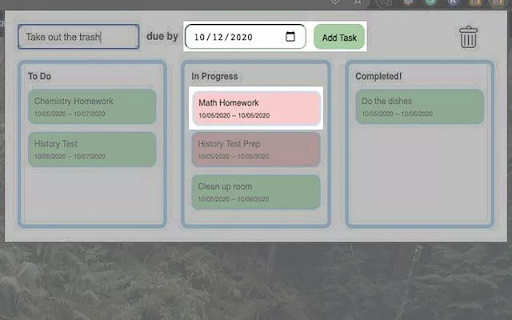
Whether it be homework, projects, extra curricular activities or personal chores, use Synchro to manage all your tasks to maximize productivity and organization. Synchro uses a simple drag and drop system to make it very easy to get started organizing.

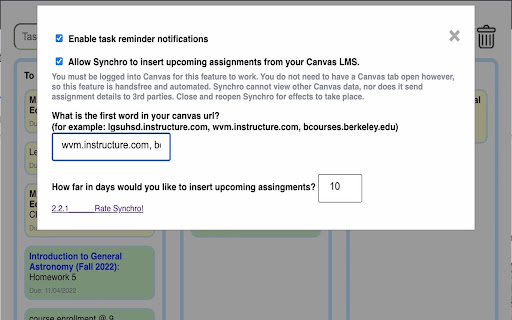
Some of these features include tasks changing color (green > yellow > red) based on how close they are to the deadline. It will also send notifications when tasks approach their due date. The last feature is Canvas Integration, a feature never seen before, and why it is so specifically tailored towards students. Synchro will automatically insert assignments from all your canvas courses into Synchro, with no effort from the user. These tasks act like any other; they change colors and they send notifications, so you never forget any assignment. All these features can be customized in the settings tab.

Synchro is safe, and does not store any personally identifiable  information.

v3.0: migrate to manifest v3

v2.3: New method to grab your assignments from your Canvas. Now it works uiversally with all schools.

v2.2: Cleaned up the UI, and added a backend database

v2.1: Introducing a new feature: Editing! Right click on a task to open editing and click enter our out of the box to save your edits. Simple!
 - Bug fixes with notifications and special characters like "&"

v2.0: Emergency Update: Only for the first time using opening Synchro, users will have to insert their Canvas domain, so that Synchro can collect assignments from the correct source. This new field is in the settings tab.

v1.9: Synchro's newest revolutionary feature: Canvas integration. Given user permission, Synchro can now take all events up to 10 days in advanvece from Canvas's calendar and insert them directly into Synchro. Update to notifications.

v1.8: Updated to using official Chrome notifications.

v1.7: Added Notifications! Synchro will notify you as your task due date reaches almost halfway (from green to yellow), when it is close to the deadline (yellow to red), and when it is due.

v1.6: Tasks change color based on the approaching due date

v1.5: Now adding new tasks to the top of Todo instead of at the bottom.

v1.4: Task now displays only the due date. Internal database structure updated to be more versatile for future updates.

v1.3: Based on recent feedback, the UI is now visibly smaller and more compact.

v1.2: Our newest feature includes a due date: crucial for all students tracking their assignments and assessments. The tasks are then color coded based on the due date to show a clear visual representation of your progress.
Technical
- Version
- 3.0
- Manifest
- V3
- Size
- 546KiB
- Min Chrome
- 88
- Languages
- 1
- Featured
- Yes
Metadata
- ID
- gcfbppmhmopmakhclakgnlpobjedkjhe
- Developer ID
- u123f0ed8f545206bf8220390a78106ea
- Developer Email
- [email protected]
- Created
- Sep 13, 2020
- Last Updated (Store)
- Jan 1, 2025
- Last Scraped
- May 30, 2026
- Website
- —
- Support URL
- —
- Privacy Policy
- —
Similar extensions
Alternatives to Synchro: Productivity Manager for Students, ranked by description similarity.

Canvas Assistant
Stay on top of your Canvas assignments and find new students to study with!
1.0K
★ 4.4

Boxly
Visual task manager with Canvas LMS sync, Pomodoro timer, and AI-powered focus blocking. Stay organized and productive.
9
★ 5.0

Canvas Tracker
Never miss a Canvas assignment. Get smart email reminders before deadlines.
27
★ 5.0

Super Canvas
Supercharge Your Canvas LMS Experience
926
★ 5.0
Today's Task
A simple extension that opens a new tab with a daily task to complete.
358
★ 5.0

Canvas to Notion Task Sync
Canvas-to-Notion syncing tool with a cute interface that securely transfers your assignments to an organized database
13

Taskify: Task Management Made Easy
Designed to help you stay organized, focus on what matters, and sync tasks with Google Calendar.
59
★ 3.5

Gradepeek
See Canvas without being in Canvas
28
★ 5.0
Data sourced from the Chrome Web Store · last verified May 30, 2026.