
CleanClip — Copy Articles Clean
Right-click any article to copy as clean Markdown or AI-ready text. No formatting junk, no ads, no clutter — just the content.
As of June 2026, CleanClip — Copy Articles Clean has — users in the Productivity category.
Usersno change0%
—
—
Ratingno change0%
—
— reviews
Reviewsno change0%
—
Version
1.0.0
Manifest V3
History
1 snapshotsTracking since Jun 7, 2026.
Not enough history yet for this metric — the chart fills in as we collect more snapshots.
View as table
| Date | Users | Rating | Reviews | Version |
|---|---|---|---|---|
| Jun 7, 2026 | — | — | — | 1.0.0 |
| Now | — | — | — | 1.0.0 |
Permissions & access
- Permissions
- activeTabcontextMenusscriptingstorage
- Host access
- None declared
Screenshots


About
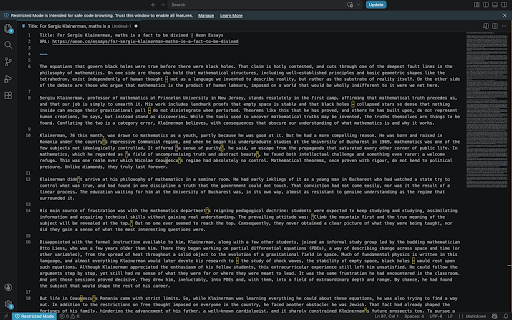
CleanClip extracts the actual article from any web page and copies it to your clipboard as clean, ready-to-use text. Two modes:

**Markdown mode** — Perfect for Obsidian, Notion, or any Markdown editor. Includes YAML frontmatter (title, author, date, source, URL), proper heading hierarchy, clean lists, and code blocks. Right-click or hit Ctrl+Shift+M.

**AI mode** — Strips everything down to pure readable text optimized for pasting into ChatGPT, Claude, or any LLM. No links, no formatting noise — just the content the model needs. Right-click or hit Ctrl+Shift+A.

**How it works:**
1. Navigate to any article
2. Right-click → "Copy as Clean Markdown" or "Copy for AI"
3. Paste. Done.

**What makes CleanClip different:**
- Battle-tested extraction engine hardened against dozens of real-world sites — news, blogs, long-form journalism, tech articles, and research papers
- Strips ads, popups, navbars, sidebars, share buttons, newsletter signup forms, and every other piece of clutter before extracting
- Smart metadata extraction: pulls title, author, publish date, and source automatically
- Works as a distraction-free article extractor and web clipper — if it has words, CleanClip cleans it

**Settings:**
- Toggle image inclusion in Markdown output
- Toggle link inclusion in AI output
- Your preferences sync across devices

**Privacy:** CleanClip collects zero data. All processing happens locally in your browser. No analytics, no tracking, no accounts. Your clipboard is yours.
Technical
- Version
- 1.0.0
- Manifest
- V3
- Size
- 55.32KiB
- Min Chrome
- 88
- Languages
- 1
- Featured
- No
Metadata
- ID
- gcepnkmpcahkghmcdcklmpbigcikhmmm
- Developer ID
- u72eb57b1b2abad0c2e669d54951c061a
- Developer Email
- [email protected]
- Created
- Jun 6, 2026
- Last Updated (Store)
- Jun 6, 2026
- Last Scraped
- Jun 7, 2026
- Website
- —
- Support URL
- —
Data sourced from the Chrome Web Store · last verified Jun 7, 2026.