
YouTube Decimal Seek
Use Alt+number on YouTube to seek to decimal positions relative to the last whole-number digit.
As of June 2026, YouTube Decimal Seek has — users in the Productivity category.
Usersno change0%
—
—
Ratingno change0%
—
— reviews
Reviewsno change0%
—
Version
1.0.0
Manifest V3
History
1 snapshotsTracking since May 21, 2026.
Not enough history yet for this metric — the chart fills in as we collect more snapshots.
View as table
| Date | Users | Rating | Reviews | Version |
|---|---|---|---|---|
| May 21, 2026 | — | — | — | 1.0.0 |
| Now | — | — | — | 1.0.0 |
Permissions & access
- Permissions
- None declared
- Host access
- None declared
Screenshots
About
YouTube Decimal Seek adds finer keyboard scrubbing on YouTube.

Use number keys (0-9) normally for YouTube’s default 0%/10%/…/90% jumps.

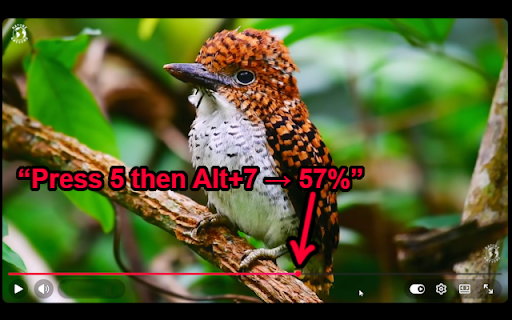
Then use Alt + number to jump to a decimal step based on the last whole number you set.

Example: press 5 to go to 50%, then press Alt+7 to go to 57%. On a new video, Alt+3 goes to 3%.

The extension only runs on youtube.com video pages and is designed for fast, precise timeline navigation without opening menus or clicking the progress bar.
No account. No remote server. No data collection.
Technical
- Version
- 1.0.0
- Manifest
- V3
- Size
- 22.28KiB
- Min Chrome
- 88
- Languages
- 1
- Featured
- No
Metadata
- ID
- gceccciaefojfdjgnbkjkbcdgomglcma
- Developer ID
- u4d3222dfbcad900303f23d6c86f0a699
- Developer Email
- [email protected]
- Created
- May 20, 2026
- Last Updated (Store)
- May 20, 2026
- Last Scraped
- Jun 9, 2026
- Website
- —
- Support URL
- —
- Privacy Policy
- —
Data sourced from the Chrome Web Store · last verified Jun 9, 2026.