
AutoMate IT
AI-powered Cypress & Playwright test generator with page scanning, action recording, and Groq AI
As of June 2026, AutoMate IT has — users in the Developer Tools category.
Usersno change0%
—
—
Ratingno change0%
—
— reviews
Reviewsno change0%
—
Version
3.0.0
Manifest V3
History
1 snapshotsTracking since Jun 5, 2026.
Not enough history yet for this metric — the chart fills in as we collect more snapshots.
View as table
| Date | Users | Rating | Reviews | Version |
|---|---|---|---|---|
| Jun 5, 2026 | — | — | — | 3.0.0 |
| Now | — | — | — | 3.0.0 |
Permissions & access
- Permissions
- storagetabssidePanelscriptingactiveTab
- Host access
- https://*/*, http://*/*
Screenshots



About
**AutoMate IT — AI Test Generator for Cypress & Playwright**

Generate production-ready Cypress and Playwright tests directly from your browser — no setup, no boilerplate, no context switching.

AutoMate IT is a Chrome side panel extension that turns real user actions into clean, assertable end-to-end tests. Record a flow, scan page elements, or describe your test in plain English — the AI writes the spec, you ship it.

---

**RECORD, SCAN, OR DESCRIBE**

**Record & Convert** — Interact with any page like a real user. Clicks, inputs, selects, and form submits are captured with stable selectors and converted into runnable tests. Replay before you generate.

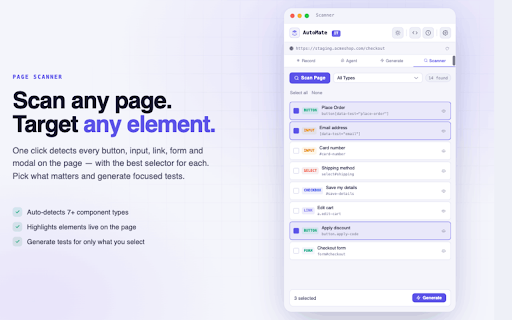
**Page Scanner** — Instantly detect every button, input, link, form, and modal on any page. Pick the elements you care about and generate focused, targeted tests.

**AI Agent Mode** — Describe your test goal in plain English: "add the first product to cart, apply code SAVE10, verify the total updates." The agent plans the steps, executes them in your live tab, self-heals broken selectors, and logs every move with step screenshots.

---

**FLEXIBLE TEST GENERATION**

Choose your framework and pattern:
- **Frameworks**: Cypress, Playwright
- **Patterns**: Page Object Model, BDD, Data-Driven, single spec
- **Output types**: Full-page suites, step-by-step tests, API tests

Built-in static analysis flags brittle selectors and missing assertions before you run a single line.

---

**INSTANT EXPORT**

Copy a single spec file or download a complete project ZIP — spec files, page objects, and config included — ready to drop into your CI pipeline.

---

**WHY QA ENGINEERS CHOOSE AUTOMATE IT**

✔ Works on any site you can open in Chrome — localhost, staging, or production
✔ Generates stable selectors that survive deploys
✔ Cuts test authoring time from hours to minutes
✔ Bring your own API key: free Groq keys or Anthropic Claude
✔ Full generation history, snippets, light/dark themes

---

**PRIVACY FIRST**

Your API keys, recordings, and history stay in your browser — never on our servers. Page data is sent only to your chosen AI provider (Groq or Anthropic), only when you trigger a generation.

---

**GET STARTED IN UNDER A MINUTE**

1. Pin AutoMate IT and open the side panel
2. Add your Groq or Claude API key in Settings
3. Open any page you want to test
4. Record, scan, or describe — then generate

Questions? Reach us at [email protected]
Technical
- Version
- 3.0.0
- Manifest
- V3
- Size
- 83.96KiB
- Min Chrome
- 88
- Languages
- 1
- Featured
- No
Metadata
- ID
- gbpagopjhaapoggiafnokinffdjfejgl
- Developer ID
- uaac08f697f884d2e15373081f6c5a995
- Developer Email
- [email protected]
- Created
- Jun 4, 2026
- Last Updated (Store)
- Jun 4, 2026
- Last Scraped
- Jun 11, 2026
- Website
- —
- Support URL
- —
- Privacy Policy
- https://sites.google.com/view/automateit/home
Data sourced from the Chrome Web Store · last verified Jun 11, 2026.