
BCBlur
Blur sensitive data before you screen-share or record. Draw boxes, hide elements, auto-detect emails & numbers. 100% local.
As of June 2026, BCBlur has — users in the Privacy & Security category.
Usersno change0%
—
—
Ratingno change0%
—
— reviews
Reviewsno change0%
—
Version
1.3.0
Manifest V3
History
1 snapshotsTracking since Jun 15, 2026.
Not enough history yet for this metric — the chart fills in as we collect more snapshots.
View as table
| Date | Users | Rating | Reviews | Version |
|---|---|---|---|---|
| Jun 15, 2026 | — | — | — | 1.3.0 |
| Now | — | — | — | 1.3.0 |
Permissions & access
- Permissions
- activeTabscriptingstorage
- Host access
- <all_urls>
Screenshots


About
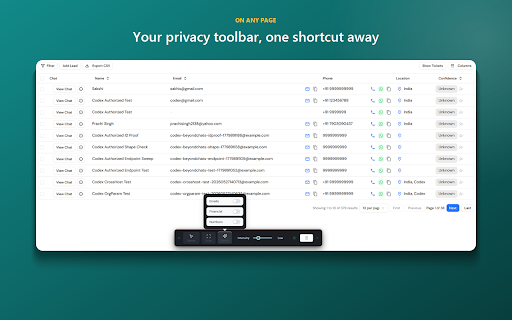
BCBlur is the privacy layer for screen-sharing, demos, and screenshots. Before you hit record or share your screen, hide anything sensitive on the page whether its customer emails, revenue, names, API keys, account numbers.

What you can do:
• Draw a blur box over any area
• Click an element to blur it instantly
• Smart auto-detect for emails, money, and numbers in just one click
• Adjustable blur intensity
• Blurs persist per page and restore on reload
• Capture a blurred screenshot (copy or download)

Open it anytime with Ctrl+Shift+S, or click the BCBlur toolbar icon.

Privacy is the whole point. BCBlur runs 100% locally:
• No account, no sign-up
• No analytics, no telemetry
• Nothing is ever sent to any server. You can verify it from your browser's Network tab and watch: zero requests

Completely free. No watermark, no limits.
Technical
- Version
- 1.3.0
- Manifest
- V3
- Size
- 91.54KiB
- Min Chrome
- 88
- Languages
- 1
- Featured
- No
Metadata
- ID
- gbfcboafnocgcgcihaffgblncbpidfji
- Developer ID
- ub23cd16b238ec52adb15338d0c4ab048
- Developer Email
- [email protected]
- Created
- Jun 14, 2026
- Last Updated (Store)
- Jun 14, 2026
- Last Scraped
- Jun 15, 2026
- Website
- —
- Support URL
- —
Data sourced from the Chrome Web Store · last verified Jun 15, 2026.