
OverLook
Capture any screen region and overlay it on any page. Adjust opacity, rotation, and size. Add shapes. No data collection.
As of June 2026, OverLook has — users in the Productivity category.
Usersno change0%
—
—
Ratingno change0%
—
— reviews
Reviewsno change0%
—
Version
1.2
Manifest V3
History
1 snapshotsTracking since Jun 8, 2026.
Not enough history yet for this metric — the chart fills in as we collect more snapshots.
View as table
| Date | Users | Rating | Reviews | Version |
|---|---|---|---|---|
| Jun 8, 2026 | — | — | — | 1.2 |
| Now | — | — | — | 1.2 |
Permissions & access
- Permissions
- activeTabscriptingstorage
- Host access
- None declared
Screenshots


About
Key Features

1. Screenshot Capture
・Drag & Snap: Effortlessly drag to select any area on your screen and pin it instantly as an overlay.

2. Image Upload
・ Local File Support: Upload images (PNG, JPG, etc.) from your device to display as overlays.
・ Design & Map Mockups: Perfect for layering map images or design comps directly over active web pages.

3. Intuitive Move & Resize
・ Drag-and-Drop: Move your overlays freely anywhere on the page.
・ Smart Resizing: Adjust sizes smoothly using corner handles. Hold the Shift key to lock the aspect ratio while resizing.

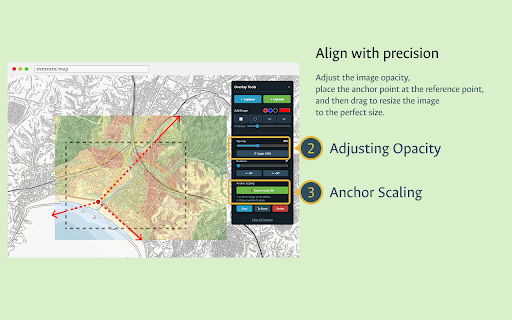
4. Opacity Adjustment
・ Opacity Slider: Fine-tune transparency seamlessly from 0% to 100%.
・ Quick Toggle: Use the "Toggle 100%" button to instantly switch between your custom opacity and 100% (fully opaque) for rapid comparison.

5. Rotation Control
・ 360° Rotation: Rotate overlays to any precise angle using the slider.
・ 90° Quick Snapping: Flip orientation instantly with quick "+90°" and "-90°" buttons.

6. Anchor Scaling
・ Fixed-Point Scaling: Scale overlays based on a specific reference point.
・ Precision Alignment: Enable "Anchor Scale" and click anywhere on the overlay to lock a red anchor point, letting you zoom or shrink without losing your alignment.

7. Vector Shape Tools
・ SVG Overlays: Place vector shapes directly onto the page, including Rectangles, Circles, Lines, and Arrows (with adjustable arrowhead sizes).
・ Live Editing: Fully customize and update colors and stroke thickness even after placement.

8. Layer Management
・Multi-Overlay Support: Display and manage multiple overlays simultaneously.
・Depth Control: Bring selected overlays to the very top using the "To Front" button. Easily delete single elements or wipe the canvas with "Clear All".

9. Export & Save
・One-Click Download: Save your edited overlays back to your local drive instantly using the "Save" button.
Technical
- Version
- 1.2
- Manifest
- V3
- Size
- 24.21KiB
- Min Chrome
- 88
- Languages
- 1
- Featured
- No
Metadata
- ID
- gbdbnodkmfegnkddomhglpkmakhhleal
- Developer ID
- u5e314e0cec3242147655325d7a0bad77
- Developer Email
- [email protected]
- Created
- Jun 7, 2026
- Last Updated (Store)
- Jun 7, 2026
- Last Scraped
- Jun 8, 2026
- Website
- —
- Support URL
- https://github.com/MsrSDK/overlook
- Privacy Policy
- https://github.com/MsrSDK/overlook/blob/main/PRIVACY.md
Data sourced from the Chrome Web Store · last verified Jun 8, 2026.