
Actify - Job Queue
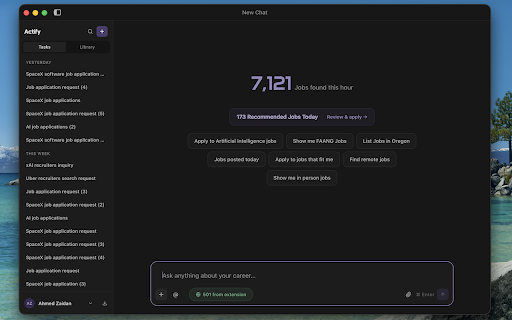
Detect job listings on any career site and queue them in your Actify desktop app for one-click applications and tracking.
As of June 2026, Actify - Job Queue has — users in the Productivity category.
Usersno change0%
—
—
Ratingno change0%
—
— reviews
Reviewsno change0%
—
Version
1.2.1
Manifest V3
History
1 snapshotsTracking since Jun 19, 2026.
Not enough history yet for this metric — the chart fills in as we collect more snapshots.
View as table
| Date | Users | Rating | Reviews | Version |
|---|---|---|---|---|
| Jun 19, 2026 | — | — | — | 1.2.1 |
| Now | — | — | — | 1.2.1 |
Permissions & access
- Permissions
- contextMenusnotificationsstoragealarmsactiveTabwebNavigationfavicon
- Host access
- http://127.0.0.1/*
Screenshots

About
Actify – Job Queue turns any career page into a one-click pipeline. It spots job listings as you browse, lets you queue them instantly, and hands them off to the Actify desktop app for fast applications and tracking — all without ever sending your data off your machine.

STOP COPY-PASTING JOB LINKS
Job hunting means dozens of tabs across LinkedIn, Indeed, Greenhouse, Lever, Workday, and company career pages. Actify watches for job listings wherever they appear — job boards, company sites, newsletters, search results — and lets you capture them in one click instead of juggling spreadsheets and bookmarks.

HOW IT WORKS
1. Browse job sites like you normally do.
2. Actify detects job listings on the page and shows a subtle on-page indicator.
3. Click to queue a job — or press Alt+A for Accept Mode to rapidly pick from every job link on the page.
4. Queued jobs sync instantly to your Actify desktop app, ready for one-click applications and tracking.

KEY FEATURES
• One-click queueing — add a job from the on-page indicator, the popup, or a right-click "Add to Actify" on any job link.
• Accept Mode (Alt+A) — an overlay that highlights every detected job link on the page so you can queue several in seconds.
• Instant feedback — a checkmark appears on links you've already added, so you never queue the same job twice.
• Works with any job board — detects new listings as you scroll or navigate single-page sites, no refresh needed.
• Offline-tolerant — if the desktop app isn't running, jobs are held and automatically delivered when it's back.
• Per-site control — disable the extension on any domain with one toggle in the popup.

PRIVACY FIRST — YOUR DATA STAYS ON YOUR MACHINE
• No external servers. The extension talks only to the Actify desktop app on your own computer (localhost). Nothing is ever uploaded to the cloud.
• No analytics, tracking, or telemetry of any kind.
• It reads only link URLs to detect jobs — never page text, form fields, or anything you type.
• Tracking parameters (utm_*, gclid, fbclid, etc.) are stripped from job URLs before they're saved.
• Only matched job URLs are stored — nothing else leaves the page.

REQUIREMENTS
This extension works together with the Actify desktop app, which must be installed and running on your computer to receive queued jobs.
Technical
- Version
- 1.2.1
- Manifest
- V3
- Size
- 120KiB
- Min Chrome
- 88
- Languages
- 1
- Featured
- No
Metadata
- ID
- gapmlfhebfodekgiclofndmehhojakjf
- Developer ID
- u0fb9b40aec0fa5f2a6babf8c73f37665
- Developer Email
- [email protected]
- Created
- Jun 18, 2026
- Last Updated (Store)
- Jun 18, 2026
- Last Scraped
- Jun 19, 2026
- Website
- actify-ai.com
- Support URL
- https://actify-ai.com/contact
- Privacy Policy
- https://actify-ai.com/privacy
Data sourced from the Chrome Web Store · last verified Jun 19, 2026.