
Dictionary to Notion
Saving Dicionary vocabularies to Notion, now supporting Oxford Learner's Dictionary and Cambridge Dictionary!
As of May 2026, Dictionary to Notion has 85 users and a 5.00/5 rating from 2 reviews in the Productivity category.
Usersdown 1.2 percent−1.2%
85
85
Ratingno change0%
5.00
2 reviews
Reviewsno change0%
2
Version
0.6.1
Manifest V3
History
2 snapshotsTracking since Apr 1, 2026.
View as table
| Date | Users | Rating | Reviews | Version |
|---|---|---|---|---|
| Apr 1, 2026 | 86 | 5.00 | 2 | 0.6.1 |
| May 1, 2026 | 88 | 5.00 | 2 | 0.6.1 |
| Now | 85 | 5.00 | 2 | 0.6.1 |
Permissions & access
- Permissions
- storage
- Host access
- https://dictionary.cambridge.org/dictionary/english/*, https://*.oxfordlearnersdictionaries.com/definition/english/*, https://*.notion.so/*, https://*.notion.com/*
Screenshots

About
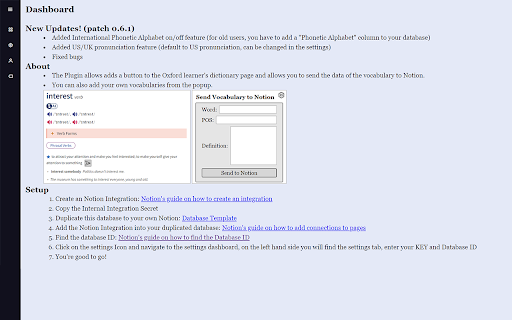
New Updates! (patch 0.6.2) !
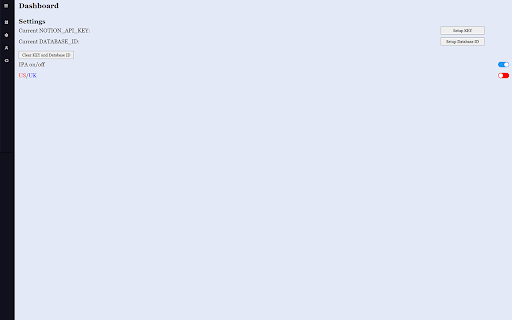
1. Added International Phonetic Alphabet on/off feature (for old users, you have to add a "Phonetic Alphabet" column to your database
2. Added US/UK pronunciation feature (default to US pronunciation, can be changed in the settings)
3. Fixed bugs

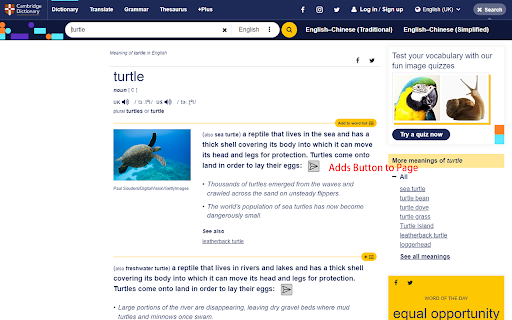
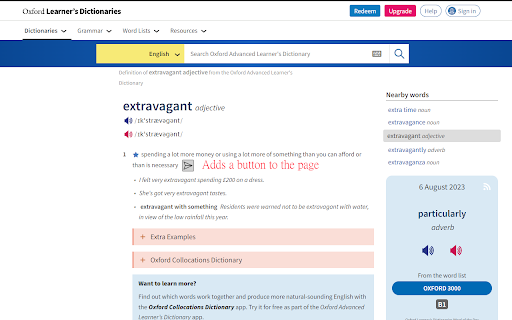
This plugin allows you to send Vocabulary data to your own Notion account. (Currently supporting Oxford Learner's Dictionary and Cambridge Dictionary!)
Setup:

1. Create an Notion Integration:
[Notion's guide on how to create an integration](https://www.notion.so/help/create-integrations-with-the-notion-api)
2. Copy the Internal Integration Secret
3. Duplicate this database to your own Notion: https://electric-mice-3d7.notion.site/Vocabularies-5808944f5d7846eb8a72a148aef42052?pvs=4
4. Add the Notion Integration into your duplicated database: [Notion's guide on how to connect your integrations](https://www.notion.so/help/add-and-manage-connections-with-the-api#add-connections-to-pages)
5. Find the database ID:
[Notion's guide on how to find the database ID](https://developers.notion.com/reference/retrieve-a-database)


You could copy the link to view and find the Database ID.

6. Click on the settings Icon and navigate to the settings dashboard, on the left hand side you will find the settings tab, enter your KEY and Database ID
7. You're good to go!
Technical
- Version
- 0.6.1
- Manifest
- V3
- Size
- 394KiB
- Min Chrome
- 88
- Languages
- 1
- Featured
- No
Metadata
- ID
- galpjmkjddpnaahipgeplbaeocpahohb
- Developer ID
- u4b93435682ac73b8bea50bf75222f29e
- Developer Email
- [email protected]
- Created
- Aug 9, 2023
- Last Updated (Store)
- May 2, 2024
- Last Scraped
- May 30, 2026
- Website
- —
- Support URL
- —
- Privacy Policy
- —
Similar extensions
Alternatives to Dictionary to Notion, ranked by description similarity.

Dictionary to Notion
Look up any word with a simple double click and sync to Notion.
159
★ 5.0

Vocab to Notion - AI Dictionary to Notion
Highlight a word on any webpage → AI generates the definition, part of speech & example → save it to your Notion database.
14

VocabClip
Highlight and save words to Google Sheets
7
★ 5.0

Mapify to Notion
Mapifyの内容をNotionに送信する拡張機能です。
8

VocabAI
AI-powered vocabulary learning from YouTube with smart detection, definitions, and bilingual support (English & Spanish)
—

notion library: auto-save books to Notion
Browse a book on Google Books, click the extension, and save the title, author, ISBN, and cover to your Notion database.
25
★ 5.0

X2Notion
Save Twitter/X to Notion
4

GhostDictionary
Show English word meanings with hover+keys, speak text, and translate selected passages.
8
★ 5.0
Data sourced from the Chrome Web Store · last verified May 30, 2026.