
Web Scraper, Easy, Visual Web Data Extractor
Web Scraper, Easy, Visual Web Data Extractor
As of May 2026, Web Scraper, Easy, Visual Web Data Extractor has 348 users and a 1.00/5 rating from 1 reviews in the Workflow & Planning category.
Usersup 5.5 percent+5.5%
348
348
Ratingno change0%
1.00
1 reviews
Reviewsno change0%
1
Version
1.11
Manifest V3
History
3 snapshotsTracking since Apr 1, 2026.
View as table
| Date | Users | Rating | Reviews | Version |
|---|---|---|---|---|
| Apr 1, 2026 | 330 | 1.00 | 1 | 1.11 |
| May 1, 2026 | 350 | 1.00 | 1 | 1.11 |
| May 30, 2026 | 362 | 1.00 | 1 | 1.11 |
| Now | 348 | 1.00 | 1 | 1.11 |
Permissions & access
- Permissions
- activeTabscripting
- Host access
- None declared
Screenshots



About
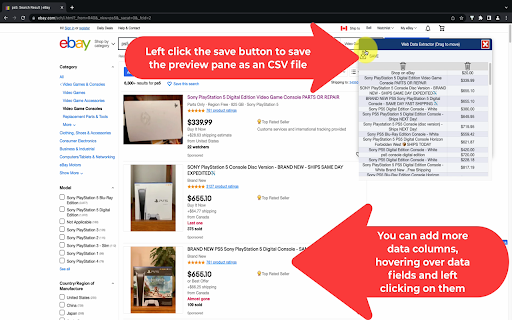
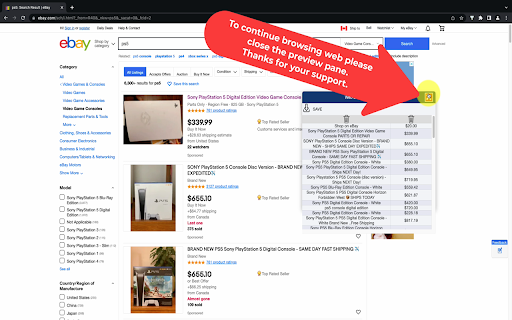
With Web Scraper for Chrome Browser, you can get data from the current webpage easily by clicking on the data fields when you hover your mouse over the data fields on any webpage. When Web Scraper finds a repeating data pattern, an orange shadow will appear on the repeating data fields with similar patterns. After you left-click mouse button, the data preview pane will be filled with the selected data.

To add more data columns, simply click on more repeating data fields. If you click on an unwanted data field, you can simply click the "Delete Icon" on the data preview pane.

After extracting the data from the web page, you can export it as a CSV file. You can open this CSV data file with Microsoft Excel on Windows or Numbers on Mac.

I hope you enjoy my extension. Please leave your feedback if you have any ideas for improvement on it, and thank you very much for your support.

Finally, you can watch this 1-minute video to better see its capabilities:

https://youtu.be/U0halSVCBAc
Technical
- Version
- 1.11
- Manifest
- V3
- Size
- 59.14KiB
- Min Chrome
- 88
- Languages
- 1
- Featured
- Yes
Metadata
- ID
- gakfcdkhpeipmjojaleebpnhmeemiajl
- Developer ID
- u46492f5e78d3b817423075fd5e0bafcd
- Developer Email
- [email protected]
- Created
- Oct 12, 2022
- Last Updated (Store)
- Oct 12, 2022
- Last Scraped
- May 30, 2026
- Website
- —
- Support URL
- —
- Privacy Policy
- —
Similar extensions
Alternatives to Web Scraper, Easy, Visual Web Data Extractor, ranked by description similarity.

Data Scraper - AI Data Miner
With Data Scraper, you can extract website content in a few clicks. This web scraping tool delivers structured data without coding.
5.0K
★ 5.0

Data Scraper
Data Scraper is a powerful Chrome extension designed for professionals across various sectors such as marketing, sales,…
99
★ 4.8

Click and Scrape
A simple tool to click and scrape data from web pages to JSON or CSV in seconds, no coding required
45

Web Data Scraper - Extract & Export to CSV/Excel/JSON
Web Data Scraper - no-code internet scraping. Extract and export to CSV, Excel, JSON, Google Sheets, and Webhook.
1.0K
★ 5.0
Easy Scraper - One-click web scraper
A free web scraper for instant results. Scrape any website with one click. No coding required.
100.0K
★ 5.0

Web Scraper - Free Web Scraping
Web data extraction tool with an easy point-and-click interface for modern web
900.0K
★ 4.1

Advanced Web Scraper
Scrape and download website content
84
★ 5.0

Email Extractor Live Web Scraper
Extract email addresses by simply searching the web. Fast, accurate, and easy to use — just search and collect.
3
Data sourced from the Chrome Web Store · last verified May 30, 2026.