
Free Tab Manager
A visual tab manager that replaces your new tab page with organized collections.
As of June 2026, Free Tab Manager has 4 users and a 5.00/5 rating from 5 reviews in the Productivity category.
Usersno change0%
4
4
Ratingno change0%
5.00
5 reviews
Reviewsno change0%
5
Version
1.2.2
Manifest V3
90-day change · In the last 90 days this extension 2 version updates.
History
7 snapshotsTracking since Apr 24, 2026.
View as table
| Date | Users | Rating | Reviews | Version |
|---|---|---|---|---|
| Apr 24, 2026 | — | — | — | 1.2.0 |
| May 1, 2026 | — | — | — | 1.2.0 |
| May 7, 2026 | 3 | 5.00 | 2 | 1.2.1 |
| May 12, 2026 | 4 | 5.00 | 4 | 1.2.1 |
| May 17, 2026 | 5 | 5.00 | 5 | 1.2.1 |
| May 24, 2026 | 7 | 5.00 | 5 | 1.2.1 |
| Jun 6, 2026 | 6 | 5.00 | 5 | 1.2.1 |
| Now | 4 | 5.00 | 5 | 1.2.2 |
Changelog
- May 1, 2026description
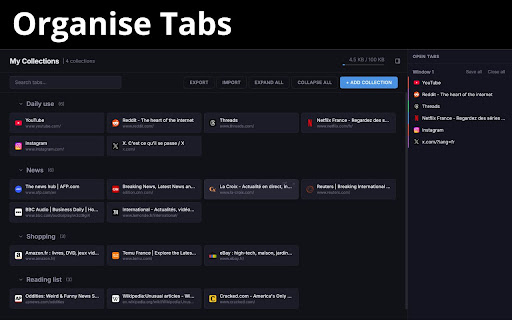
- Save tabs into collections: Group related tabs into named collections
- Always in sync: Your collections follow you across every computer signed into your Google account
- Drag and drop everything: Reorder collections. Rearrange tabs within a collection. Drag any open tab directly into a collection from the sidebar
- See all your open tabs at a glance: The built-in sidebar shows every open tab across all your windows
- Back up and restore: Export all your collections anytime. If you ever switch browsers, reinstall Chrome, or just want a backup, import it back in seconds
- Lightweight by design: No accounts. No tracking. Your data lives in Chrome's built-in sync storage. The storage indicator in the header shows exactly how much space you're using at all times

Changelog

v1.2.0

+Fixed
- Cross-device sync no longer wipes collections on a second computer. A fresh device that opened the new tab before Chrome finished delivering synced data could overwrite or delete the real collections; the default "Reading List" is now held in memory only until you edit it, and remote sync updates are picked up live via `chrome.storage.onChanged`
- Stale-key cleanup in `chrome.storage.sync` only removes collection keys that existed at load time, so collections added from another device mid-session are no longer deleted

+Added
- Toolbar action popup. Click the extension icon to open a small popup with a **Send feedback** button and a **⭐ Rate on Chrome Web Store** link

v1.1.0

+Added
- Close tabs from sidebar — hover over a tab in the sidebar to reveal a close button
- Click to switch tab — click any tab in the sidebar to jump to it, even across windows
- Cross-collection drag and drop — drag tabs between collections to reorganize
- Sidebar toggle — collapse or expand the open tabs sidebar with a toggle button in the header
- Sidebar state persistence — the sidebar remembers whether you left it open or collapsed

v1.0.0
+Release!
- Save tabs into collections: Group related tabs into named collections
- Always in sync: Your collections follow you across every computer signed into your Google account
- Drag and drop everything: Reorder collections. Rearrange tabs within a collection. Drag any open tab directly into a collection from the sidebar
- See all your open tabs at a glance: The built-in sidebar shows every open tab across all your windows
- Back up and restore: Export all your collections anytime. If you ever switch browsers, reinstall Chrome, or just want a backup, import it back in seconds
- Lightweight by design: No accounts. No tracking. Your data lives in Chrome's built-in sync storage. The storage indicator in the header shows exactly how much space you're using at all times
Permissions & access
- Permissions
- tabsstoragewindowsfavicon
- Host access
- None declared
Screenshots


About
- Save tabs into collections: Group related tabs into named collections
- Always in sync: Your collections follow you across every computer signed into your Google account
- Drag and drop everything: Reorder collections. Rearrange tabs within a collection. Drag any open tab directly into a collection from the sidebar
- See all your open tabs at a glance: The built-in sidebar shows every open tab across all your windows
- Back up and restore: Export all your collections anytime. If you ever switch browsers, reinstall Chrome, or just want a backup, import it back in seconds
- Lightweight by design: No accounts. No tracking. Your data lives in Chrome's built-in sync storage. The storage indicator in the header shows exactly how much space you're using at all times
Technical
- Version
- 1.2.2
- Manifest
- V3
- Size
- 116KiB
- Min Chrome
- 88
- Languages
- 1
- Featured
- No
Metadata
- ID
- gacgagdacdkdhccbellgeoefgjjcghca
- Developer ID
- uf3ee9a9daad73dca586860127557b1bc
- Developer Email
- [email protected]
- Created
- Apr 14, 2026
- Last Updated (Store)
- Jun 5, 2026
- Last Scraped
- Jun 6, 2026
- Website
- —
- Support URL
- —
- Privacy Policy
- —
Data sourced from the Chrome Web Store · last verified Jun 6, 2026.