
CopyMaster
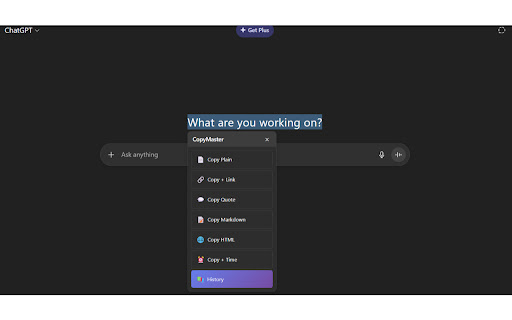
Quick Copy with Format - Copy text in different formats: plain, with link, as quote, or without formatting
As of June 2026, CopyMaster has 4 users in the Productivity category.
Usersno change0%
4
4
Ratingno change0%
—
— reviews
Reviewsno change0%
—
Version
1.0
Manifest V3
History
4 snapshotsTracking since Apr 19, 2026.
View as table
| Date | Users | Rating | Reviews | Version |
|---|---|---|---|---|
| Apr 19, 2026 | 4 | — | — | 1.0 |
| May 4, 2026 | 5 | — | — | 1.0 |
| May 13, 2026 | 8 | — | — | 1.0 |
| May 25, 2026 | 5 | — | — | 1.0 |
| Now | 4 | — | — | 1.0 |
Permissions & access
- Permissions
- clipboardWritestorage
- Host access
- <all_urls>
Screenshots
About
CopyMaster - Smart Copy with Format & History Transform your copying experience with a powerful text copying extension for Chrome! 🚀 Smarter Copy Experience CopyMaster isn’t just another copy tool – it’s a productivity extension that helps you manage and format text efficiently across the web. Whether you’re a researcher, writer, student, or content creator, CopyMaster helps you copy and organize text with precision. ✨ 6 Powerful Copy Formats 📄 Copy Plain – Clean text without any formatting 🔗 Copy + Link – Text with source URL for proper attribution 💬 Copy Quote – Quote format with citation 📝 Copy Markdown – Ready-to-use Markdown formatting 🌐 Copy HTML – HTML blockquote for web development ⏰ Copy + Time – Text with timestamp for documentation 🎯 Lightning-Fast Keyboard Shortcuts Ctrl+Shift+C – Copy Plain Ctrl+Shift+L – Copy with Link Ctrl+Shift+Q – Copy as Quote Ctrl+Shift+M – Copy Markdown Ctrl+Shift+H – Copy HTML Work quickly and efficiently with instant copying — no need to open menus. 📚 Global Copy History – Your Personal Library Never lose a copy again! CopyMaster keeps a smart history of your last 10 copies across all websites: Cross-page persistence – Access copies from any website Source tracking – See which page each copy came from Format identification – Know how each item was copied One-click reuse – Click any item to copy it again Smart management – Clear history with one click 🎨 Beautiful, Intuitive Interface Floating Menu: Appears instantly when you select text 6 clearly labeled copy options with icons Auto-hides after 5 seconds or manual close Smart positioning that stays visible Draggable History Popup: Centered, clean popup design Drag anywhere for easy positioning Dark overlay for focus Escape key or click outside to close 🔧 Smart Features That Just Work Scroll Persistence: Menu follows your selected text while scrolling Never disappears during long reads Smooth animations and positioning Works reliably on long documents Mobile Optimized: Touch-friendly interface Responsive design for all screen sizes Touch dragging support Dark Mode Support: Automatic dark mode detection Clean, readable dark theme Matches your system preferences 🎯 Perfect For: 👨💼 Professionals: Research and documentation, content creation, technical writing, business communication 🎓 Students & Academics: Research papers, citation management, note-taking, study organization ✍️ Writers & Journalists: Article research, source attribution, content organization, formatting 💻 Developers: Code documentation, API notes, technical references 🚀 Why CopyMaster Stands Out Unlike basic copy tools, CopyMaster offers: ✅ Multiple format options – More than just plain text ✅ Global history – Access copies from any website ✅ Keyboard shortcuts – Fast and efficient workflow ✅ Smart positioning – Keeps your selection visible ✅ Professional formatting – Ready-to-use citations ✅ Cross-platform compatibility – Works on major browsers ✅ Privacy focused – All data stays on your device ✅ Easy to use – Intuitive from first use 🔒 Privacy & Security First 100% local – No data sent to external servers No tracking, analytics, or monitoring No cookies or tracking mechanisms Uses secure Chrome storage API You control your data – Clear history anytime ⚡ Performance Optimized Loads quickly – under 100ms Minimal memory usage – under 1MB Smooth 60fps animations Works seamlessly on all websites Efficient storage management 🎉 Improve Your Workflow Today Make copying smarter and more efficient. Whether you’re researching, writing, coding, or studying – CopyMaster helps you get more done with less effort. 📱 Universal Compatibility ✅ Chrome 88+ ✅ Edge (Chromium) ✅ All Chromium-based browsers ✅ Windows, Mac, Linux ✅ Mobile and desktop ✅ All websites and domains 🚀 Get Started in Seconds Install CopyMaster Select any text on any website Choose your copy format Experience a faster, more organized way to copy Download CopyMaster now and make copying smarter and easier than ever.
Technical
- Version
- 1.0
- Manifest
- V3
- Size
- 2.91MiB
- Min Chrome
- 88
- Languages
- 1
- Featured
- No
Metadata
- ID
- fpmebnefcckpcimaeoegdnilaajhgnad
- Developer ID
- u165d48976764480ed4f868458449d822
- Developer Email
- [email protected]
- Created
- Oct 15, 2025
- Last Updated (Store)
- Oct 15, 2025
- Last Scraped
- Jun 6, 2026
- Website
- —
- Support URL
- —
- Privacy Policy
- —
Similar extensions
Alternatives to CopyMaster, ranked by description similarity.

Smart Clipboard
Ultimate productivity tool: Auto-copy selections, quick-paste (Alt+Click), and access clipboard history seamlessly on any site.
10
★ 5.0

Auto Copy
Automatically copy selected text to clipboard with configurable options
43

Clipboard History Saver
Clipboard History Saver - enhance your browser clipboard with a tool for quick access to copied text history and better productivity
45

CopySmart: Copy Text Directly in Your Desired Style
Copy text in style with custom font styles, sizes, and formatting.
34
★ 5.0

Copy Paste History
Use copy paste history tool to track clipboard history, manage copied text with clipboard manager and access it anytime fast
74
★ 5.0

Clipboard PRO - Copy and Paste
Automatically saves all texts copied in the browser. Simple, fast and useful: copy again with one click and paste wherever you want.
96

Text Copier
Introducing the Text Copier extension – Your smart solution for auto fast copy right now!
5.0K
★ 4.4

ClipCaddy
Smart Clipboard Manager - Store and organize multiple clipboard items
—
★ 1.0
Data sourced from the Chrome Web Store · last verified Jun 6, 2026.