
Enhanced IconKitchen
Enhance icon.kitchen with local font support and gradient preset management
As of June 2026, Enhanced IconKitchen has 4 users in the Productivity category.
Usersup 100.0 percent+100.0%
4
4
Ratingno change0%
—
— reviews
Reviewsno change0%
—
Version
1.0.0
Manifest V3
History
4 snapshotsTracking since Apr 19, 2026.
View as table
| Date | Users | Rating | Reviews | Version |
|---|---|---|---|---|
| Apr 19, 2026 | 2 | — | — | 1.0.0 |
| Apr 24, 2026 | 2 | — | — | 1.0.0 |
| May 2, 2026 | 4 | — | — | 1.0.0 |
| May 22, 2026 | 3 | — | — | 1.0.0 |
| Now | 4 | — | — | 1.0.0 |
Permissions & access
- Permissions
- storageactiveTab
- Host access
- https://icon.kitchen/*
Screenshots
About
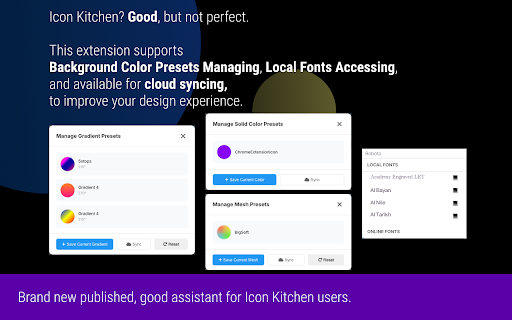
Elevate your icon design experience on icon.kitchen with this powerful enhancement toolkit. Enhanced IconKitchen seamlessly integrates with the popular icon design tool to bring you features that streamline your workflow and unlock new creative possibilities.

### 🚀 Key Features

**1. 💻 Local Font Support**
Access your entire system font library directly within icon.kitchen!
- No more uploading font files one by one
- Automatically detects and lists all fonts installed on your computer
- Search and filter your local fonts instantly
- Privacy-focused: Fonts are accessed locally using the Local Font Access API

**2. 🎨 Advanced Gradient Management**
Save your favorite gradient combinations and reuse them anytime.
- **Save Presets**: Capture the current gradient state with one click
- **Visual Preview**: See exactly what your gradient looks like before applying
- **Smart Editing**: Fine-tune presets (colors, stops, angles) with a built-in editor
- **Stop Management**: Easily add, remove, or adjust gradient stops without clutter

**3. ☁️ Cloud Sync (Optional)**
Keep your presets synchronized across all your devices.
- Sync securely via GitHub Gist
- Backup your carefully curated presets
- Share gradient configurations between work and home computers

### 🔒 Privacy First

We believe in privacy by design.
- **No Data Collection**: We do not collect, store, or transmit your personal data.
- **Local Storage**: All your presets and settings are stored locally in your browser.
- **Open Source**: The full source code is available for audit on GitHub.

### 💡 How to Use

1. Install the extension
2. Visit [icon.kitchen](https://icon.kitchen)
3. **Local Fonts**: Go to the "Text" tab and click the font dropdown to see your system fonts (marked with 💻).
4. **Gradients**: Go to "Background" -> "Gradient" and look for the new "Palette" icon to manage presets.

---

*Note: This is an independent open-source project and is not affiliated with icon.kitchen.*
Technical
- Version
- 1.0.0
- Manifest
- V3
- Size
- 2.75MiB
- Min Chrome
- 88
- Languages
- 2
- Featured
- No
Metadata
- ID
- fpdgocfpeldajfekglbbgbhfddbmigcl
- Developer ID
- ucdfa622d906f0ce0c203000d50ab53a3
- Developer Email
- [email protected]
- Created
- Feb 12, 2026
- Last Updated (Store)
- Feb 12, 2026
- Last Scraped
- Jun 9, 2026
- Website
- railgun.tech
- Support URL
- —
- Privacy Policy
- —
Similar extensions
Alternatives to Enhanced IconKitchen, ranked by description similarity.

Preview your Icons
This extension is designed to help designers easily preview and debug Chrome extension icons.
4
★ 5.0

Color Picker - BestDevTools.io
Professional color picker with pixel zoom, history and gradient generator, image export and favorites.
38
★ 5.0

Ultimate Designer Tools
Professional designer toolkit: Save images in multiple formats and inspect fonts with precision. No external calls, privacy-focused.
23

PixelKit — 웹 디자인 툴킷
색상·이미지 분석, 스크린샷, 스타일 편집, 프리셋 자동 적용.
7

ColorLift
🏆 Color palettes from Tailwind, Material, Radix, Nord and more — in HEX and RGB formats.
25
★ 5.0

Icon Resizer
Resize icons to 11 sizes (16-1024px) from one image. Fast, free, private. Perfect for apps and websites.
24

ShadeSurfer Gradient Builder
Create stunning color gradients, download them in high resolution, and instantly extract a matching palette.
—

fontDownloader - Identify & download fonts
Recognize and download local or remote fonts from any websites. Find & copy CSS styles of the selected text. Lightweight & faster
10.0K
★ 4.7
Data sourced from the Chrome Web Store · last verified Jun 9, 2026.