
NotePin: Web Page Notes & Sticky Notes
Save color-coded notes to any URL. Sync across devices, filter by domain, and organize web research instantly. Dark mode included.
As of June 2026, NotePin: Web Page Notes & Sticky Notes has 22 users in the Productivity category.
Usersup 2100.0 percent+2100.0%
22
22
Ratingno change0%
—
— reviews
Reviewsno change0%
—
Version
1.0.16
Manifest V3
90-day change · In the last 90 days this extension 3 version updates, changed permissions.
History
10 snapshotsTracking since Apr 1, 2026.
View as table
| Date | Users | Rating | Reviews | Version |
|---|---|---|---|---|
| Apr 1, 2026 | 1 | — | — | 1.0.2 |
| Apr 17, 2026 | 1 | — | — | 1.0.2 |
| Apr 24, 2026 | 14 | — | — | 1.0.10 |
| May 1, 2026 | 17 | — | — | 1.0.15 |
| May 8, 2026 | 19 | — | — | 1.0.16 |
| May 12, 2026 | 18 | — | — | 1.0.16 |
| May 18, 2026 | 16 | — | — | 1.0.16 |
| May 24, 2026 | 18 | — | — | 1.0.16 |
| May 31, 2026 | 17 | — | — | 1.0.16 |
| Jun 6, 2026 | 21 | — | — | 1.0.16 |
| Now | 22 | — | — | 1.0.16 |
Changelog
- Apr 24, 2026description
📝 Capture Notes Where You Find Them

Stop losing ideas in separate apps. NotePin lets you highlight text on any website, save it from the context menu, and keep that note tied to the page where you found it. When you save a selected-text note, NotePin automatically stores the current URL and domain, so your quotes, reminders, research, and references stay connected to their source.

✨ Why NotePin

Instead of wondering where you saved that thought, NotePin shows you notes that belong to the site you are visiting. Use the popup for fast capture, or open the fullscreen workspace for sorting, domain filters, search, export/import, and deeper organization.

🛠 Core Features

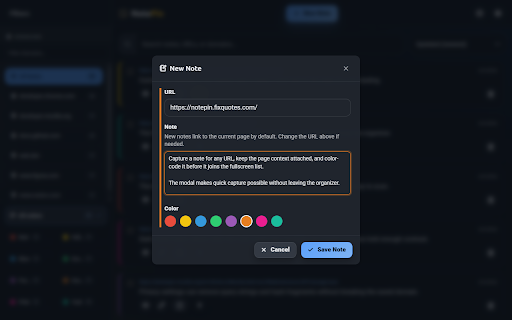
• Selected-text capture: Highlight any text on a webpage, right-click, and choose "Save to NotePin" to open a prefilled note.
• Automatic source linking: Notes created from selected page text keep the current page URL and domain automatically when you save.
• Contextual notes: Save notes for the current page or manually enter any URL you want to remember.
• Visual organization: Use 8 note colors and pin important notes to keep key information at the top.
• Fast search and filters: Find notes by text, URL, or domain with All Notes, Current Site, search, and fullscreen domain filters.
• Popup and fullscreen views: Capture quickly in the popup or switch to the fullscreen organizer for sorting, bulk actions, and cleanup.
• Draft and editing support: Auto-save drafts, edit notes inline, and update note URLs and colors without breaking your flow.
• Sync and backup: Sync across your signed-in Chrome devices and export or import notes as JSON.
• Privacy controls: Strip query strings or hash fragments from saved URLs and keep all note data inside your browser storage.
• Dark mode and keyboard support: Work comfortably with automatic theme support and shortcuts like Ctrl+Enter to save.

🎯 Perfect For

• Researchers and students saving quotes, sources, and summaries.
• Developers and designers leaving page-specific bug notes, QA findings, or UI feedback.
• Writers and content creators collecting ideas, references, and snippets while browsing.
• Everyday users saving recipes, shopping notes, reminders, and links exactly where they found them.

🚀 Make the Web Your Workspace

Add NotePin to Chrome and keep your ideas attached to the pages that matter.
📝 Capture Notes Where You Find Them
Stop losing ideas in separate apps. NotePin lets you highlight text on any website, save it from the context menu, and keep that note tied to the page where you found it. When you save a selected-text note, NotePin automatically stores the current URL and domain, so your quotes, reminders, research, and references stay connected to their source.

✨ Why NotePin
Instead of wondering where you saved that thought, NotePin shows you notes that belong to the site you are visiting. Use the popup for fast capture, or open the fullscreen workspace for sorting, domain filters, search, export/import, and deeper organization.

🛠 Core Features
• Selected-text capture: Highlight any text on a webpage, right-click, and choose "Save to NotePin" to open a prefilled note.
• Automatic source linking: Notes created from selected page text keep the current page URL and domain automatically when you save.
• Contextual notes: Save notes for the current page or manually enter any URL you want to remember.
• Visual organization: Use 8 note colors and pin important notes to keep key information at the top.
• Fast search and filters: Find notes by text, URL, or domain with All Notes, Current Site, search, and fullscreen domain filters.
• Popup and fullscreen views: Capture quickly in the popup or switch to the fullscreen organizer for sorting, bulk actions, and cleanup.
• Draft and editing support: Auto-save drafts, edit notes inline, and update note URLs and colors without breaking your flow.
• Sync and backup: Sync across your signed-in Chrome devices and export or import notes as JSON.
• Privacy controls: Strip query strings or hash fragments from saved URLs and keep all note data inside your browser storage.
• Dark mode and keyboard support: Work comfortably with automatic theme support and shortcuts like Ctrl+Enter to save.

🎯 Perfect For
• Researchers and students saving quotes, sources, and summaries.
• Developers and designers leaving page-specific bug notes, QA findings, or UI feedback.
• Writers and content creators collecting ideas, references, and snippets while browsing.
• Everyday users saving recipes, shopping notes, reminders, and links exactly where they found them.

🚀 Make the Web Your Workspace
Add NotePin to Chrome and keep your ideas attached to the pages that matter.
- Apr 24, 2026permissions
storage, activeTab, contextMenus
storage, activeTab, contextMenus, scripting
- Apr 17, 2026description
Stop losing your thoughts in separate apps. Pin them to the web with NotePin!

NotePin is a powerful, seamless contextual note-taking extension that lets you attach ideas, reminders, and research directly to the exact URL or domain you are browsing. Whether you are a student saving citations, a developer leaving site-specific bug reports, or just saving a recipe with your own tweaks, NotePin keeps your thoughts exactly where you'll need them next.

Why NotePin?
Instead of wondering "Where did I save that thought?", NotePin's smart filtering automatically shows you the notes relevant to the exact website you are currently looking at.

Core Features:
📍Contextual Capture: Notes automatically save the current URL and domain. Use the "Current Site" filter to only see notes relevant to the page you're browsing.
🎨 Visual Organization: Categorize your thoughts with 8 distinct color codes (red, yellow, blue, green, purple, orange, pink, teal) and "Pin" important notes to keep them at the top of your list.
⚡ Quick Capture Context Menu: Highlight any text on a webpage, right-click, and select "Save to NotePin" to instantly create a new note with the selected text and source URL.
☁️ Cross-Device Sync: Seamlessly backs up and syncs your notes across all your devices using Chrome's built-in sync.
📱 Dual-View System: A streamlined drop-down popup for quick capturing, and a full-screen dashboard for heavy-duty organization, advanced sorting, bulk clearing, and data export/import.
📝 Robust Text Support: Edit notes inline with preserved formatting. NotePin automatically saves your drafts, so you never lose your progress if the popup closes accidentally.
🌙 Built-in Dark Mode: Automatically adapts to your system’s preferred color scheme for comfortable reading, day or night.

Perfect For:
🎓 Researchers & Students: Capture quotes and summaries linked directly to source articles.
💻 Developers & Designers: Leave site-specific development notes, bug reports, or UI feedback.
✍️ Writers & Content Creators: Save inspiration and quick thoughts without leaving the page.
🛒 Everyday Web Users: Keep track of shopping hints, recipes, or reminders right where you found them.

Transform your browser into a smart, organized workspace. Add NotePin to Chrome today and keep your ideas tethered to the web!
📝 Capture Notes Where You Find Them

Stop losing ideas in separate apps. NotePin lets you highlight text on any website, save it from the context menu, and keep that note tied to the page where you found it. When you save a selected-text note, NotePin automatically stores the current URL and domain, so your quotes, reminders, research, and references stay connected to their source.

✨ Why NotePin

Instead of wondering where you saved that thought, NotePin shows you notes that belong to the site you are visiting. Use the popup for fast capture, or open the fullscreen workspace for sorting, domain filters, search, export/import, and deeper organization.

🛠 Core Features

• Selected-text capture: Highlight any text on a webpage, right-click, and choose "Save to NotePin" to open a prefilled note.
• Automatic source linking: Notes created from selected page text keep the current page URL and domain automatically when you save.
• Contextual notes: Save notes for the current page or manually enter any URL you want to remember.
• Visual organization: Use 8 note colors and pin important notes to keep key information at the top.
• Fast search and filters: Find notes by text, URL, or domain with All Notes, Current Site, search, and fullscreen domain filters.
• Popup and fullscreen views: Capture quickly in the popup or switch to the fullscreen organizer for sorting, bulk actions, and cleanup.
• Draft and editing support: Auto-save drafts, edit notes inline, and update note URLs and colors without breaking your flow.
• Sync and backup: Sync across your signed-in Chrome devices and export or import notes as JSON.
• Privacy controls: Strip query strings or hash fragments from saved URLs and keep all note data inside your browser storage.
• Dark mode and keyboard support: Work comfortably with automatic theme support and shortcuts like Ctrl+Enter to save.

🎯 Perfect For

• Researchers and students saving quotes, sources, and summaries.
• Developers and designers leaving page-specific bug notes, QA findings, or UI feedback.
• Writers and content creators collecting ideas, references, and snippets while browsing.
• Everyday users saving recipes, shopping notes, reminders, and links exactly where they found them.

🚀 Make the Web Your Workspace

Add NotePin to Chrome and keep your ideas attached to the pages that matter.
Permissions & access
- Permissions
- storageactiveTabcontextMenusscripting
- Host access
- None declared
Screenshots


About
📝 Capture Notes Where You Find Them
Stop losing ideas in separate apps. NotePin lets you highlight text on any website, save it from the context menu, and keep that note tied to the page where you found it. When you save a selected-text note, NotePin automatically stores the current URL and domain, so your quotes, reminders, research, and references stay connected to their source.

✨ Why NotePin
Instead of wondering where you saved that thought, NotePin shows you notes that belong to the site you are visiting. Use the popup for fast capture, or open the fullscreen workspace for sorting, domain filters, search, export/import, and deeper organization.

🛠 Core Features
• Selected-text capture: Highlight any text on a webpage, right-click, and choose "Save to NotePin" to open a prefilled note.
• Automatic source linking: Notes created from selected page text keep the current page URL and domain automatically when you save.
• Contextual notes: Save notes for the current page or manually enter any URL you want to remember.
• Visual organization: Use 8 note colors and pin important notes to keep key information at the top.
• Fast search and filters: Find notes by text, URL, or domain with All Notes, Current Site, search, and fullscreen domain filters.
• Popup and fullscreen views: Capture quickly in the popup or switch to the fullscreen organizer for sorting, bulk actions, and cleanup.
• Draft and editing support: Auto-save drafts, edit notes inline, and update note URLs and colors without breaking your flow.
• Sync and backup: Sync across your signed-in Chrome devices and export or import notes as JSON.
• Privacy controls: Strip query strings or hash fragments from saved URLs and keep all note data inside your browser storage.
• Dark mode and keyboard support: Work comfortably with automatic theme support and shortcuts like Ctrl+Enter to save.

🎯 Perfect For
• Researchers and students saving quotes, sources, and summaries.
• Developers and designers leaving page-specific bug notes, QA findings, or UI feedback.
• Writers and content creators collecting ideas, references, and snippets while browsing.
• Everyday users saving recipes, shopping notes, reminders, and links exactly where they found them.

🚀 Make the Web Your Workspace
Add NotePin to Chrome and keep your ideas attached to the pages that matter.
Technical
- Version
- 1.0.16
- Manifest
- V3
- Size
- 880KiB
- Min Chrome
- 88
- Languages
- 7
- Featured
- No
Metadata
- ID
- fonaehlalnjinfdkjpicffebenbhhnbj
- Developer ID
- ua8a0b87179e178eb55362b699cdb3939
- Developer Email
- [email protected]
- Created
- Mar 26, 2026
- Last Updated (Store)
- Apr 27, 2026
- Last Scraped
- Jun 6, 2026
- Privacy Policy
- https://notepin.fixquotes.com/privacy.html
Data sourced from the Chrome Web Store · last verified Jun 6, 2026.