
Salesforce SOQL Enhancer
Run massive SOQL queries with smart IN-list batching, OAuth, modern UI, and rock-solid download support
As of June 2026, Salesforce SOQL Enhancer has 265 users and a 5.00/5 rating from 2 reviews in the Developer Tools category.
Usersdown 2.6 percent−2.6%
265
265
Ratingno change0%
5.00
2 reviews
Reviewsno change0%
2
Version
4.1.3
Manifest V3
90-day change · In the last 90 days this extension 1 version update, changed permissions.
History
6 snapshotsTracking since Apr 19, 2026.
View as table
| Date | Users | Rating | Reviews | Version |
|---|---|---|---|---|
| Apr 19, 2026 | 272 | 5.00 | 2 | 3.1 |
| May 4, 2026 | 280 | 5.00 | 2 | 3.1 |
| May 13, 2026 | 297 | 5.00 | 2 | 3.1 |
| May 26, 2026 | 289 | 5.00 | 2 | 3.1 |
| Jun 2, 2026 | 292 | 5.00 | 2 | 4.1.3 |
| Jun 8, 2026 | 268 | 5.00 | 2 | 4.1.3 |
| Now | 265 | 5.00 | 2 | 4.1.3 |
Changelog
- May 26, 2026description
This extension facilitates the execution of extensive SOQL queries, addressing the constraint where the maximum query length is restricted to 4000 characters beyond the WHERE clause. In scenarios where data retrieval involves a WHERE clause containing a substantial number of names or IDs, potentially reaching up to 100,000 records, this extension proves invaluable. The syntax for utilizing this functionality involves constructing the query with the WHERE clause containing the extensive list of IDs or names without any length restrictions. An example query structure is as follows:

SELECT Id FROM Account WHERE Id IN ('HERE YOU CAN HAVE AS MANY IDs AS NEEDED WITHOUT LENGTH RESTRICTIONS')

Moreover, besides handling such extensive queries, this extension is versatile enough to execute standard SOQL queries. The resultant output is conveniently provided in a spreadsheet format, ensuring ease of interpretation and analysis. As this is the initial version release, subsequent updates will focus on resolving any identified bugs and enhancing overall performance and functionality.
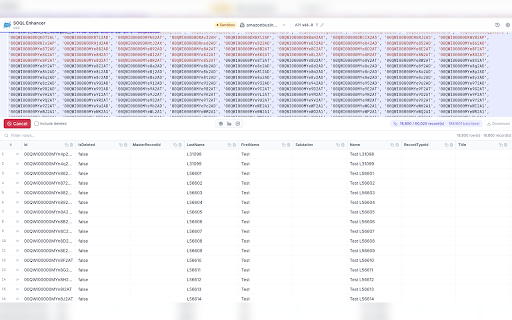
What it does Have a long SOQL or a WHERE with lots of IDs or names? Salesforce often won’t run it in one go because there’s a practical limit on how much you can send at once. This extension runs those heavy queries for you by splitting the work into smaller runs and merging the rows, then lets you save results with Download and continue later with History. Features Big IN (...) lists — Paste or build lists with many IDs or values; the extension splits the work so you don’t have to chop queries by hand. Progress while it runs — When a query is split into several runs, you can see progress and cancel if you need to stop. History — Keeps recent queries so you can open and run them again without retyping. Download — One button saves your results as a CSV file you can open in Excel or other spreadsheet apps. Search — Find rows in your results quickly instead of scrolling a huge table. Full picture of each row — Open a detail view to inspect all fields for a record when you need more than the columns on screen. Related data in one table — Child records from subqueries can show as extra rows in the same grid so exports match what you see. Sign-in — Uses your normal Salesforce browser login when possible; if your org blocks that, you can connect with OAuth (Connected App) so you can still query. Right org — Figures out which Salesforce org you’re in from the tab you have open (works across common Salesforce site types). Run in a small window or full screen — Use the popup or open the same tool in a full browser tab when you want more space (big result sets are more comfortable there). Shortcuts — Run with ⌘ + Enter (Mac) or Ctrl + Enter (Windows); Esc to cancel a run. Optional “include deleted” — Toggle to pull archived / deleted rows when your query allows it. Settings — Choose light or dark theme; adjust defaults (API version, batch size, Connected App keys for OAuth, and display options).
- May 26, 2026short_description
An Extension that helps to Execute the Large Length Where Clause Query
Run massive SOQL queries with smart IN-list batching, OAuth, modern UI, and rock-solid download support
- May 26, 2026host_permissions
(empty)
https://*.salesforce.com/*, https://*.salesforce.mil/*, https://*.cloudforce.com/*, https://*.cloudforce.mil/*, https://*.force.com/*, https://*.visualforce.com/*, https://*.documentforce.com/*, https://*.content.force.com/*, https://*.lightning.force.com/*, https://*.lightning.force.com.mcas.ms/*, https://*.sfcrmproducts.cn/*, https://*.my.site.com/*, https://*.builder.salesforce-experience.com/*, https://login.salesforce.com/*, https://test.salesforce.com/*
- May 26, 2026permissions
(empty)
storage, cookies, activeTab, tabs, identity, downloads
Permissions & access
- Permissions
- storagecookiesactiveTabtabsidentitydownloads
- Host access
- https://*.salesforce.com/*, https://*.salesforce.mil/*, https://*.cloudforce.com/*, https://*.cloudforce.mil/*, https://*.force.com/*, https://*.visualforce.com/*, https://*.documentforce.com/*, https://*.content.force.com/*, https://*.lightning.force.com/*, https://*.lightning.force.com.mcas.ms/*, https://*.sfcrmproducts.cn/*, https://*.my.site.com/*, https://*.builder.salesforce-experience.com/*, https://login.salesforce.com/*, https://test.salesforce.com/*
Screenshots



About
What it does

Have a long SOQL or a WHERE with lots of IDs or names? Salesforce often won’t run it in one go because there’s a practical limit on how much you can send at once. This extension runs those heavy queries for you by splitting the work into smaller runs and merging the rows, then lets you save results with Download and continue later with History.

Features

Big IN (...) lists — Paste or build lists with many IDs or values; the extension splits the work so you don’t have to chop queries by hand.
Progress while it runs — When a query is split into several runs, you can see progress and cancel if you need to stop.
History — Keeps recent queries so you can open and run them again without retyping.
Download — One button saves your results as a CSV file you can open in Excel or other spreadsheet apps.
Search — Find rows in your results quickly instead of scrolling a huge table.
Full picture of each row — Open a detail view to inspect all fields for a record when you need more than the columns on screen.
Related data in one table — Child records from subqueries can show as extra rows in the same grid so exports match what you see.
Sign-in — Uses your normal Salesforce browser login when possible; if your org blocks that, you can connect with OAuth (Connected App) so you can still query.
Right org — Figures out which Salesforce org you’re in from the tab you have open (works across common Salesforce site types).
Run in a small window or full screen — Use the popup or open the same tool in a full browser tab when you want more space (big result sets are more comfortable there).
Shortcuts — Run with ⌘ + Enter (Mac) or Ctrl + Enter (Windows); Esc to cancel a run.
Optional “include deleted” — Toggle to pull archived / deleted rows when your query allows it.
Settings — Choose light or dark theme; adjust defaults (API version, batch size, Connected App keys for OAuth, and display options).
Technical
- Version
- 4.1.3
- Manifest
- V3
- Size
- 787KiB
- Min Chrome
- 116
- Languages
- 1
- Featured
- No
Metadata
- ID
- fomoblbilenaghlmlpokkinbegnfddmp
- Developer ID
- ua07fd964f12fc2f7a978df32a15fd256
- Developer Email
- [email protected]
- Created
- Mar 11, 2024
- Last Updated (Store)
- May 20, 2026
- Last Scraped
- Jun 8, 2026
- Website
- —
- Support URL
- https://minhajameen-portfolio.netlify.app/
- Privacy Policy
- —
Similar extensions
Alternatives to Salesforce SOQL Enhancer, ranked by description similarity.

Salesforce InClause Wizard
This is utilized to generate an IN query for Salesforce.
10
★ 5.0

Salesforce Faker
Generate realistic fake data and inject it into any Salesforce org
—

Salesforce Query Builder
Build SOQL queries for Salesforce objects
456
★ 4.8

SQL to SOQL Converter
Free SQL to SOQL Converter with unlimited queries and Salesforce metadata integration
8
★ 5.0

Salesforce Character Limit Helper
Displays character usage and warnings for Salesforce fields containing limits.
10

SOQL Console
Helps Admins, Developers, and Consultants with Salesforce
17

Salesforce Query Tool
🚀 Run SOQL queries directly from your browser – fast, intuitive, and powerful.
The Salesforce Query Tool is a lightweight Chrome…
10

Salesforce SOQL Query and Run Apex
Elevate your Salesforce development experience with the SOQL Query Runner, a powerful and intuitive Chrome extension designed to…
125
Data sourced from the Chrome Web Store · last verified Jun 8, 2026.