
FluentWith: Translate & Learn English
Translate any word or sentence, explain YouTube captions, look up definitions, and save what's worth practicing — on any webpage.
As of June 2026, FluentWith: Translate & Learn English has — users in the Education category.
Usersno change0%
—
—
Ratingno change0%
—
— reviews
Reviewsno change0%
—
Version
1.0.0
Manifest V3
History
1 snapshotsTracking since Jun 14, 2026.
Not enough history yet for this metric — the chart fills in as we collect more snapshots.
View as table
| Date | Users | Rating | Reviews | Version |
|---|---|---|---|---|
| Jun 14, 2026 | — | — | — | 1.0.0 |
| Now | — | — | — | 1.0.0 |
Permissions & access
- Permissions
- storage
- Host access
- https://api.dictionaryapi.dev/*, https://api.mymemory.translated.net/*, https://fluentwith.com/*
Screenshots



About
FluentWith helps you understand any English you encounter on the web and turn the words you discover into vocabulary you can actually use.

Simply select a word, phrase, or sentence on any webpage. A small icon appears next to your selection, allowing you to instantly translate text, look up meanings, see pronunciation and examples, or get a simple explanation in plain English.

Whether you're reading articles, blogs, documentation, LinkedIn posts, news websites, or watching YouTube videos, FluentWith helps you learn English without breaking your flow.

Learn English From Real Content

Most people spend hours reading English online every day but forget the new words they encounter.

FluentWith helps you learn naturally from the content you're already consuming. Instead of memorizing random vocabulary lists, you build your vocabulary from real articles, conversations, videos, tutorials, and professional content.

Every new word becomes a learning opportunity.

Select Any Word or Sentence

Highlight text anywhere on the web and instantly:

• Translate words, phrases, and full sentences
• See definitions and meanings
• Check pronunciation and usage examples
• Understand difficult text through simple explanations
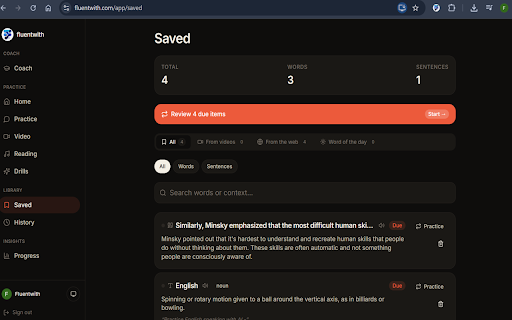
• Save useful vocabulary for future review

No switching tabs. No copy-pasting into another website. No interruptions.

Translate Text Instantly

Use FluentWith as a fast and convenient text translator while browsing.

• Translate selected words and phrases
• Translate complete sentences
• Understand content without leaving the page
• Read English websites more confidently

Perfect for learners who regularly encounter unfamiliar vocabulary while browsing.

Dictionary, Pronunciation & Examples

Understand words beyond simple translations.

FluentWith helps you learn:

• Word meanings
• Pronunciation
• Parts of speech
• Example usage in context

This makes it easier to remember and correctly use new vocabulary in conversations and writing.

Simple English Explanations

Some sentences are difficult even after translation.

FluentWith can explain complex words and sentences in simpler English, helping you improve reading comprehension and understand how native speakers naturally communicate.

Vocabulary Builder

Don't let useful words disappear after you learn them.

Save vocabulary directly from webpages and YouTube videos to create your personal vocabulary library.

Build a collection of:

• New words
• Useful phrases
• Professional expressions
• Academic vocabulary
• Everyday English expressions

Your saved vocabulary can later be reviewed and practiced to strengthen long-term retention.

Learn From YouTube Captions

FluentWith works directly with YouTube subtitles and captions.

While watching videos, you can:

• Click words inside captions
• Instantly understand unfamiliar vocabulary
• Translate subtitle lines
• Get explanations for difficult expressions
• Save useful words and phrases

Learn English while watching interviews, tutorials, lectures, podcasts, news, and educational content.

Improve Speaking Through Vocabulary Practice

Learning a word is only the first step.

FluentWith helps transform passive vocabulary into active vocabulary by allowing you to save words you encounter and practice them later through personalized learning activities.

The vocabulary you discover while browsing can become part of your future English practice and speaking sessions.

Perfect For

• English learners (A2–C1)
• IELTS preparation
• TOEFL preparation
• Cambridge English exam preparation
• Students and university learners
• Software developers reading English documentation
• Professionals reading articles and LinkedIn posts
• Job interview preparation
• Anyone looking to improve English vocabulary, reading comprehension, and speaking confidence

Why Choose FluentWith?

Most translation extensions only translate.

Most dictionary extensions only define words.

FluentWith combines translation, dictionary support, explanations, vocabulary building, and future practice in a single workflow.

You don't just understand new words—you remember them and learn how to use them.

Privacy First

FluentWith only works when you interact with selected text.

• Activated only when you select text or interact with captions
• No intrusive browsing experience
• No unnecessary tracking
• Designed with user privacy in mind

You stay in control of what you choose to look up, translate, explain, or save.

How It Works

1. Install FluentWith.
2. Open any English webpage or YouTube video.
3. Select a word, phrase, or sentence.
4. Translate, look up, or explain it instantly.
5. Save vocabulary for future review and practice.
6. Continue learning from the content you already consume every day.

Support

Questions, feedback, or feature requests?

Contact: [email protected]
Technical
- Version
- 1.0.0
- Manifest
- V3
- Size
- 128KiB
- Min Chrome
- 88
- Languages
- 1
- Featured
- No
Metadata
- ID
- fokdfojbjkangaddjbjjlmmiaanljbcn
- Developer ID
- u607eb7542c9f4c8f31e1e9ecbe5bca5f
- Developer Email
- [email protected]
- Created
- Jun 13, 2026
- Last Updated (Store)
- Jun 13, 2026
- Last Scraped
- Jun 14, 2026
- Website
- fluentwith.com
- Support URL
- https://fluentwith.com/help
- Privacy Policy
- https://fluentwith.com/privacy
Data sourced from the Chrome Web Store · last verified Jun 14, 2026.