Gimli Tailwind
A DevTools extension enabling smart tools for Tailwind CSS.
As of June 2026, Gimli Tailwind has 10,000 users and a 4.43/5 rating from 47 reviews in the Developer Tools category.
Usersno change0%
10.0K
10,000
Ratingdown 3.1 percent−3.1%
4.43
47 reviews
Reviewsup 6.8 percent+6.8%
47
Version
5.1
Manifest V3
90-day change · In the last 90 days this extension 1 version update, changed permissions.
History
2 snapshotsTracking since Apr 19, 2026.
View as table
| Date | Users | Rating | Reviews | Version |
|---|---|---|---|---|
| Apr 19, 2026 | 10.0K | 4.57 | 44 | 5.0 |
| Jun 7, 2026 | 10.0K | 4.57 | 44 | 5.0 |
| Now | 10.0K | 4.43 | 47 | 5.1 |
Changelog
- Jun 7, 2026description
Gimli Tailwind is the most popular DevTools extension for Tailwind CSS developers.
It lets you view and intuitively edit utility classes.

Feature Highlights 🔥

✔️ Works on any website.

✔️ Autocomplete:
Intelligent suggestions for class names. It also supports searching for CSS property names.

✔️ Instant feedback: Preview changes on hover.

✔️ Quickly toggle utility values with Cmd/Ctrl + Click.

✔️ Intuitive UI
We don't want to overwhelm developers with options and inputs. Here’s a list of features that enable developers to find relevant utilities quickly:

➤ Variant override: Displays what variant is active.
➤ Inputs are grouped the same way as in the official docs.
➤ Some sections like Grid and Flex will only be visible when relevant.
➤ Active inputs are always shown.
➤ Customizable UI.

Personal data 🔒
Gimli Tailwind will never collect any personal data, browsing history, etc.
The professional Devtools extension for Tailwind CSS developers.
It lets you view and intuitively edit utility classes.

Please note: Gimli Tailwind requires a $49 one-time lifetime license. No subscriptions. You can purchase your license via the extension (includes a 14-day money-back guarantee).

Feature Highlights 🔥

✔️ Works on any website.

✔️ Autocomplete:
Intelligent suggestions for class names. It also supports searching for CSS property names.

✔️ Instant feedback: Preview changes on hover.

✔️ Quickly toggle utility values with Cmd/Ctrl + Click.

✔️ Intuitive UI
We don't want to overwhelm developers with options and inputs. Here’s a list of features that enable developers to find relevant utilities quickly:

➤ Variant override: Displays what variant is active.
➤ Inputs are grouped the same way as in the official docs.
➤ Some sections like Grid and Flex will only be visible when relevant.
➤ Active inputs are always shown.
➤ Customizable UI.

Personal data 🔒
Gimli Tailwind will never collect any personal data, browsing history, etc.
- Jun 7, 2026permissions
clipboardWrite
clipboardWrite, identity
Permissions & access
- Permissions
- clipboardWriteidentity
- Host access
- *://*/*
Screenshots

About
The professional Devtools extension for Tailwind CSS developers.
It lets you view and intuitively edit utility classes.

Please note: Gimli Tailwind requires a $49 one-time lifetime license. No subscriptions. You can purchase your license via the extension (includes a 14-day money-back guarantee).

Feature Highlights 🔥

✔️ Works on any website.

✔️ Autocomplete:
Intelligent suggestions for class names. It also supports searching for CSS property names.

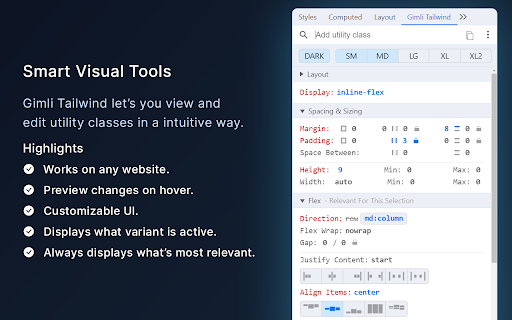
✔️ Instant feedback: Preview changes on hover.

✔️ Quickly toggle utility values with Cmd/Ctrl + Click.

✔️ Intuitive UI
We don't want to overwhelm developers with options and inputs. Here’s a list of features that enable developers to find relevant utilities quickly:

➤ Variant override: Displays what variant is active.
➤ Inputs are grouped the same way as in the official docs.
➤ Some sections like Grid and Flex will only be visible when relevant.
➤ Active inputs are always shown.
➤ Customizable UI.

Personal data 🔒
Gimli Tailwind will never collect any personal data, browsing history, etc.
Technical
- Version
- 5.1
- Manifest
- V3
- Size
- 563KiB
- Min Chrome
- 88
- Languages
- 1
- Featured
- Yes
Metadata
- ID
- fojckembkmaoehhmkiomebhkcengcljl
- Developer ID
- uc3d26faf4a47a179174c343ffe86fe23
- Developer Email
- [email protected]
- Created
- Jun 16, 2022
- Last Updated (Store)
- May 28, 2026
- Last Scraped
- Jun 12, 2026
- Website
- gimli.app
- Support URL
- —
- Privacy Policy
- https://gimli.app/terms
Similar extensions
Alternatives to Gimli Tailwind, ranked by description similarity.

Tailwind Lens - Inspect and Edit Tailwind CSS Visually
Inspect & Edit Tailwind right in your browser.
4

TailwindSight — Inspect & Edit Tailwind CSS in Real-Time
Instantly inspect, view, and modify Tailwind CSS classes on any webpage with live suggestions and undo/redo support.
43
★ 5.0

Toolwind - Devtool for Tailwind css
Enhance Tailwind CSS workflow: Easily add, modify, remove, and copy classes with built-in Tailwind IntelliSense
204
★ 4.2

Tailwind CSS Devtools
Tailwind CSS Developer Tools
7.0K
★ 4.4

GoTailwind
GoTailwind is a cutting-edge browser extension designed to simplify your web development workflow by converting traditional CSS…
7

Tail Lens for Tailwind: Inspect, Edit, and Build Tailwind CSS Visually
Inspect. Edit. Build. Tailwind, right in your browser.
747
★ 4.0

Tailwind Class Scanner
Hover over any element on any site, hit Option+C, and generate Tailwind classes.
—

Tailwind Inspector
Easily inspect and edit Tailwind CSS classes on web pages for rapid prototyping and debugging
185
★ 3.5
Data sourced from the Chrome Web Store · last verified Jun 12, 2026.