
Switch Workstation Tab Manager
Switch is a workstation that helps you manage web applications and accounts in 1 place.
As of May 2026, Switch Workstation Tab Manager has 6,000 users and a 3.78/5 rating from 74 reviews in the Functionality & UI category.
Usersno change0%
6.0K
6,000
Ratingup 0.8 percent+0.8%
3.78
74 reviews
Reviewsdown 1.3 percent−1.3%
74
Version
3.8.8
Manifest V3
History
2 snapshotsTracking since Apr 19, 2026.
View as table
| Date | Users | Rating | Reviews | Version |
|---|---|---|---|---|
| Apr 19, 2026 | 6.0K | 3.75 | 75 | 3.8.8 |
| May 13, 2026 | 6.0K | 3.75 | 75 | 3.8.8 |
| Now | 6.0K | 3.78 | 74 | 3.8.8 |
Permissions & access
- Permissions
- tabsstorageunlimitedStoragemanagementbackgroundhistoryscriptingcontextMenuscookieswebRequest
- Host access
- http://*/*, https://*/*, file://*/*
Screenshots


About
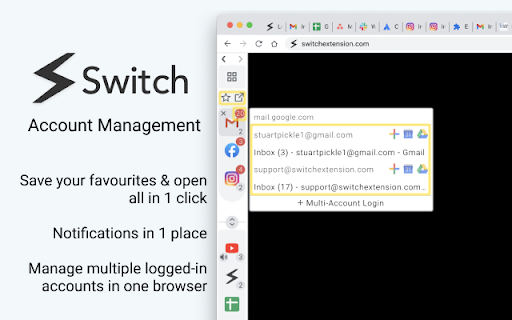
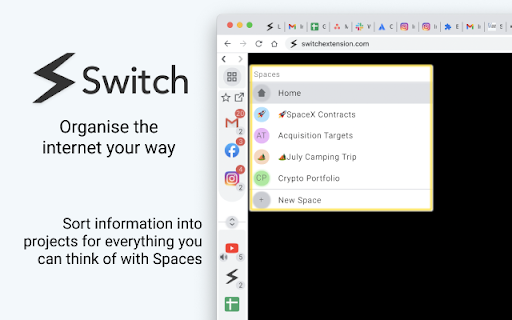
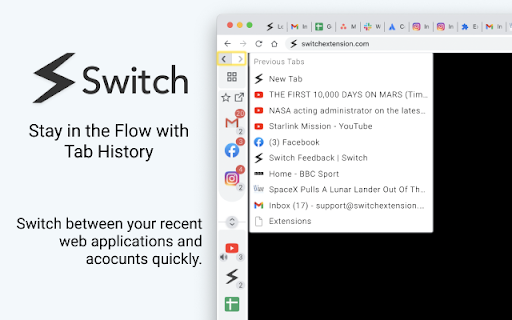
Switch adds a sidebar to your Chrome browser and gives you a set of productivity tools that make it easier to switch between apps, accounts, and workflows. Unlike desktop workstations, Switch runs inside your Chrome web browser so you can manage all your web applications without sacrificing flexibility and features. Using the Switch Sidebar helps you to become ultra-productive in the browser with the following features: 🧠 Tab Management Smart tab management with the Switch sidebar – avoid tab overload and keep track of your browsing with tab stacking. 🐙 Multi-Account Management Switch lets you log in and use multiple accounts (e.g. Gmail, Facebook, Instagram, etc) for a single website directly from the Switch extension - helping you to focus on the tasks that matter. 📚 Organise your workflow Organise the internet your way with Spaces – sort information into projects for everything you can think of. 🌟 Favourites & Notifications Save important web applications as favorites and they'll stay in the sidebar even after you close them. Open them with 1 click, and see instant notifications badges in the Sidebar from your favorite communication apps (i.e. Slack, Gmail, Messenger, Outlook). 🔍 Active Search Find your active tabs with a simple text search and see them listed chronologically for easy access. You can create up to 2 Spaces and save up to 2 Favourites in our free version. We also offer a Switch Pro subscription plan with unlimited functionality and the following advanced features: 🕵️♂️ Advanced Search Quickly find any tab from your history with our keyword search. Switch uses a flexible search algorithm that makes finding what you need fast and easy. 🗂 Document Management Search With our filters, you can easily search through your Google Drive accounts. All Docs, Sheets, Slides show up and are sorted chronologically, meaning you can find and manage your documents in seconds. 🏄 Tab Flow Whether you're comparing multiple tabs or responding to a loved one on Facebook, easily switch back and forth between your recent tabs with Switch Tab History and get back into the flow. When logging in, we will ask you to verify your email address. Your email address is only used to log you in to your account and for email updates about the product. You can read our full privacy policy here: https://www.switchextension.com/privacy-policy/ -------------- Permissions When you install Switch you’ll be asked for the following permissions: "Read and change all your data on the websites that you visit": Switch needs this so that you can manage your tabs in the Sidebar. "Read and change your browsing history": Switch needs this so that you can access your search history for our Power Search feature. "Manage your apps, extensions, and themes": Switch needs this to manage multi-account login preferences -------------- If you have any questions, comments, or issues with Switch or your Switch plan, please send us an email at: [email protected]
Technical
- Version
- 3.8.8
- Manifest
- V3
- Size
- 7.88MiB
- Min Chrome
- 88
- Languages
- 1
- Featured
- Yes
Metadata
- ID
- foilkalbafoifklkphdkijdcnkgcjefn
- Developer ID
- ud517b57c5890c7b99d0a241229771ee9
- Developer Email
- [email protected]
- Created
- Jun 25, 2019
- Last Updated (Store)
- May 16, 2025
- Last Scraped
- May 26, 2026
- Website
- —
- Support URL
- —
- Privacy Policy
- https://switchextension.com/privacy-policy/
Similar extensions
Alternatives to Switch Workstation Tab Manager, ranked by description similarity.

Vertical Tabs - Tab Manager, Workspaces & Tab Scroll by SuperchargeBrowser
Vertical Tabs & Tab Manager: synced workspaces, command bar, tab scroll, session restore. Arc replacement. Zero tracking.
4.0K
★ 5.0

Tab Switch with Search
Quickly switch between tabs using Ctrl+Q and a search function
4
Page Sidebar | Open any page in side panel
Effortlessly open any website in your web browser's sidebar – streamline your workflow instantly!
20.0K
★ 4.3

Shift Tab
Toggle between saved tab groups with a single keybind.
4

TabMeister
Organize tabs into a smart dashboard. Add notes, reminders, secure passwords, and sync across devices with Flipbook view.
11
★ 5.0

Smart Modern Tab Manager - Organised Browsing
Organize browser tabs into minimalist workspaces. Save, restore, and manage tab groups with notes and tasks.
10
★ 5.0

Shortcut Tab Switcher
Shortcut Tab Switcher: tab switcher for handy switching with customizable keyboard hotkeys. Instant switching! 🚀
1.0K
★ 4.7

FOS Tab-Switcher
FOS Tab-Switcher is a simple, free, and open-source extension that automatically cycles through tabs.
43
★ 5.0
Data sourced from the Chrome Web Store · last verified May 26, 2026.