
Workflowy Encrypter
Seamless client-side encryption for Workflowy
As of May 2026, Workflowy Encrypter has 124 users and a 5.00/5 rating from 5 reviews in the Productivity category.
Usersdown 2.4 percent−2.4%
124
124
Ratingno change0%
5.00
5 reviews
Reviewsno change0%
5
Version
1.0.3
Manifest V3
History
2 snapshotsTracking since Apr 26, 2026.
View as table
| Date | Users | Rating | Reviews | Version |
|---|---|---|---|---|
| Apr 26, 2026 | 127 | 5.00 | 5 | 1.0.3 |
| May 23, 2026 | 133 | 5.00 | 5 | 1.0.3 |
| Now | 124 | 5.00 | 5 | 1.0.3 |
Permissions & access
- Permissions
- None declared
- Host access
- *://*.workflowy.com/*
Screenshots
About
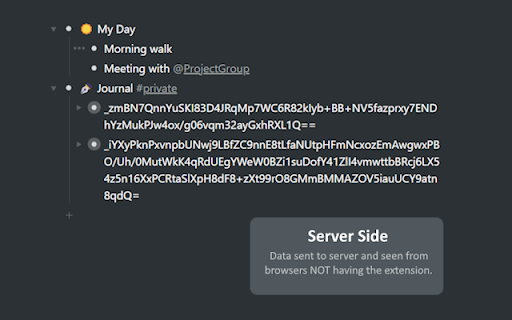
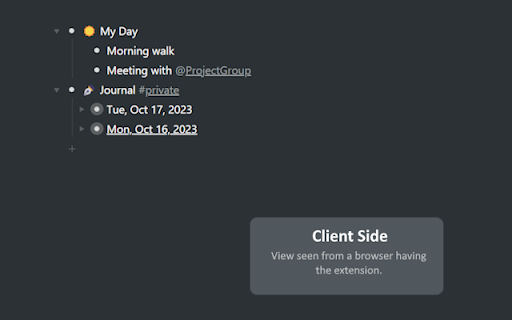
Workflowy Encrypter is an open-source, simple browser extension providing client-side encryption for Workflowy. It encrypts all data locally on your device, meaning no data is sent to a remote server. To keep Workflowy's simplicity, the extension only provides minimal interfaces styled with Workflowy's native styling. While it is designed to be minimal and seamless from the user's perspective, it ensures that all text-based content sent to Workflowy servers is encrypted with AES standards so that your sensitive content can only be read by you.

=> Getting Started
After installing the extension, follow the steps below to get started:
1. Visit workflowy.com and and follow the on-screen instructions to set up your encryption key.
2. Add a #private tag to any node you want to secure. All sub-nodes of the selected node, including the ones you will add later, will be encrypted automatically.
And that's it! Encrypted nodes will be readable only from web browsers that have WorkflowyEncrypter installed. Try to use a different device or disable the extension temporarily to see the magic!

=> Data & Privacy
Workflowy Encrypter does not collect data from any user; there is not even a remote server dedicated to this extension. All processing is done locally on your device and shared with neither the developer nor any third parties.

=> Contact
Have something on your mind? For any questions, suggestions, or feedback, do not hesitate to shoot an email, drop a message on social media, open an issue on GitHub, or better yet, open a pull request if you are a developer. Contributions are much appreciated! Visit alpafyonluoglu.dev for communication details.

=> Note
Workflowy Encrypter is an open-source third-party extension that is in beta period and under active development, meaning while it is possible to encounter bugs, reported issues are resolved as soon as possible. Visit Workflowy Encrypter's GitHub page for further details.
Technical
- Version
- 1.0.3
- Manifest
- V3
- Size
- 114KiB
- Min Chrome
- 88
- Languages
- 1
- Featured
- No
Metadata
- ID
- fohbpcookddpmmhpmgoogodlanhikeib
- Developer ID
- ufd14c2b17159b316899a8de33dea5b80
- Developer Email
- [email protected]
- Created
- Oct 18, 2023
- Last Updated (Store)
- Jan 12, 2024
- Last Scraped
- May 23, 2026
- Website
- alpafyonluoglu.dev
- Support URL
- —
- Privacy Policy
- —
Similar extensions
Alternatives to Workflowy Encrypter, ranked by description similarity.

Message Encryptor
Securely encrypt and decrypt messages and files using AES-GCM — fast, offline, and private.
9
★ 5.0

Easy Encrypt
Local text encryption, decryption, Base64 encoding, and SHA-256 hashing with safer key handling
36
★ 5.0

SecureNotes Vault Web Clipper
Clip web pages securely to your end-to-end encrypted SecureNotes Vault. Zero-knowledge — your data never leaves unencrypted.
—
★ 5.0

Protect text
Use Protect Text — a Chrome extension to store secure notes and passwords. Encrypt text in the notepad directly in the browser!
427
★ 5.0

Encryp
A Extension for encrypting and decrypting
1

WhatsChatEnhancer
Enhance messaging with WhatsChatEnhancer. Offers features for privacy, personalization, and security for a better chat experience.
4

Word to PDF Converter
Convert Word documents (.docx) to PDF directly in your browser — no uploads, no servers.
5

NoteWise
Create, view, and manage visual notes directly on web pages. All notes are stored locally.
9
Data sourced from the Chrome Web Store · last verified May 23, 2026.