
Cute Countdown Timer
A super cute countdown timer popup extension for Chrome.
As of June 2026, Cute Countdown Timer has 16 users in the Functionality & UI category.
Usersup 128.6 percent+128.6%
16
16
Ratingno change0%
—
— reviews
Reviewsno change0%
—
Version
1.0.0
Manifest V3
History
4 snapshotsTracking since Apr 1, 2026.
View as table
| Date | Users | Rating | Reviews | Version |
|---|---|---|---|---|
| Apr 1, 2026 | 7 | — | — | 1.0.0 |
| Apr 29, 2026 | 6 | — | — | 1.0.0 |
| May 16, 2026 | 9 | — | — | 1.0.0 |
| May 25, 2026 | 13 | — | — | 1.0.0 |
| Now | 16 | — | — | 1.0.0 |
Permissions & access
- Permissions
- None declared
- Host access
- None declared
Screenshots
About
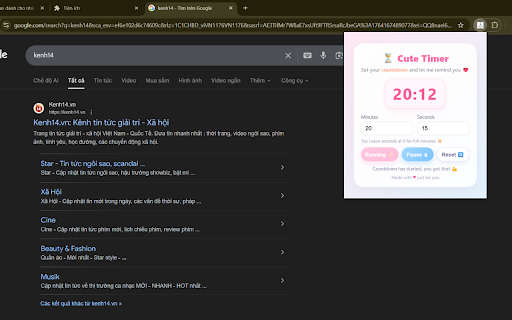
Cute Countdown Timer is a simple and delightful Chrome extension designed to help you manage small tasks, breaks, and reminders through an adorable countdown timer. The extension opens as a lightweight popup, allowing you to quickly set a timer in minutes and seconds without leaving your current tab.

The interface is designed with soft colors, rounded shapes, and friendly visuals to bring a calm and pleasant feeling while you work. You can start, pause, and reset the countdown at any time. When the countdown reaches zero, the extension gently notifies you with a short sound and a visual animation.

This tool is perfect for users who want a minimal, distraction-free way to track focus sessions, study breaks, short tasks, or daily routines. No additional permissions are required, and the extension does not collect or store any personal data. Everything runs locally inside your browser.

Cute, simple, and easy to use — this extension adds a small touch of joy to your productivity.
Technical
- Version
- 1.0.0
- Manifest
- V3
- Size
- 12.07KiB
- Min Chrome
- 88
- Languages
- 1
- Featured
- No
Metadata
- ID
- fnhcjfnfmecccohbkmcoemldjhaapmmh
- Developer ID
- u9297a2d0048bc95bf5c12e0c689312da
- Developer Email
- [email protected]
- Created
- Nov 27, 2025
- Last Updated (Store)
- Dec 3, 2025
- Last Scraped
- Jun 4, 2026
- Website
- —
- Support URL
- https://for88.de.com/
- Privacy Policy
- —
Similar extensions
Alternatives to Cute Countdown Timer, ranked by description similarity.

Cute Countdown Timer
A cute and simple countdown timer extension 💕
35

Cute Countdown Timer
A super cute countdown timer popup extension for Chrome.
14

Simple Countdown Timer
Start a quick countdown timer directly from your browser popup.
10

Mini Countdown Timer
Start a quick countdown timer directly from the browser popup.
14

Simple Countdown Timer
A clean and minimal countdown timer that remembers your timer state.
41

Cute Critter Countdown
An adorable animal-themed countdown timer in your toolbar. Set, start, pause, resume, and reset — with a gentle chime at zero.
6

Elegant Countdown Timer
A simple and elegant countdown timer for quick time tracking.
4

Simple Countdown Timer
Set a simple countdown timer directly in the Chrome popup. Lightweight and offline.
18
★ 1.0
Data sourced from the Chrome Web Store · last verified Jun 4, 2026.