
EncodeDecode Craft
A developer utility tool for quickly encoding, decoding, and formatting strings.
As of June 2026, EncodeDecode Craft has 13 users and a 5.00/5 rating from 4 reviews in the Developer Tools category.
Usersup 333.3 percent+333.3%
13
13
Ratingno change0%
5.00
4 reviews
Reviewsup 300.0 percent+300.0%
4
Version
1.3
Manifest V3
History
7 snapshotsTracking since Apr 7, 2026.
View as table
| Date | Users | Rating | Reviews | Version |
|---|---|---|---|---|
| Apr 7, 2026 | 3 | 5.00 | 1 | 1.3 |
| Apr 19, 2026 | 4 | 5.00 | 1 | 1.3 |
| Apr 24, 2026 | 4 | 5.00 | 1 | 1.3 |
| May 1, 2026 | 5 | 5.00 | 2 | 1.3 |
| May 8, 2026 | 7 | 5.00 | 3 | 1.3 |
| Jun 1, 2026 | 9 | 5.00 | 4 | 1.3 |
| Jun 7, 2026 | — | 5.00 | 4 | 1.3 |
| Now | 13 | 5.00 | 4 | 1.3 |
Permissions & access
- Permissions
- clipboardReadstorageactiveTabclipboardWrite
- Host access
- None declared
Screenshots


About
Meet EncodeDecode Craft, a fast, lightweight, and intuitive extension designed to simplify your daily text transformations. Whether you are debugging web requests, handling API payloads, analyzing data, or just need to quickly convert strings, this tool provides a seamless experience without ever forcing you to leave your current tab.

Features:
- Smart Auto-Paste: Simply copy text to your clipboard and open the extension your data is automatically populated in the input field. No manual pasting required!
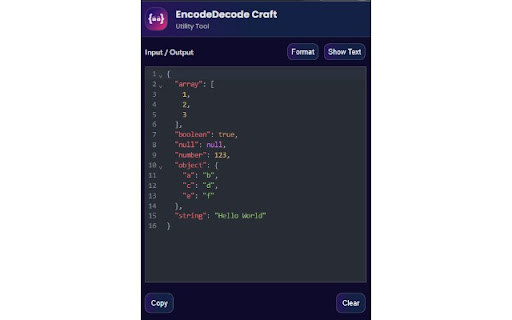
- Intelligent JSON Auto-Formatting: If your decoded output is valid JSON, the extension automatically detects it and formats it into a beautifully highlighted, interactive viewer with line numbers and collapsible nodes.
- State Memory: The extension remembers your last used operation and format settings, saving you clicks every single time you open it.

How to Use
1. Copy Your Data: Just copy the text, code, or payload you want to process to your clipboard.
2. Open the Extension: Click the EncodeDecode Craft icon in your Chrome toolbar. Your copied text will automatically appear in the input box!
3. Select Operation & Format: Choose Encode or Decode, and select your target format (URL, Base64, or XOR). (Note: You only have to do this once if you repeat the same tasks, as the extension remembers your last choice!)
4. Run: Click the Run button to instantly transform your text.
5. View Results: If your decoded result is JSON, it will be automatically beautified in the JSON view. You can use the Show Text / Operations button to toggle your view back and forth.
6. Copy & Go: Hit Copy to grab your final result and paste it wherever you need it.

Copy & Go: Hit Copy to grab your result wherever you need it!
Technical
- Version
- 1.3
- Manifest
- V3
- Size
- 1.38MiB
- Min Chrome
- 88
- Languages
- 1
- Featured
- No
Metadata
- ID
- fnfknhikepnneapffffgehkbhdmcgnpo
- Developer ID
- ua6d94af1fc76632f9c38e9ac32a97687
- Developer Email
- [email protected]
- Created
- Dec 31, 2025
- Last Updated (Store)
- Mar 21, 2026
- Last Scraped
- Jun 7, 2026
- Website
- —
- Support URL
- —
Similar extensions
Alternatives to EncodeDecode Craft, ranked by description similarity.

en/de coder
A simple encoder/decoder for Base64, Hex, and URI
20
★ 5.0

Base64 Decode and Encode - Online
Decode from Base64 format or encode into it with various options. Our extension has an easy-to-use online tool to convert data
185

Halloween Toolbox
Encode, decode, JSON beautify, and on-device AI chat with page and web search. For developers.
11

Base64 - Encoder & Decoder
Quickly encode or decode Base64 text with proper UTF-8 support — fully offline and local.
4

Base64ly
Instant Base64 encode/decode with zero friction. Auto-detects and converts clipboard content.
12

Encodr
A comprehensive suite of encoding, decoding, and hash analysis tools
33

URL Decoder, JSON Formatter && Unicode Decoder
Decode selected text using URL decode, format JSON string , and decode Unicode string within the current web page.
19
★ 4.0

Encoding Tool
Encode/decode: Base64/URL/Unicode/Hex/HTML, MD5/SHA hash, UUID/GUID. Offline, 10 languages.
485
★ 5.0
Data sourced from the Chrome Web Store · last verified Jun 7, 2026.