
React Developer Tools
Adds React debugging tools to the Chrome Developer Tools. Created from revision 3cde211b0c on 10/20/2025.
As of June 2026, React Developer Tools has 5,000,000 users and a 3.95/5 rating from 1,632 reviews in the Developer Tools category.
Usersno change0%
5.0M
5,000,000
Ratingno change0%
3.95
1.6K reviews
Reviewsup 0.2 percent+0.2%
1.6K
Version
7.0.1 (10/20/2025)
Manifest V3
History
3 snapshotsTracking since Apr 19, 2026.
View as table
| Date | Users | Rating | Reviews | Version |
|---|---|---|---|---|
| Apr 19, 2026 | 5.0M | 3.95 | 1.6K | 7.0.1 (10/20/2025) |
| May 23, 2026 | 5.0M | 3.95 | 1.6K | 7.0.1 (10/20/2025) |
| Jun 5, 2026 | 5.0M | 3.95 | 1.6K | 7.0.1 (10/20/2025) |
| Now | 5.0M | 3.95 | 1.6K | 7.0.1 (10/20/2025) |
Permissions & access
- Permissions
- scriptingstoragetabs
- Host access
- <all_urls>
Screenshots
About
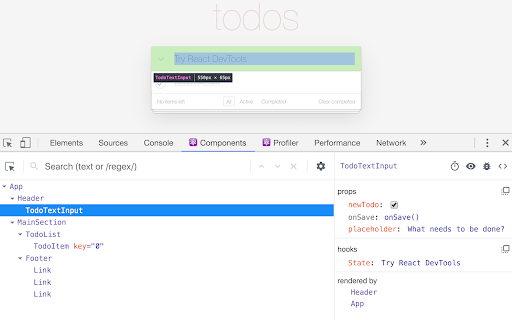
React Developer Tools is a Chrome DevTools extension for the open-source React JavaScript library. It allows you to inspect the React component hierarchies in the Chrome Developer Tools.

You will get two new tabs in your Chrome DevTools: "Components ⚛" and "Profiler ⚛".

The Components tab shows you the root React components that were rendered on the page, as well as the subcomponents that they ended up rendering.

By selecting one of the components in the tree, you can inspect and edit its current props and state in the panel on the right. In the breadcrumbs you can inspect the selected component, the component that created it, the component that created that one, and so on.

If you inspect a React element on the page using the regular Elements tab, then switch over to the React tab, that element will be automatically selected in the React tree.

The Profiler tab allows you to record performance information.

This extension requires permissions to access the page's React tree, but it does not transmit any data remotely. It is fully open source, and you can find its source code at https://github.com/facebook/react/tree/main/packages/react-devtools-extensions.
Technical
- Version
- 7.0.1 (10/20/2025)
- Manifest
- V3
- Size
- 789KiB
- Min Chrome
- 114
- Languages
- 1
- Featured
- Yes
Metadata
- ID
- fmkadmapgofadopljbjfkapdkoienihi
- Developer ID
- u9e86c5e44afcf61b3ff037fb76134768
- Developer Email
- [email protected]
- Created
- Dec 21, 2013
- Last Updated (Store)
- Oct 22, 2025
- Last Scraped
- Jun 5, 2026
- Website
- —
- Privacy Policy
- —
Similar extensions
Alternatives to React Developer Tools, ranked by description similarity.

C-React
A Chrome Extension tool that visualizes React rendering of components
110
★ 5.0

React Tree Injector
Inject the React Tree tool into any webpage.
—

React Inspector Pro
High-fidelity React component inspector with JSX export, computed styles, and global search.
33
★ 5.0

React Hook Form Developer Tools
React Hook Form developer tools to help debug forms with validation.
3.0K
★ 2.4

React for SEO
Detect React instances and analyze React reliance percentage on any website for SEO analysis
31

React Three DOM
Inspect React Three Fiber scene graph in DevTools
13

React Component Names
Hold Alt/Option + hover to see React component names (Dev Mode)
53
★ 5.0

React code finder
Chrome extension for React Developer
1.0K
★ 5.0
Data sourced from the Chrome Web Store · last verified Jun 5, 2026.