
Cozeva Connect Overlay (BETA)
Plugin for direct Cozeva access
As of June 2026, Cozeva Connect Overlay (BETA) has 2,000 users and a 5.00/5 rating from 1 reviews in the Accessibility category.
Usersno change0%
2.0K
2,000
Ratingno change0%
5.00
1 reviews
Reviewsno change0%
1
Version
9.1
Manifest V3
90-day change · In the last 90 days this extension 2 version updates.
History
3 snapshotsTracking since Apr 19, 2026.
View as table
| Date | Users | Rating | Reviews | Version |
|---|---|---|---|---|
| Apr 19, 2026 | 2.0K | 5.00 | 1 | 7.3 |
| Apr 24, 2026 | 2.0K | 5.00 | 1 | 9.0 |
| Jun 8, 2026 | 2.0K | 5.00 | 1 | 9.0 |
| Now | 2.0K | 5.00 | 1 | 9.1 |
Permissions & access
- Permissions
- tabsactiveTabscriptingcookiesstorage
- Host access
- https://*.cozeva.com/*, http://localhost/*, http://*/*, https://*/*
Screenshots
About
Does your organization use Cozeva to manage quality gaps and chronic conditions for your patients?

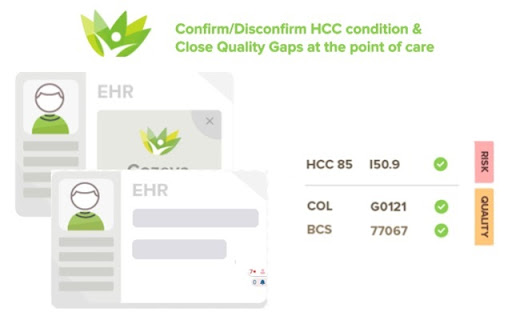
Install the CozevaConnect Overlay today to view and close gaps directly within your EHR!

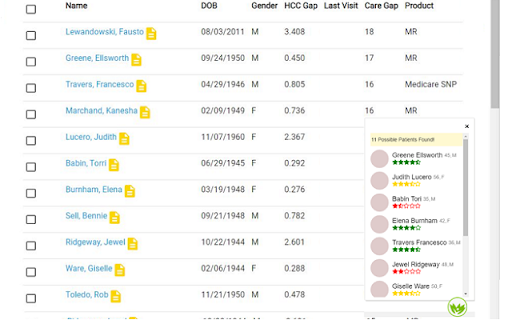
CozevaConnect Overlay is compatible with most web-based EHR systems. Through this extension, care teams can quickly access a patient’s risk and quality care gaps in Cozeva at the point of care.

Features:
Launch COZEVA’s patient dashboard directly in the EHR
Assess and take actions on open quality care gaps and HCC conditions
Get real-time notifications and alerts from your Cozeva account

About Cozeva:  Cozeva is the operating system for value-based healthcare for quality, risk, and cost performance. As a cloud-based solution for ACOs, IPAs, payers, and providers, Cozeva aggregates and transforms multiple data streams into actionable analytics and registry driven dashboards in real-time.

Premium features available with additional configuration. Email [email protected]

Requirements:
Must have a Cozeva account

Supported EHRs:
Allscripts Touchworks (v 20 & above), athenahealth, Drchrono, Elation, Practice Fusion.
If your browser-based EHR is not listed above, you can use the ‘Contact Us’ form within the extension.

How to Install and Configure the CozevaConnect Overlay Extension:
Click ‘Add to Chrome’
Click ‘Add extension’ in the pop-up window
Click the Cozeva Connect Overlay extension icon at the top right-hand corner of your Chrome window
If you already have an active Cozeva session, the extension automatically retrieves your details. If you are not yet logged in, click on the ‘Login With Cozeva’ button
Add the URL(s) of your EHR to the ‘My URLs’ list.

Note: CozevaConnect is only supported through the Chrome Web Store. Do not download from third party sites.
Technical
- Version
- 9.1
- Manifest
- V3
- Size
- 2.01MiB
- Min Chrome
- 88
- Languages
- 1
- Featured
- No
Metadata
- ID
- fmggfkefgnkapcdeigjoanlkgjdmmdij
- Developer ID
- uf7072fed5d62ede2f5c21a9e38205a97
- Developer Email
- [email protected]
- Created
- Nov 13, 2022
- Last Updated (Store)
- Jun 4, 2026
- Last Scraped
- Jun 14, 2026
- Website
- —
- Support URL
- —
- Privacy Policy
- https://www.cozeva.com/privacy
Similar extensions
Alternatives to Cozeva Connect Overlay (BETA), ranked by description similarity.

360 Ribbon
360 Ribbon by DataQ Health
2.0K
★ 5.0

Clarity by Wellvana
Clarity by Wellvana
533

Live Preview Opener
Enter your workspace url and click on any button to open Frontend Preview OR Backend Data
78
★ 5.0

medha scribe
Boost Your Clinical Documentation Productivity with the All-in-One AI Assistant
10.0K
★ 5.0

WorkHub - To make WorkHub your startup page
This extension will set app.workhub.ai as the startup page and upon click, it will open app.workhub.ai for you!
10
★ 5.0

Google Meet Zoom In Zoom Out
Google Meet Zoom In Zoom Out allows to zoom in-out the content shared by others in Google Meet
1.0K
★ 4.9

Siteimprove Accessibility Checker
Jumpstart your web accessibility efforts directly in Chrome.
60.0K
★ 3.2

Darkmode for Managebac
Make Managebac Dark
116
★ 4.5
Data sourced from the Chrome Web Store · last verified Jun 14, 2026.